So this may get some negative response here. But i would actually recommend a hardware RAID card for this. Like an adaptec 8805 or something similar. Hardware RAID as a local storage actually is still viable.
Otherwise, if your MB has some sort of fake RAID, that could be an option too.
Funny story… I bought these 4TB HDDs about 10 years ago (I think) along with a Highpoint Rocket raid 2720SGL. I used that for years, then upgraded to an LSI something-or-other RAID card when I seemed to be having issues.
I then upgraded to 8TB drives on the RAID card and switched to using two of the 4TB ones on my main PC as a software RAID 0. Some time later, I went to ZFS for the 8TBs and have never look back!
I have never had the best of luck with either of these RAID cards and don’t think they are very viable in desktop usage at all. I still have both cards, though one is in use as an HBA in my server.
I suppose I could chance it again, or even see what my motherboard RAID can do - Asus Strix Z590(?) Gaming WiFi of whatever the correct chipset is. But my distaste for that is the hardware failure side of things. As I said, it’s not a disaster if I lose data, but I’d still like to avoid it where reasonably possible and using software RAID is a solution to that
It’s a shame that Windows (10) doesn’t let their software RAID 5 function on desktop OSes. Does the long-term business version of Windows support it? Is it LTSC or something? I’ve been meaning to try that OS out for a long time and now would be a good excuse to try it if that feature works.
Highpoint is fake raid. Also most LSI cards dont have a real hardware variant iether. Adaptec in very specific use cases is a good solution.
Windows is not a good platform to try and do any software RAID on in my experience, including fake RAID.
as to one of the other points, yes iSCSI to a NAS could be used but getting that to feel not terribly slow, even compared to slow local drives, is a a fair amount of effort.
Yeesh. Thought I’d check if my motherboard supports RAID 5… It does!
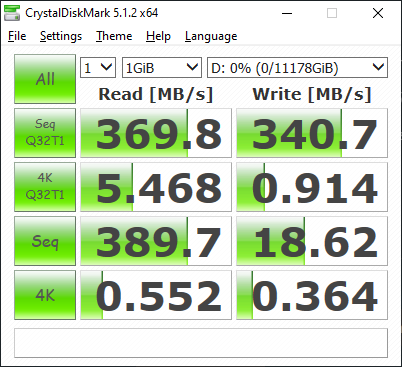
So I set it the four drives up as a RAID 5 and the results seemed promising at first. But then it got to sequential writes and CrystalDiskMark makes me say ouch!
I totally accept that what I’m after isn’t “normal”. But technology is such an amazing thing, and what I’m asking isn’t something that is physically impossible. It’s just sadly not common enough that fully functioning, and high performing versions of it exist.
RAID 10 doesn’t suit as I then don’t gain any space - which I need. I either have to accept terrible performance, buggy ZFS with good performance, not what I want, or add a RAID card back in. Considering all the options and my requirements, I think a RAID card is the only viable solution, sadly. Even though if I ran Linux, I’d be super happy with ZFS.
As for running iSCSI… I may give it a shot, but I’m not familiar with the config options. Do you have any documentation for newbies to hand?
where would you be hosting the drives that you would then connect to VIA iSCSI? if it would be a TrueNAS as that host it is pretty easy to configure through their GUI. Ideally you would want a dedicated NIC in each box just for iSCSI but it is possible other ways too.
Keep in mind that ZFS performance gets worse the more you use it due to the unrecoverable fragmentation it experiences… this isn’t talked about that often but is a big factor if you keep your volumes around for multiple years.
You hit the nail on the head there: it’d be with TrueNAS Core as that’s what I run my other drives with. On a Proxmox host, just to complicate matters . I’d probably consider getting 10Gb NICs for both my main PC and server if I were to go that route as I have a switch with two SFP+ 10Gb ports that are begging to be used. I’m just cheap, and that’s why I’ve not bothered upgrading yet.
EDIT: Well damn… Whatever tutorial I used before for iSCSI clearly made no sense. I just searched it up again and found a very clear tutorial that had accurate information. I’ve now go my server sharing an iSCSI drive to my main PC and I hit near enough full network speeds (~280MB/s) on sequential writes. Just testing it with a game to see how it goes.
I’ve had it around for a few years now with all my media and backups on it and haven’t had any trouble with ZFS slowing down or causing issues. I’ve had drives fail and I’ve definitely screwed up configs a few times, but that’s not ZFS’ fault.
 . I’d probably consider getting 10Gb NICs for both my main PC and server if I were to go that route as I have a switch with two SFP+ 10Gb ports that are begging to be used. I’m just cheap, and that’s why I’ve not bothered upgrading yet.