Which path to take ( PC hardware wise )

So currently i am using a 3900X on a prime x470 pro with 32GB and a sapphire Pulse RX 5700XT and Linux as the OS.

I’ve problems with running some games, mostly DX12 games, where the system will either crawl to a halt and then reboot or simply reboot. Which also doesn’t leave much in the logs for me to go on. I’ve reached the point where it is bothering me enough that i want to solved it but not entirely sure which path to take and … you know … budget be tight and all that.

If you are thinking this might be a software issue, i can pretty much say i doubt that since i have installed Windows 10 on a separate SSD. And played some games only to find out i’ve similar crashes as i do under Linux.

Things i’ve done so far is replacing the PSU with a newer one, bought from a store and ending up replacing the systems memory with 2 x 16GB modules from my server to resolve a memory corruption issue.

So … now i am left with the question … which part(s) is/are broken? Is the motherboard? Or Perhaps the CPU or would replacing the GPU solve everything or worse … do i need to replace 2 or more things. Even second hands that might cost quite a bit and that brings us to the “replace everything and move over to the AM5 platform” train of thought.

And while i wish i could pay & build a system based on a 9950X3D … I don’t have that kinda money. So i figured a nice step in model based on a AMD Ryzen 5 9600X and a ASRock B650M-HDV/M.2 with 32GB of RAM which basically sets me on a nice upgrade path for the future. Even then it would be about 400 euro’s.

But then… I am stuck with the idea it might be cheaper to replace a part … ( i just don’t know which one ) … and in small part … i want to know what is wrong with it.

So do i gamble or just give up & take the plunge and save up for the “step-in-am5” hoping the system runs long enough for me to collect and order it. Or perhaps someone has a suggestion for a better option/path to take. Or you will just tell me i am being a twat for being an indecisive being. Regardless I will thank you for reading this.
When you say everything crawls to halt after some time, I’d start suspecting memory issues. Probably not the memory itself, but the release of unused memory to the kernel. That or you simply have too much going on in your workflow. Cheapest would be expanding memory and see if and how that makes a difference. Borrowing RAM you already have is quickest to test.

Should the problem persist, switching to AM5 is the better option, although your RX5700 GPU may quickly become a bottleneck then.

1 Like

The slowdown over time issue looks a lot like a RAM issue, but the random reboots really seem like a PSU issue. You were right to suspect and replace those first, but it is weird that they haven’t resolved the issue.

Have you ever monitored your mains power? Sometimes random issues can be due to fluctuating power at the wall.

Maybe the issue is elsewhere (bad wires or components causing a short resulting in PSU protection kicking in) or maybe the integrated memory controller on the CPU has gone bad or there is poor contact or corrosion in some of your RAM slots.

What type of RAM do you have? What settings is it running at?

One common mistake is to buy super-duper high clocked RAM and run it at XMP/Expo settings not realizing that while the RAM itself might be rated for the clocks, the memory controller might not be, and you may be inadvertently overclocking the memory controller in the CPU.

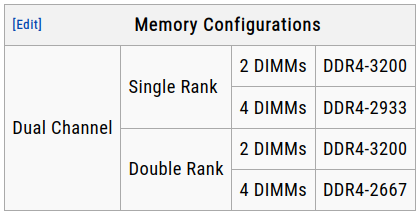
The officially supported RAM clocks per AMD for the 3900x are as follows:

3900x memory

The max is DDR4-3200 if using two single rank sticks. The worst is DDR4-2667 if using four dual rank sticks.

If running above these clock speeds, even if the RAM is listed as supporting it, you are overclocking your memory controller, and that can result in instability.

This doesn’t mean that you can’t run above those settings, but you may have to tweak your settings a little bit, like boosting voltage to the IMC to get it stable at higher clocks.

The easiest one to eliminate is a RAM issue so I would recommend testing that first.

I would create a USB stick with the latest Memtest86 version (PassMark’s proprietary - but still free - version is generally considered superior these days) and run it to test your RAM.

Depending on how much RAM you have, a full test will take some time to complete, so I would plan on running it overnight, preferably on a night where you don’t need the system first thing next morning, just in case.

If it passes, that should tell us that the problem isn’t with the RAM. If it doesn’t pass, I would return the RAM to non-overclocked settings per the table above, and try again. If it passes at the lower clocked settings, then we know it is a “too high RAM clock” problem, and we can troubleshoot the voltage settings to see if we can get the RAM stable at over clocked IMC settings, or just run the IMC at in spec settings.

If the RAM passes then we know the problem is elsewhere, and we will have to do some further troubleshooting.

1 Like

I am using 2 dimms at DDR4-3200 speeds.
Also the slowdowns is literal seconds where the system is unresponsive and will always end in a crash/reboot of the system. Most of the time it will simply crash and reboot the system.

To give you an example, in Cyberpunk 2077 i have no issue in the games menu. But when i start a new game or load a previous made one it will crash during the loading screen.
Other games will have different moments where they crash, could be during the initial loading of the game or when it enters the menu, or starting/loading a (new) game or even during play time. That last one is just mean.

But from what i am understanding is that you both suspect that its the memory controller that might be the issue. And that would mean a replacement CPU could solve it. It would be a postponement of the inevitable am4 → am5 step but at least that would be an affordable one.

I will run memtest86 tonight before going to bed, i had no issues when i ran it last time when i had installed the 2 x 16GB modules, i hope that is still the case. I will report the findings back tomorrow morning. Thank you so far.

I had a similar problem before, turned out I had specced the PSU a little bit too cheap. If you only have a 650W PSU or below, the 3900X + 5700 XT could be drawing enough power to not trip the PSU… Until you hit a really demanding title, then it will simply shut off and reboot.

Hopefully you have a good specced PSU though. Going with a 5700X for ~€129 is an option, though a downgrade in cores.

If you are going with an AM5 upgrade I would recommend something like this (german prices):

PCPartPicker Part List

Type Item Price
CPU AMD Ryzen 5 9600X €179.90
CPU Cooler Thermalright Assassin Spirit 120 EVO €34.89
Motherboard ASRock B850M Pro RS €142.90
Memory Patriot Viper Venom 2x16 GB DDR5-6000 CL30 €97.90
Total €455.59

Now, this is not the cheapest, you can shave off ~€70 by going with the cheapest AM5 B650 motherboard and cheapest DDR5 32GB RAM kit. But it is the cheapest I dare recommend. It does give you enough oumph to upgrade to a Zen 7 part which are rumored to be coming to AM5 (~90% certainty, nothing is certain until AMD announce it).

Though, I would like to stretch just slightly more for a €170 ASRock B850 Pro RS WiFi or a €185 Gigabyte B850 Gaming X WiFi6E, for the added m.2 slot heatsinks, the above recommended motherboard is good enough for what you want it to do.

Your call to make though! :slight_smile:

1 Like

I was worried about the PSU as well, i do however tend to overspec on them.
Currently using a Seasonic Vertex GX-750 ( 750 watts ) So that should be fine.

Thank you for the suggested Motherboard and memory, the motherboard has a PCIe 5.0 x16 slot where as the motherboard i had only had a PCIe 4.0 x16 slot ( highest ) and the memory is more inline with the ideal memory speed, if i recall correctly.

It does raise the price to nearly 500 euro… but that should be a nice solid starting system.
Now to run memtest, so … good night!

3 Likes

I’ve run memtest86+, it has run for 6 hours and a bit. And had done 3 rounds through the 32GB of memory that all passed.

… So i reminded myself … that i still had a copy of 3Dmark… so booted back in to windows to run some tests … results didn’t go as i suspected …
Fully expecting to have the system crash while trying the DX12 benchmarks “time spy” or “steel nomad” (Dx12/vulkan) but it completed those just fine. The one my system has trouble with was the Fire Strike one… specifically the demo. If i turned that one off it would complete just fine but when you just run the demo … yeah no luck there.

I am close to just asking a local computer store if they could test the GPU for me… would cost a bit of money but if they confirm it … i would at least know where i stand. Then again… i am also hoping someone here have any ideas left.

What kernel version are you on? There was a bug in 6.13 and 6.14 that wouldn’t release vram and could cause crashes, fixed in 6.16 and 6.17 for my rx580.

In Windows, upon rebooting after the crash, in the Event Viewer program (search bar → Event Viewer), check Windows Logs → System for any errors generated prior to the reboot/crash.

Currently using 6.17.1 but i have had this problem before using the 6.x.x kernel line.

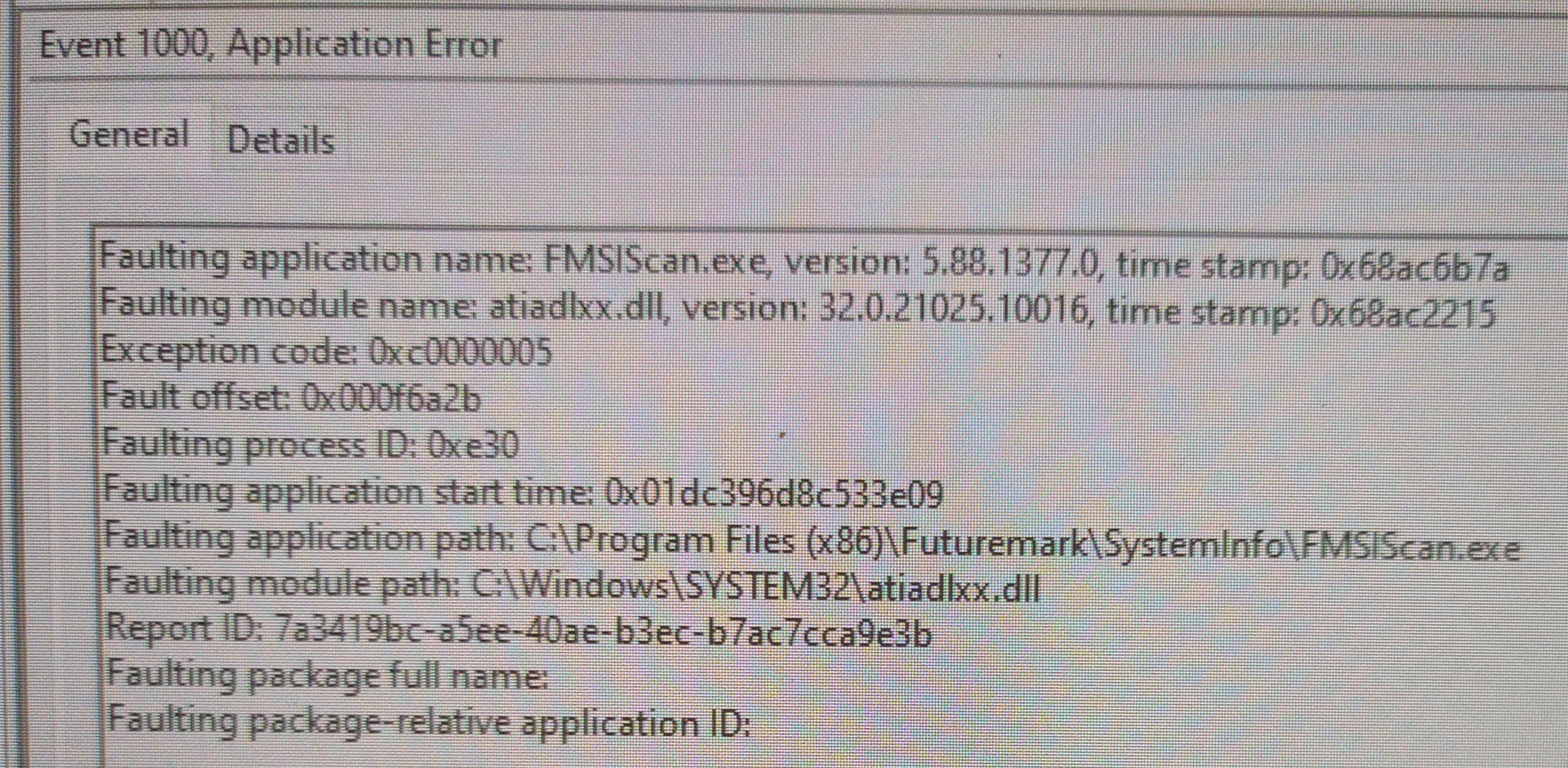
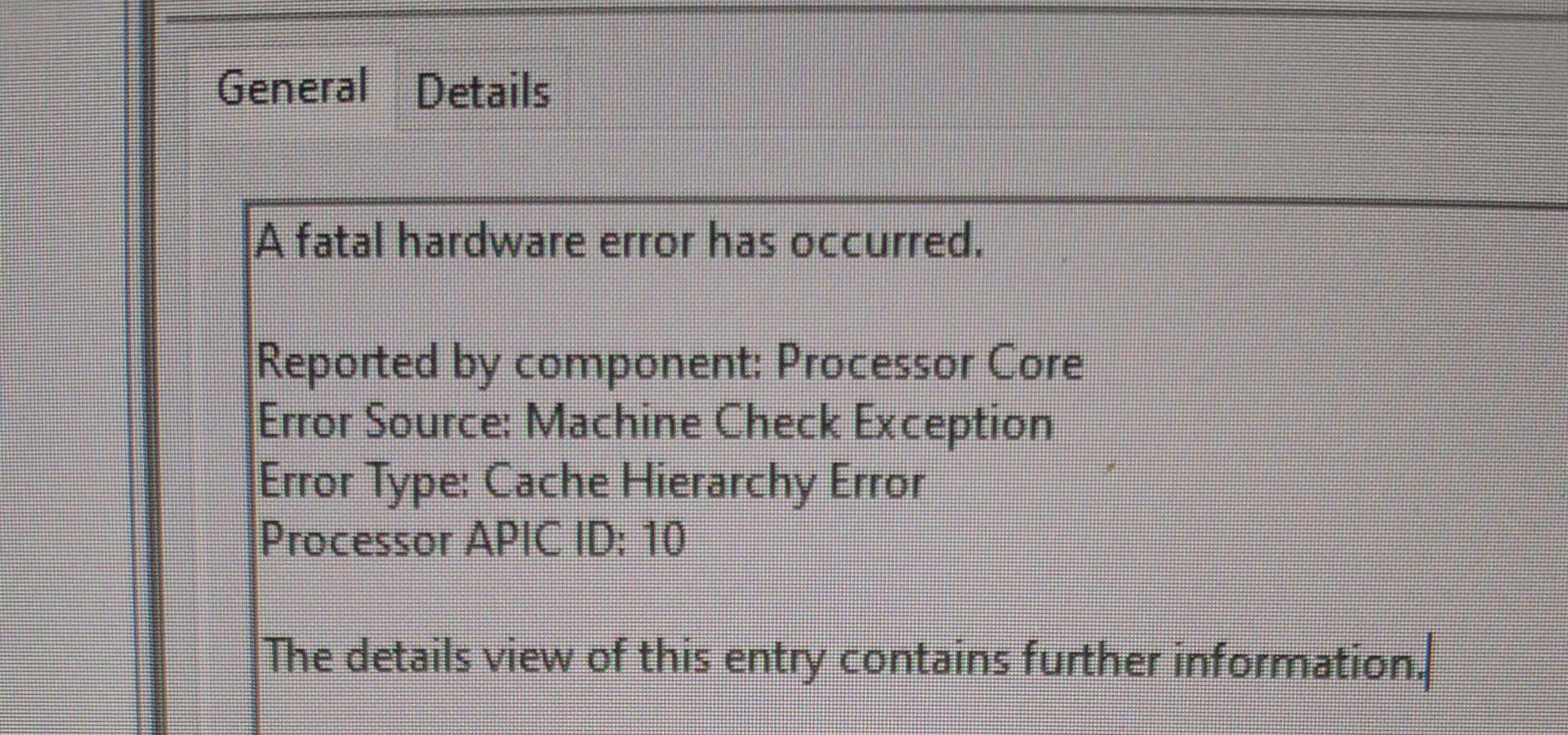
There were two such logs, one regarding faulting module name “atiadlxx.dll” and Machine Check Exception involving a Cache Hierarchy Error.


I have found: FMSIScan.exe crashes :: 3DMark General Discussions Which pretty much indicates it could be related to hardware issue(s).

I am guessing that means i am better of replacing the whole thing with the AM5 system posted above then trying to be cheap and hoping it gets resolved.

I would like to thank you all for thinking along with me.

I’d be really tempted to grab the cheapest ebay AM4 processor I could find and see if that didn’t stop the crashing… or maybe find a buddy with one sitting around. If nothing else, it would mean you have a usable mobo-ram-cpu combo leftover after your upgrade, if it works.

I tend to hoard hardware, though, so this approach may not be suitable for you.

I fully understand you, but sadly current finances doesn’t let me. Especially since i can’t tell which part is broken an if there is more then one or not.
By making the jump to the AM5 platform I can eliminate the CPU/MEM/Mobo combo and just test the GPU. If that fails i can rely on the iGPU in the CPU for the time being.
Yeah, it will probably be a (massive?) downgrade in performance or perhaps not since i am making the jump from zen2 to zen4, but then again its from 12 to 6 cores… so… yeah. But ,and that is the expectation, it will be stable/not crash.
Testing the GPU on that platform should be trivial … it either works as expected or it doesn’t. And that will tell me enough about the C.M.M. combo’s state.
And i don’t have to throw it away… I can keep it and watch the second hand market to see if a ‘good deal’ for a part goes by for when the financial constraints allow it.

I don’t think memtest86(+) is a good memory stability test. Personally, I stress tested memory with y-cruncher FFT/N63/VT3 the last time I overclocked them. What would have kept memtest86 running without error for hours almost immediately fails those.

LinpackXtreme was useful for catching CPU instability the one time I tried undervolting, though CPU stress tests of y-cruncher and small-FFT Prime95 should also do.

Maybe those would help you spot the issue, at least.

1 Like

I’ve run one round of the FFT/N63/VT3 tests with no problems, except giving the system a hard time doing anything else. But that is the point of it, no?

Temps seem also fine. highest i’ve seen was 80C and if the CPU gives any kinda room the temp drops quickly to 50-60C. So that should mean the AIO cooling is still doing its job.

I am guessing you would want to test the system for an extended period of time … so overnight? Or Couple or hours or x number of rounds … what would you recommend JWNoctis?

And i am assuming if it passes this, we can exclude the CPU/MEM from being the problem… that would actually be nice …

12-24 hours seemed to be common, so long as your system could handle the thermal load. You can also stress test the graphics at the same time, and see what happens.

2 Likes

The Intel Core 14th generation will be better.

An update:

  • I ran y-cruncher through a night for about 7 hours with no issue
  • Someone recommended me to use older drivers ( under windows ) result … it crashed and corrupted the windows install on the second crash.

I caved after that… i acquired a second hand RX 6700XT … and all my game crashing went away~
This should hopefully last me until i can upgrade to the AM5 platform. Thank you all for thinking along!

3 Likes