
I didn't think this would need a description, but seriously - what can I do about that sata power connector? the plastic just got stuck inside the power cord and I didn't feel a thing untill I heard a soft snap...
Post a picture of your ball sack for us to mock
What the fuck did i just read?
Speaking of balls, that sucks...them...whatever. Anyway, I've had similar damage to drive connectors and have been able to cannibalize parts from other things. Maybe you have spare?
LMAO dude I just laughed entirely too hard at this.
The pins should still go in they are just gonna be very delicate. Make sure that the power wire doesn't move once it's plugged in.
Are you saying I should just ducktape it? I'm quite sure it still works but the thing is that its just not going back in. I'll see if I can do some random crafting around it. Though by now I've found some sollutions such as glueing a new connector on, like an extender or whatever, but that may not work for me cause I don't really wanna open it yet.
I might, but I dont wanna open it myself cause it's still under warranty. And in the case of if I do need it in the future, its going to be a very painfull process getting the rma and what not from here. Just my luck that when I was pulling out my new storage drive cause it got corrupted or some shit. Now I have nothing to boot it from. I'll figure something out on booting, but damn.. really unlucky this year so far...
Duct tape? i agree...
if it is just the plastic, then try using some super glue to attach it back in the proper location
If that does not work, then you can solder a cable directly to it simply buy a cheap extension cable.
http://www.ebay.com/itm/15-Pin-SATA-Power-Extension-Cable-8-/291016935882?pt=US_Drive_Cables_dapters&hash=item43c1f609ca
you can then cut off one end of the cable, then solder the wires directly. (then use hot glue provide extra support for the soldered wires. (PS if needed, use a clean nail file to scratch the surface of the connectors before soldering, then apply flux to all pins (this will make soldering easier and reduce the amount of time you spend heating the connector up0
Match the colors, then solder each wire to one pin of its corresponding color, then using some extra solder, bridge the corresponding pins. (sata uses multiple of the same pins in order to improve power handling)
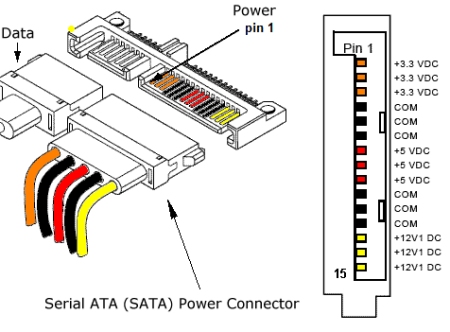
other than that, you are stuck finding an old broken sata drive if you are lucky, you can dumpster dive for an old PC or find a broken drive at a flea market, then salvage the connector.
Compared to old molex and IDE, SATA is not as strong of a connection, and relies on the plastic taps for all of its strength, it is important to never stress the sata cables.
really scarred of soldering the thing, but I know its probably the best way to go about it. But now since you droped a picture of the pinnouts of the plug, I totaly forgot I could just use the right pins and probably hook them up to a IDE power cable. I'd win some soldering off my hands and it should still work I suppose. Currently I'm curious if those 4 pins on the left could be power ports, but it doesn't seem to be a floppy tipe connector, eh. I don't know, I'll see later what those are for. Oh and by the way its a Kingston ssdnow v+200 60GB curently holding my OS hostage.
