Im having issues with sony vegas pro 12. when i look at the preview window it shows it shows video just find (like recorded) im playing minecraft but when night time comes its an issue. see the video was recorded just find but after rendering it makes night time pitch black. I have reset vegas to defaults yet it still gives me this issue. I render it using adobe premier and the video is as recorded (works perfectly) my problem is i dont know how to use premier and would much rather stick with vegas. are there any settings i can change so that it doesnt darken my videos?
I cant edit brightness because it blows out my day time footage :/
Yes.
On your video track in the timeline, on the left will be the Event FX icon.
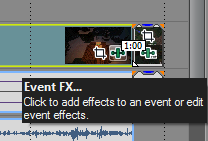
Clicking on this will open up two new windows. The one will be the Pan and Crop Screen, the other the Event FX Picker. In this select Song Levels.
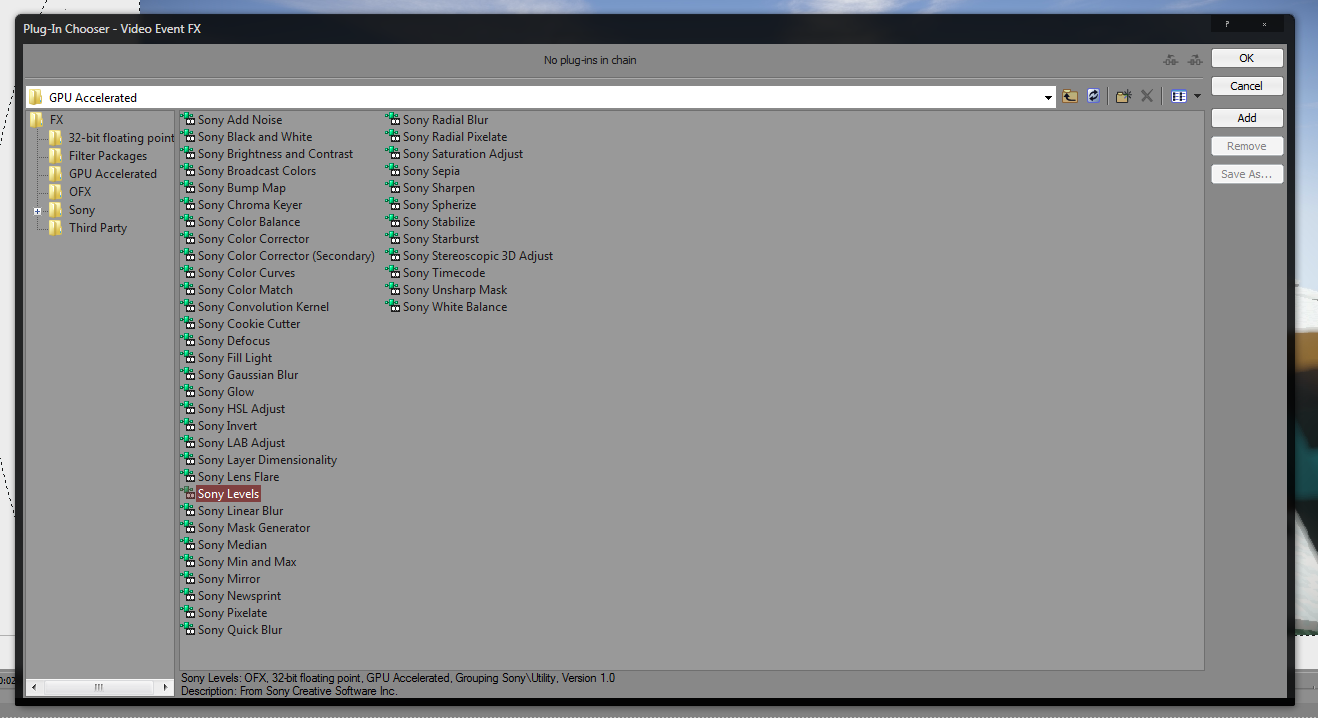
After double clicking this, you shall see it added at the top of the window. Click OK.
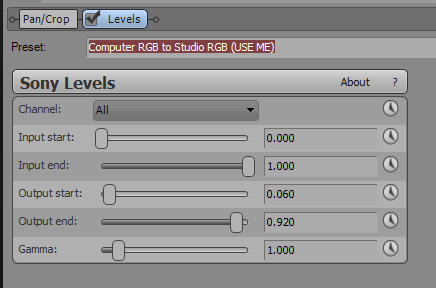
Adjust your settings to look like this. I have found this to be the best. Save these settings (Save icon on the right of this screen) so you can easily access them later.
What you are essentially doing is removing the lower end (darker colours) levels.
Apply this to every video clip in your timeline and there you go.
Wow you are a life saver! Pictures and everything?! Yesss! I'm working right now so I'm going to follow your instructions as soon as I get back. Is there a way to set those settings as default? I don't understand why Vegas messes with footage when you haven't told it to -_-
You can't make them default as you have to load the FX module on to the clip. The closest you can get is to just save the template so you can easily select it later.
Its something to do with the encode method and i've tried sorting it before, but to no avail.