Unreal Build Farm: Proposed Build Server Thoughts?

Long story short, I need to replace my current infracture. Everything is fully depreciated and I have the budget to purchase new.

Keen to get everyone’s thoughts on the below proposed build server. I will purchase 30x when I have fully tested these in every step of the build process.

Some key notes when building this out were:

  • Server Size
    • 2U
    • Moving from a 4U
  • I/O (Disk)
    • Shared / Local Flash (Hot Swap)
    • For Cooking/Package
  • Memory
    • 512GB
      • Cooking/Package
      • 8 channel memory is a must
      • 256GB w/ 4 channels was not great
  • CPU
    • AMD Ryzen™ Threadripper™ PRO 7985WX
    • For Compile/Shaders
    • Clock speed matters most, not cores
  • GPU
    • Out-of-Scope
    • Removed to save on power and heat
    • Already have build machines with 4090s for light baking

Below is my current gen and proposed, please let me know what think and why. Thank you in advance for any insights, too!

Current Build Machine Specs x30

  • 4U
  • AMD Ryzen Threadripper PRO 3995WX 64-Cores
  • 2565GB
  • x2 4TB Samsung EVO QVO 870
  • Nvidia 3090 Founders Edition

Proposed New Build Machine Specs x30

  • Case ALPHACOOL ES 2U
  • Motherboard ASROCK WRX90 WS EVO
  • Processor AMD THREADRIPPER PRO 7985WX 32C/64T 5.1G
  • Memory ECC DDR5 64GB 5600MHZ [(64x8)512gb]
  • SSD (M.2 NVMe) MSI M480 PRO 2TB NVME M.2 (OS Only)
  • (NVMe) SSD Micron 9400 15 TB Solid State Drive (Builds)
    • Hot-Swappable SSD Kingwin U.2/U.3 NVMe Mobile Rack Cage with SlimSAS Connector for 5.25”
    • M.2 PCI expansion slot M.2 NVMe SSD to PCIe x4 Mobile Rack/Backplane
    • Vendor had to customize this for us to fit everything into a 2U
  • Maybe the new Mircon 9550 would be better?
    • Don’t really have the luxury to wait for release
    • Is it enterprise trust worthy if so?
  • CPU Cooling Custom CPU water cooling
  • NIC card 40GB NIC CARD
  • Power Supply Athena Power AP-U2ATX80FEP8 20+4Pin 800W Single 2U IPC Server Power Supply - 80PLUS Bronze
  • Graphics Card None
    • Light bake builds are on dedicated desktops with 4090s
  • Accessories/Supplies Watercooling supplies, mounting accesories. Premium Thermal Paste, Cable Mangement. Badging & Boxing
Not being familiar with this model my search brought up a lot of links from German websites. I suppose that’s close to your location.
2TB seems excessive for a boot drive. OTOH I’m not sure if you will save a lot with smaller drives. My goto would be a Samsung 980 Pro or 990 Pro.

Noice!
These are quite the upgrade from the Samsung 870 QVOs! You don’t sound like you need to save money, but Micron 7450 Pro would probably be sufficient as well.

Why don’t you get MCIO to U2/3 cables and call it a day? That’s what the ports are designed for. Get the shorter ones (50cm) making sure they fit into the case.

You have given your own answer.

In 2024 only invest in 40gb NICs if you add to existing 40gb infrastructure. Consider 100gb otherwise.

You need to spend more time considering cooling in a 2U case with this much heat being generated. Slapping on a water cooling rig on the CPU is not sufficient and will lead to your Microns overheating. These need serious data center air flow to operate at which point you may find that you’re paying double for water cooling the CPU.

Since this is for business and I assume expected to be on 24/7 I would get a better power supply, meaning Platinum to Titanium level, which will save measurable money over the lifetime of the rig. Will the added cost make up for the added cost of the power supply? Probably not, but the better power supply should provide added peace of mind…

1 Like

Thank you for the feedback!

Good call out in regards to proper air flow and cooling for the Microns; I didn’t think about that.

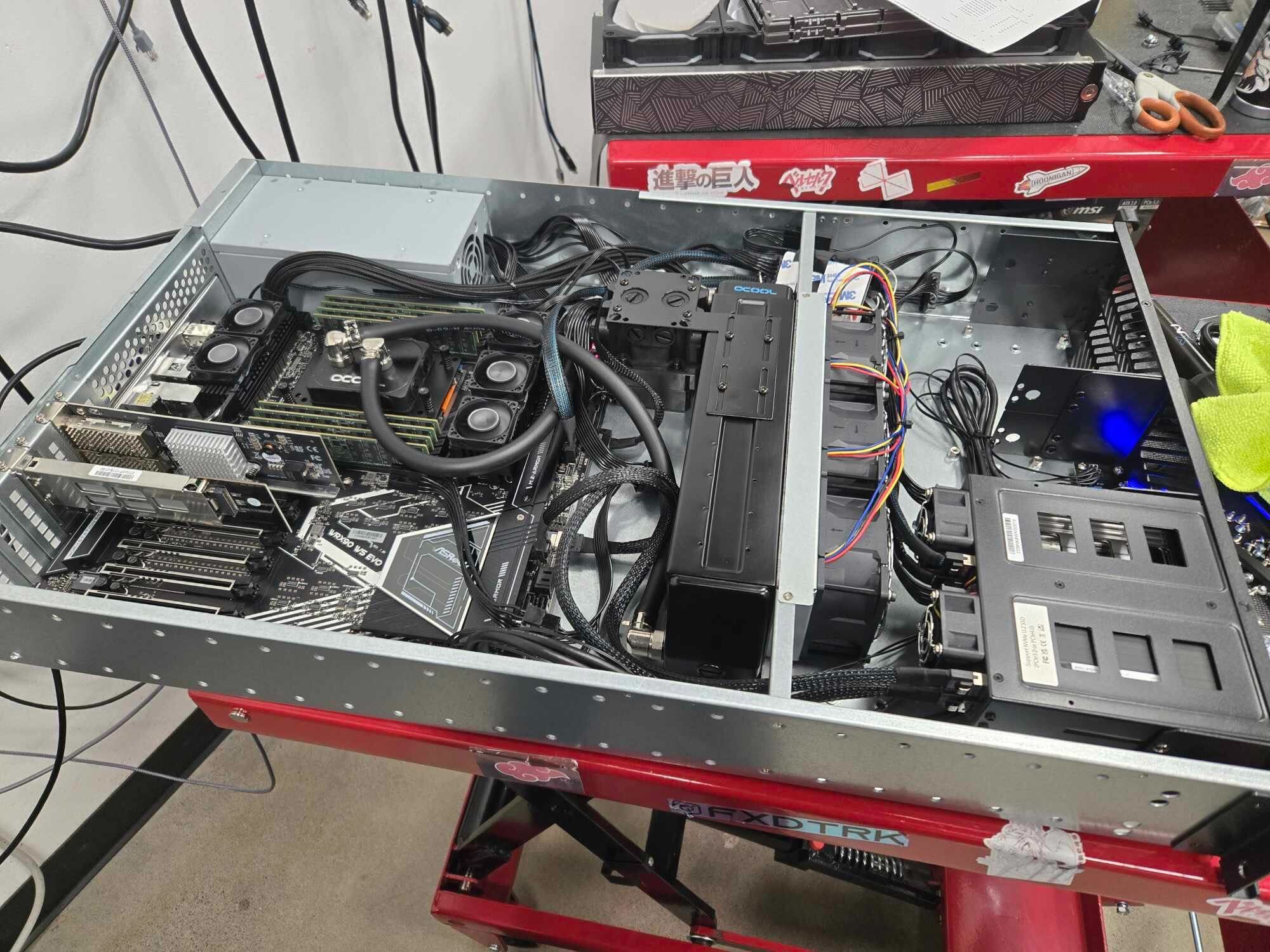
Below is a picture of the current progress on the poc unit:

2 Likes

whoa momma, he’s puttin in a 40 gigabyte / 320 gigabit card
Otherwise I’d say 100 gb or 400 gb card as 800 gb hasn’t been ratified yet

Year old thread, I’ll comment anyway.

I designed and spec’d out our infrastructure after running simulations POC cluster using 5995WX couple years back. Aim was to balanced IT and Build team flexibility (virtualization), with good performance, and multiple scalable domains. One scalability domain, “General Purpose”, was provided via virtualization. This domain included build agents with an allocation of >= 12 cores + 128GB RAM + local attached SSDs for workspaces - memory is higher than what one might expect, but a large portion of that memory is used for filesystem caching and it makes a large difference in performance. The other domain, “Compute”, supplied dedicated resources for DBS (code + shader compiles), Lightmass (if teams wished to use baked lighting), and any other tasks we might need. General purpose domain should prefer high clock / IPC cores to complement Compute domain’s high density but lower clocked cores. Min spec for Compute domain was dual socket 64 cores Epyc’s with 512GB RAM. Recommendation for GP node was to house 4 build agents, plus ancillary capacity, and balance cost based on licensing (VSphere money grab). Simulation suggest a minimum of 25Gbps networking was needed to support 8 build against for every compute node. SLA target was 30min for clean end-to-end build (compile, cook, package, etc). SLA target for partial buddy build, e.g. pre-commit, was < 15min and ideally much shorter.

Software side, I instrumented UBT to emit structured timings for every node / command / task in a build graph. I can easily identify tent poles, like Epic relying on .Net Zip implementation for compressing build artifacts which does not thread. I also tuned DBS supporting artifact caching, customization of BuildConfiguration.xml and adding an additional DBS BuildConfiguration suitable for build farm vs local - most clean build aren’t exactly clean, if the build command and inputs hash to an existing artifact (obj / lib / etc) it’s returned immediately. Artifact cache does require strict adherence to IWYU, and a not so quick test is using a Non-Unity build for validation. DBS caching was 2-3x improvement, a large win.

Right now I aware of at least 9 compute nodes, and I’ve lost count of build agents having moved on from that role. Compute domain also supports devs (like myself) accelerating their local builds. I’m happy with how it turned out.

When IT provisioned the gear originally I learned they doubled networking capacity. My dashboard suggest I overestimated the bandwidth necessary. So they’ve a lot more bandwidth capability than needed.

I’ve more stories but this is already long.

Would be interested in hearing how your system worked out.

1 Like