Using EOL hardware with no aftermarket support seems like a great idea if you care about security…
Are you using the latest updates on the dream machine? 4.1.09/4.1.13
What do you mean? The UDM SE is not EOL neither is the Firewalla that was mentioned as a potential solution. So, I am lost as to what you are talking about.
1 Like
Yes, I am on the early access channel, so the UDM SE is running 4.1.13 and the Network application is 9.0.113
@EniGmA1987, thanks for the video’s. I was watching the first video where they set it up for transparency bridge and decided to reach out to Firewalla and they responded pretty quickly with an article of how to achieve what I want and the article had the second vidoe you provided showing that I can install the Unifi control directly to the device and get rid of the UDM SE completely. Which is sad, that think was expensive but I would need to recoup some of the cost if I go the Gold Pro route.
1 Like
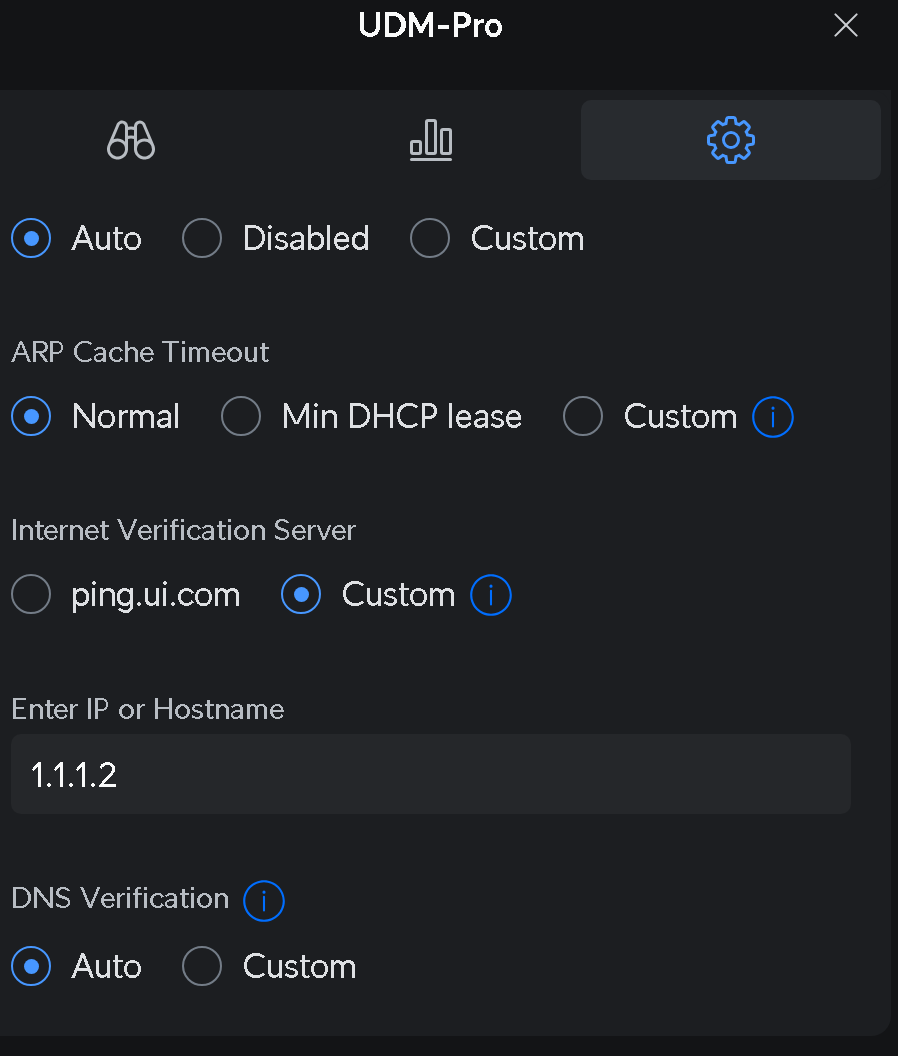
Try changing the verification server. Should be in the Dream Machine Pro SE settings. I know the default ping . ui . com has issues. I am using 1.1.1.2 but you can use whatever you want. Not sure if it is directly tied to the speed test server or not. But i noticed a speed increase by changing it. I believe by default ping . ui . com points to 1.1.1.1 or 8.8.8.8 depending on your location.
Uhm… Firewalla hardware sure is
Coffee Lake is EOL since long
https://www.intel.com/content/www/us/en/ark/products/codename/97787/products-formerly-coffee-lake.html and has multiple security issues (spectre etc)
Alder Lake is likely to be soon EOL given that we already have 3+ generations out after its release
Apart from vendor EOL you also have BIOS/firmware updates which can be crucial.
No idea about the Annapurna Labs AL324 as there’s very little information about it publicly and no upsteam (Linux) support but given its age you’re likely not going to see much in terms of software enhancements. Annapurna Labs - TechInfoDepot
At these speeds you needs some kind of PPPoE hardware offloading unless you want a quite beefy CPU.
The old EdgeRouter Lite (Octeon MIPS-based, long EoL) can do 1Gbit speeds with PPPoE using hardware acceleration but it comes with its own set of limitations and maxes out at 1Gbit due to interface limitations.
I’m not aware of any consumer/prosumer friendly hardware (cost wise) available so I guess your best bet is x86 and bruteforce it. At least on Linux there seems to be support for PPPoE offloading using Intel ICE driver (E800-series) but I’m not sure if it applies at all variants in the series.
https://patchwork.kernel.org/project/netdevbpf/patch/[email protected]/
I don’t have PPOE but after i updated to the latest early access my speeds dropped to 1Gb on the built in speed test for some reason. Not sure which release caused the issue for me. But if i use fast.com or openspeedtest i get 2Gb.
Set your smart queues to both 0
That fixed it for me
That wasn’t it, I ended up getting a Firewalla and after dealing with the hazards to get the UDM to work around not being the primary gateway, I am getting full speeds.
1 Like
Im using an.old Sophos XG 330 rev 1 with 2 10gb ports. It has a old i7-4570 in it. Im able to get 3gbps (u/d the max my isp has) on PPPoE on it. Im running the home licensed software version of XG, with IDS on for certain VLANs and traffic. I did have to apply a ifconfig mod as the txqueuelen is set to 3 on the PPPoE interface. 1000 is the regular setting. Once i manually override the txqueuelen to 1000 the speed is ok. Without that tweak 300mbps is max what it will do. I submitted that fix to Sophos a few months ago and it should be in there upcoming release as they confirmed the perforance boost for PPPoE connections over the stock linux pppd settings.
So CPU should not be a issue with PPPoE, interface settings are.
The Firewalla Gold Pro is a great device though. Would love one but $$$ holds me back.
Hey, sorry for coming in on an old thread but I found this on google as I’m about to be in the same situation with a UDM Pro moving to a 2.5gbit Cityfibre service that uses PPPoE (indeed I’m migrating away from the provider using DHCP that you mention in the OP…)
I just wanted to ask if you could share how you did end up getting around this issue specifically around using the Firewalla as the gateway and what needed to be fixed on the UDM when it was no longer the primary gateway. Just looking to be prepared…
Thank you for any help!
1 Like
Sorry this is late, I didn’t see a notification about this.
Basically it is very confusing. I still have the UDM SE in my setup, I have two ports dedicated to WAN (Aquiss and Virgin Media (backup internet)). The other two ports are plugged into the UDM as a workaround, one tricks the UDM into thinking its doing internet and the other into a standard port to handle routing. It is really annoying that the UDM SE can’t be set as a glorified switch as it won’t function. My goal is to get one of the newer Unifi devices for recording and then self-host the backend for management of the devices. But I can’t get away from the UDM SE until I can handle my cameras as the new Unifi OS doesn’t have Protect support (at least to the best of my knowledge of a month or two ago).
2 Likes
The newer UniFi Cloud Gateway Fiber can do multi-gigabit pppoe connections because of its hardware offloading support inside it, and it supports an nvme SSD for running Protect for cameras.
Have you tried your UDM SE recently with your main internet connection? I also heard that sometime recently there was a software update to the pppoe system inside unifi devices that moved it to a multi-threaded implementation and this finally got past the 1.5gb limit the devices had, with some reporting around 3gbps capability now on the older UDM Pro/SE models.
Though other options would be:
unvr for $300 to run Protect and have your hard drives. This would let you do whatever you wanted for a gateway now.
NVR-Instant for $200
Someone made an unofficial and sort of hacky docker container that runs Protect and thinks it is a unvr when really you are running a docker container. Its usability has been hit and miss by those who have tried (I have not) but might be worth trying if you already have a docker server running somewhere.
I updated the Unifi OS and the network software a few days ago. I have the same unifi switch as you (Dream Machine SE), and a new option became available since installing the latest software. I can now install Protect 6.1, but I didn’t because I don’t have any cameras in my home.
1 Like