elec costs here’re quite high and so are the temps. which’s y I’ve been meaning to make my system more efficient by undervolting it. however the prob’s that idk how to do it safely.
from reading the relevant Arch Wiki entries I’ve installed intel-undervolt and lact for my respective hardware. I’ve yet to decide on what I’ll use for my stress tests so recommendations are welcome.
so how would one safely undervolt their system such that there is no performance degradation? in addition, are there any more considerations in reducing power usage?
Silicon is different. There is not a single CPU that behaves like another CPU, even if the modelnames are the same. Like Intel 14900K for example. It is why it is called the silicon lottery. They are not making clones, exact copies. You will have to discover how much you can undervolt and how much performance you loose doing so, under what voltages etc.
Like Curve Optimizer on AMD CPUS: GitHub - DeshaunDoesTech/Ryzen-PBO-Guide: A comprehensive guide to AMD Precision Boost Overdrive (PBO), Curve Optimizer, power limits, stability testing, and performance tuning on supported Ryzen PCs. · GitHub
Some can run -30 on every core, others have to set values per core and it all differs what values are stable. Testing needs to be done.
For what others have done, you can search for your hardware here: Reddit
Find other resources too if possible. Overclockers forums. Example: https://www.overclockers.com/forums/
IIRC, you can often make the part draw 20% less power but only loose like 2% performance.
Do proper stability testing, do not rely on just synthetic benchmarks or stress tests.
IIRC, with Curve Optimizer editing, the CPU usually crashes when it is idling. If you have gone too far. I don’t know of any stress test that checks for idling…why would they?
In general people overclock/undervolt stresstest on Windows. The tools are there.
Someone did tell me about some tools for Linux but I forgot what they are called. You can get Linpack etc on Linux. OCCT should now work on Linux. In a way, it is as much about finding and learning the tools as it is about OC/UV. What does a failure look like in Linpack? What went wrong? Was voltage too low? Was the CPU multiplier too high? What does Event Viewer on Windows or logs say on Linux? What does it mean?
Other ways to reduce power is to simply not have the device on more than needed. This is why my TrueNAS is only on for 30 min/week. When I move files/backups. I have no need of having it on all the time. Another option is a Mini-PC, they draw little power. 15 watts or less in general. It is almost like having a router/Raspberry Pi on. Who cares what a consumer router draws? It is neglible amounts. I don’t care what my router or RPI draws because it is so little. Both are on all the time.
Then there is the calculation of how much money do I save in less power used VS how much the device costs to buy. Does it take 2 years to make economical sense? 15 years? If it is 10-15 years, I don’t see it as a viable option.
Today, for me, Mini-PC vs RPI, I am choosing Mini-PC everytime. Not only are Mini-PCs X86 and therefor supports all software, they are more powerful machines. For about the same price. There are Docker containers that do not have an ARM CPU version. Wont work on RPI. Poorer performance, less software, to me the choice is simple. Not RPI. And I have owned every RPI except RPI 5 and Zero.
Undervolt the CPU in the BIOS, GPU with LACT in-OS. OCCT is available free and will handle blasting the CPU with a bunch of heavy workloads. For GPU, you’re best off playing your heaviest games, GPUs behave differently under FurMark load so it’s not the best for finding instabilities/crashes.
Depending on your hardware, you can enable the CPU’s own frequency control instead of using the Linux Kernel’s scheduler options, this’ll keep the CPU from clocking up needlessly, and when it does need to it’ll clock up/down in milliseconds. For my 12th gen Intel chip, this needs the intel_pstate=active kernel cmdline argument, and flipping the pstate scheduler to “powersave”.
For GPU it depends on the GPU you have. Intel and AMD GPUs seem to just eat 20+ watts at idle no matter what you do. Nvidia ones will happily drop down to 3-5W (but their drivers can be more of a pain on linux, so pick your poison).
I wouldn’t put too much hope on intel undervolting from linux. Thanks to Plundervolt, you need to disable kernel hardening and secure boot before you can even attempt to undervolt. It’s much better to do it in the BIOS if that’s possible.
I would also not expect too much from it these days. CPU’s have a power budget, dropping the voltage actually makes them run faster. If you want to limit power, you have to change the TDP settings in the BIOS. Same goes for the GPU, change the maximum power it’s allowed to draw. Dropping it 10% will not cost you 10% performance, it’s more in the 1-2% range.
What can also help
Shut it down when you don’t need it. Use a power strip to completely power everything off.
If you have spinning rust, stop them if you don’t need them
Turn off the monitor faster
When gaming, limit your framerates (using v-sync for example). Lower the graphics settings a bit and you’ll save even more
One thing to consider, if you have a really, really crappy power supply. Consider spending the money for a better one with a higher efficiency. If it already has a bronze rating, then it’s fine, you’ll never get your money back from buying a gold or platinum one. But if it has no rating at all (or it’s like 15y old), consider ditching it.
Lastly, something that can measure power at the wall is also handy. My old PSU pulled like 10-15W in standby and my amp pulls 40W just sitting idle. Keeping those on 24/7 will cost you more than those 10-20W you want to save for a couple of hours of gaming/load.
To add some numbers to monitors and gaming. My monitor at full brightness draws ~70 watt @ 1440p. I set mine to 70% brightness. Mostly because I am light-sensitive. Haven’t checked wattage difference. If you are not sitting at PC, consider setting up screen turning off after a few mins of inactivity.
Some fresh numbers from The Division 2 and latest DLC released yesterday. I limit FPS to 80. High settings mostly @1440p. 9070 XT can draw ~300 watts but it sits at 40-50 watt with these settings. 40-50% GPU usage. CPU is a 5800X3D, sits at 15-30% usage, also draws 50 watts. So in total CPU and GPU draw 100 watts, which is next to nothing, when gaming. It would be 3-4 times higher if I didn’t limit it. No undervolting/overclocking anywhere.
My monitor is a Freesync 75 Hz 1440p, no point in drawing more frames than what I do. I wont see them anyway. I chose 80 FPS this time to have a little margin.
The 9070 XT idles at 20-25 watts at desktop. My Previous card, 6800 XT idled at 40-45 watts. Not something I care about, I just like checking numbers.
If it’s mostly about the power bill and temps, I’d try power limits before undervolting. Dropping the GPU power limit in LACT by 10-20% usually costs very little performance, and unlike a too aggressive undervolt it can’t make the system unstable. Same idea for the CPU with PL1/PL2 in the BIOS.
I’ve heard of silicon lottery and binning b4 but have yet to determine the quality of my chip as I’ve never messed around w OC or UV. and as you’ve stated, only one way to find out! my concerns were I’d apply a -100 mV all core and create magic. but I suppose getting a general baseline undervolt for the 13600K and then fine tuning based off my specifc chip is the way.
so theoretically a 20% cheaper elec bill to get 58.8 instead of 60 FPS? are both the %s proportional? can I decrease the power by 100% and get a 10% perf degradation? I did say theoretically at the start of this paragraph lol.
any pointers on what to look out for? ofc it’ll be software dependent but I’ll pretty much be going in blind.
laptops to me are significantly more useful than mini PCs and they too have similar power and size constraints. so the most effective way to budget power is to relegate tasks based on compute and use the desktop only when required.
the most graphically demanding game I have is Cyberpunk 2077 which has a built in benchmark that I’ve used to quickly determine quality settings. but I assume it too isn’t realistic and that I should play the game for a few hrs. however I am a bit torn on game settings. I play on High w RT off to get 60-80 FPS but w RT medium I get only 20-30, which is the greatest load my GPU can handle. as I am stability testing I assume I use RT medium but the frametime is unplayable for me.
I assume this won’t override UEFI settings? is it one or the other or should I use both in tandem? also is this argument exclusive to 12th gen or all Intel CPUs w hybrid architectures? speaking of hybrid, Intel’s E-cores are less power hungry than the P-cores. the latter’s like a V8 guzzling fuel at idle. is there a way I can disable them via Linux for browsing yet enabled for gaming?
how abt iGPs? on laptops laptops that have dGPUs, it can turn off when not in use and display via the iGP. but afaik doesn’t work on desktop. connecting both to the monitor and switching inputs based on the task perhaps?
I can do it via UEFI.
faster? is this due to thermal throttling? regardless, I was contemplating to start w power limits and then undervolting. would this be excessive and risky?
I assume there is a way to do this via software? cuz tbh it hadn’t ever crossed my mind so idk and instead both my non-OS HDDs are constantly running w almost no usage. one of them however contains my backups like timeshift. can I run a cron job to automatically start up the drive at specific intervals to do the backups?
RT is an absolute no on my GPU but depending on the game it can run “Ultra“ at 60+ FPS. I don’t care for Ultra so I play on High and limit my FPS to smth beyond 60. if it’s an FPS title I set the cap to 240.
I don’t have very many USB devices but disconnecting them physically is a pain. again I assume it can be done via software, yes? plus my kb has a TOF sensor so I should use it and reduce the polling rate from 4k to 1k. but how much of a saving might this be?
my monitor’s ~300 nits at its brightest and is clear only at night so I can’t really limit my brightness. however I should use the auto shutoff timer. I disabled it due to sm freezing issues w Windows after turning it back on but I no longer use fuck ass Windows.
impressive. I too limit my FPS and play exclusively at High w RT off but have no power limits set. so my system might be pulling 400+ on the regular. I have a 144hz 1440p monitor. I assume decreasing the resolution and refresh rate will also decrease power? I watch 1080p content anyway cuz my internet is shit and afair 60hz on my montior isn’t a smeary mess so I’ll look into it.
are these software or hardware measurements? cuz I checked LACT and it said my 6700’s (non XT) doing 9-12W.
I see. I will look into the power limits. how much more of a power savings may I expect from undervolting after the fact? ofc silicon lottery matters but it may not be worth the risk.
another question regarding safety, any risks from UV on a potentially degraded chip? I’m unsure if my 13600K’s one of the victims of degra-gate but I have had a few symptomatic scares which I hope to be OS oopsies.
UV helps to lower power consumption when your CPU is near fully loaded. However, for most users, their systems are mostly idle. So the right strategy is to lower power consumption at idle where UV helps little if at all.
mprime. The CLI version of prime95.
Use a PSU with excellent efficiency (like >=90%) at the range less than 100W.
Both. GPU overclocking is annoying because it’ll be stable under one kind of load, then unstable under another, and in my experience it can often be in the same game if conditions change too massively. I tend to end up with a pretty conservative undervolt (mine is -50mV right now, +50MHz core) for that reason.
It’s letting the CPU itself decide clockspeeds. It does so based off your UEFI settings (whether you have an overclock, undervolt, or both) because that’s what sets the constraints for the CPU itself. It reacts much, much faster than the operating system can, and I haven’t noticed worse performance doing so, so I like it. Not having my CPU suck down more watts than it needs to or sit at higher temps is nicer IMO.
For the P/E cores… Gamemode can let you point games at specific cores (check em with something like htop that counts from 0 and shows clockspeeds, it’s easy to tell which are P or E because the P cores boost like 2GHz higher), so you can pin games to just the P cores. For non-games, probably simplest to set up a script to launch your browser using taskset: How to assign a program to a CPU core using taskset . You can pin an application to specific cores that way.
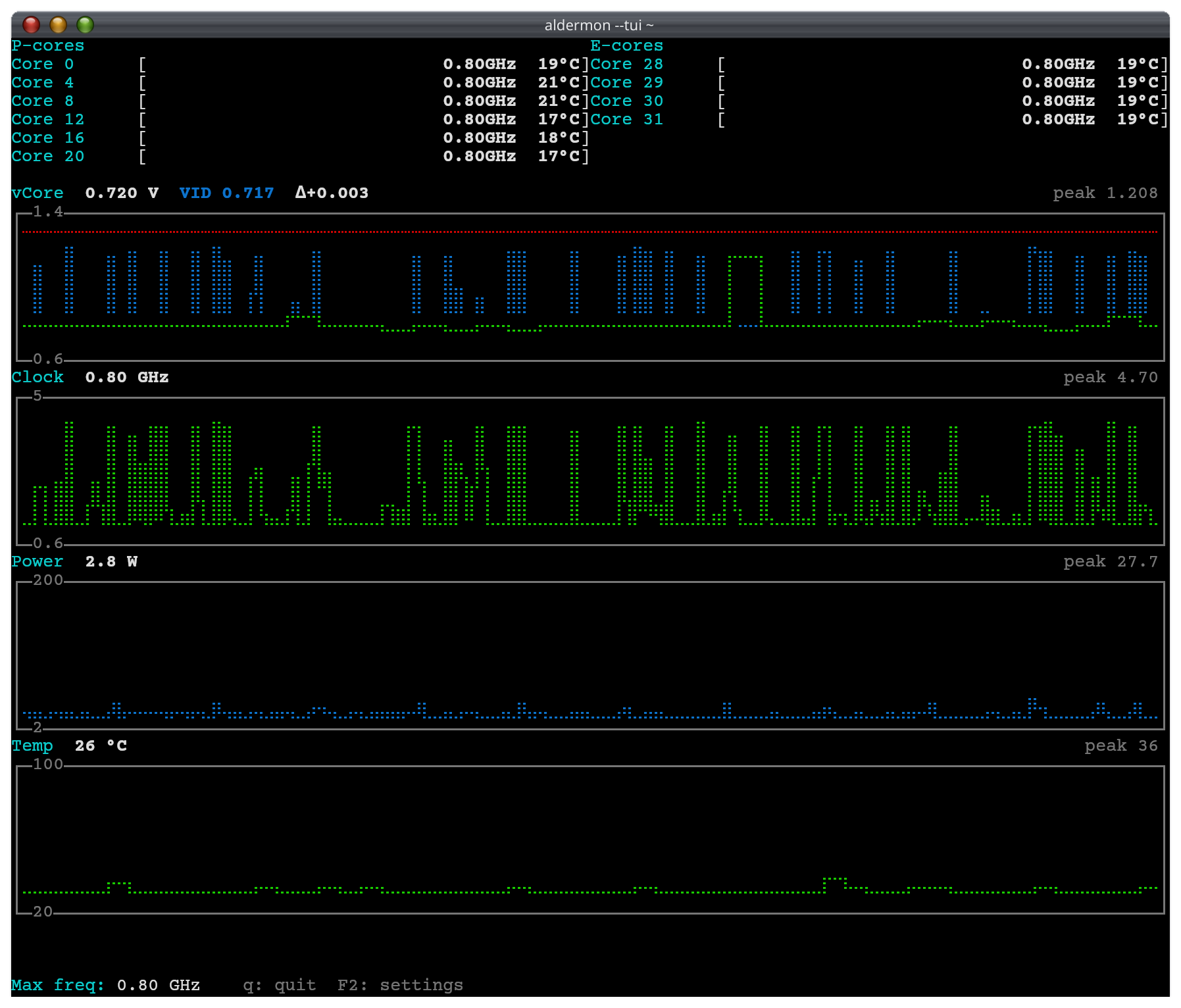
Adding to the text wall: It’s worth a note here that the p_state active scheduler on powersave may solve this issue for you without needing to pin cores. I have a zillion tabs open in Firefox right now, plus some scripts running in termanal, Zed IDE open, my mod manager, Discord (Vesktop), etc. Both the P and E cores mostly sit at 800MHz:
You can see from the clock graph that it jumps up to full boost for split seconds when a task needs that clock, then drops right back down immediately. Sits at ~2-4W, only pulling that 25W+ for those split-second boosts. You can see from the vCore graph that they’re short enough the vCore barely responds (aside from that one larger spike). The blue on the vCore graph is the VID (what the CPU asks the motherboard for), it’s requesting voltage every time it boosts but it clocks back down so fast that it seems the motherboard doesn’t have time to respond (vCore on my machine is from the motherboard’s Super I/O sensor, it reports what the board actually feeds the CPU).
I can’t offer much help here, sadly. I have a 12600KF (no iGPU), and a Ryzen 3700X (no iGPU), and a bunch of X58/79/99/299 (all CPUs on the X platforms have no iGPU), the only PC I interact with that has an iGPU is my LLM box at work (Ryzen 7950X), and that runs headless.
I know there’s some linux resources for switching i/dGPU on laptops, but I don’t know if they require MUX chips or other specific hardware. For desktops it’ll just use the iGPU if the display is plugged in to the motherboard output. What I don’t know is how it handles things that run on the dGPU, I think it just outputs it through the iGPU’s display out? Would require some google-fu. Probably worth plugging in to your iGPU output first, and confirming the dGPU actually idles lower when not rendering the desktop, before diving too deep on this.
Only if your CPU was getting too hot. Modern boost algorithms are very smart, they’ll take into account voltage, current, power draw, and temps. Lowering voltage lowers current and power draw, so if you aren’t getting too hot, the boost algorithm will see that as headroom and boost higher (or if it was already boosting to its rated peak fine, hold it there for longer). This goes for both modern CPUs and GPUs in my experience and reading.
The OS is probably doing this already (assuming you aren’t on ZFS), I believe HDDs default to spinning down when they aren’t needed. Do some reading here: https://askubuntu.com/questions/39760/how-can-i-control-hdd-spin-down-time. Looks like it can depend on the individual drive, but hdparm or similar utilities should be able to set that spin-down time once you figure out what the settings actually mean. Do remember that it’s a trade-off, spinning the drive up and down constantly is probably worse for the motor and disc than letting it spin at a consistent rpm for a while. For something like incremental backups, you can prolly set it to a pretty low timeout, so it’ll wake up when it receives the reads/writes then go right back to sleep. Usually backup software does everything in a row so it’s unlikely that it’d fall asleep in between individual reads/writes unless you set a crazy low timeout.
Experiment with capping it to whatever the refresh rate of your monitor is. If it doesn’t cause frametime jutter (depends on the game, for me with my 9060 XT it’s usually fine), the GPU will pull way less power when the scene isn’t as hard to draw. Worth noting here that I’m not super sensitive to input lag and I don’t play really fast shooters, so I don’t mind v-sync on and just not asking the GPU to render any more frames than that.
Idle draw is annoying because it kinda just depends on whatever you’re doing. I run a 4K monitor and I can’t for the life of me get my 9060 XT to sit below ~25-30W. IIRC folks with really high refresh rate or multiple monitors also have the same issue.
I don’t know of a way undervolting could harm hardware. At worst you could put your PC in an unbootable state and have to do the ole pull the CMOS battery out and wait 10 seconds then reboot method to reset the BIOS. But you gotta be making massive changes for that to happen. If you fool around with RAM you can corrupt your OS over time if it’s unstable enough to bungle data but not enough to crash outright, but that takes a while, and as far as I know it doesn’t hurt the hardware itself.
Modern hardware is pretty wicked out of the box, so you have to disable every safety limit the BIOS (motherboard or GPU) will let you, or trick them into violating those limits, and then make massive changes, and then ideally overheat your hardware to help degrade it further, to really run into issues.
The only issue I can think of with a degraded 13600K is that it will need higher voltage to do the same clocks, so you may not benefit from undervolting. No way to tell till you try. Make sure to record a baseline in something like Cinebench or any other consistent, repeatable CPU benchmark. Ideally measure 3 runs if you have the patience for it. Then you can make sure your changes actually improve or at least keep the same performance. O if they lose performance, that the wattage drop is worth it to you. IIRC back when I mucked about with a 1660 Ti I was able to get it down to like 100W flat under load and only lost 10% performance. If a setup like that is still fast enough to run your games smoothly at acceptable settings, then it would probably be worth the power savings.
^^^ 100%. Try and find data or reviews that show the efficiency graph, not just the peak. Check what your hardware pulls from the wall (use a wattmeter or an UPS with monitoring - the APC ones are affordable and what I use at home) at idle and under load. Then you’ll know what wattage range you actually run.
To add more supporting data for intel_pstate/FPS capping because it’s 1AM and thus my brain is alive:
Cyberpunk 2077 at 4K output, high settings, no RT, V-Sync on, 60fps limit to be extra sure the GPU isn’t trying to render higher (I have a 60Hz monitor). Top image where it’s pulling ~170W (it bounces all around from like 120-190W) is FSR Balanced preset. Bottom image at ~125W (bounces from ~85-140W) is FSR Performance. You can see the GPU usage is ~10% higher when rendering a bigger frame (IIRC FSR Balanced at 4K is about 1440p internal, Performance is 1080p internal). I’ve also got a ton of mods, one of which raises the LOD model quality, so that will make a busy scene like this harder to render too.
You can see that the frametime graph (green graph at the bottom of the mangohud display) is pretty smooth despite the CPU and GPU clocks/power draw bouncing all around constantly. The fact that I took some pages from CachyOS’ book probably helps here too. I use linux-tkg to compile the kernel (rolls in CachyOS, Clear Linux, and some other performance patches) with the BORE scheduler, which prioritizes bursty loads like games. Then I have ananicy-cpp installed, which changes the “niceness” (priority) to favor games (and some other apps, and you can add your own to it as well if it doesn’t cover something you use).
Power consumption on CPU/GPU does not scale linearly unfortunately, it’s squared. You can see massive decreases in power consumption by making small changes in the operating voltage. The same goes for frequency, the higher the frequency, the higher the power consumption (afaik also squared).
That’s why overclocking (and boosting algorithms) are so heat intensive and inefficient. You’re pushing so much extra power through the chip for a tiny increase in performance. The 65W eco-mode on Ryzen CPU’s and nvidia’s MaxQ chips (300W instead of 600W) aren’t much slower compared to the “unlimited” parts, just because they’re not pushing for that last mile.
And why do they get faster ? Well, let’s say your CPU is limited at 100W and under full load, it hits that 100W and it’s frequency will be limited.
Now, if you drop the vcore by 100mV, then at the same frequency as before, your CPU might only pull 90W (I’m making these numbers up btw, it all depends on a lot of factors). This means your CPU gets another 10W of headroom to increase the frequency and thus it will run faster.
hdparm to the rescue. I had a similar situation with 2 HDD’s that were barely used. I had a systemd service run at start which would let hdparm put them to sleep.
Not sure how it’s related to USB. I was talking about an actual receiver/amp under my desk that’s constantly pulling loads of power. But, while we’re on the subject, have you tried powertop already ? It’s chasing milliwatts at this point, but it’s always interesting to learn.
I rechecked powerdraw in Div2. It depends where I am. At the White House entrance, it drew 150 watts. It should be noted the newly released DLC had a bug where my FPS was halved at the WH on release day. They released some patch same day that fixed that issue. So more accurate numbers would be 50-150 W. According to MangoHUD. I don’t do powerlimits, only FPS limit.
LACT reports around 10-20 W on the 9070 XT on desktop, idling.
About CP2077. Should be a good test. But test other games and apps too. Everything loads the system a bit differently. To me, Cinebench is just too light a load, for CPU testing. I skip that. I like to use Prime95, small FFT. Prime95 Small FFTs vs Large FFTs vs Blend Explained
It loads the CPU very well. Compared to Cinebench, the temps on CPUs I’ve tested are 20 C higher. Hotter than Handbrake. Probably hotter than OCCT too. Which is perfect, in my mind. Be sure you have adequate cooling.
IIRC, in Unigine Superposition, if it artifacts, VRAM clock is unstable, too low or too high. If the benchmark straight up crashes, core clock is too high or if undervolting, coreclock and/or voltage is too low. I like to use it for a quck stability test, takes 3-5 minutes. When overclocking, you want a quick test, because it is a lot of trial and error, you might be running the test 100s of times. If the test takes 2 hours, maybe you will find stable settings sometime in the next 3 years =).
One thing to keep in mind with an undervolt: it often passes Prime95 fine and then crashes at light load, when a single core jumps to max boost. So after the stress tests I’d just use the PC normally for a few days, browsing and idling too, before calling it stable.
@sinextitan As someone else mentioned I would not CPU under-volt in software unless it had a locked down BIOS.
A lot depends on your motherboard and CPU from an ease point of view. I think you mentioned you are running an Intel I5-13600K. I have multiple Intel 12th & 13th gen CPU’s running on H610, B760 and Z790 based motherboards all running substantial CPU under-volts (e.g. The I7-12700Ks I have all run at a maximum of 150-160W at full performance/load, which is 90-100W less than the stock 253W).
If you have an MSI motherboard, it is pretty easy as you have a ‘CPU Lite Load’ setting. See an article I wrote here: The Intel i5-13500T – The little processor that could. It relates to a different processor but the method is the same and you would just set you PL1 and PL2 limits to 181W (as opposed to the 92W in the article).
It is slightly harder to do on non-MSI motherboards as you need to set the AC/DC Loadline values (AC_LL and DC_LL) independently, whereas the ‘CPU Lie Load’ does this for you. Either of these methods are preferred as they scale across the entire Voltage-Frequency curve, as opposed to just a manual Vcore offset that can cause issues with the power draw of the idle states. There are plenty of videos on YouTube regarding under-volting and setting AC/DC Loadline values for various make motherboards.
Obviously you can just set a Vcore undervolt and test.
As a side note, done properly you shouldn’t have any performance degredation, if anything you might get a performance gain as you won’t be hitting any PL1/PL2 limits.