All domains are using HTTPS.
If I try to connect to domainA with PC1, I get an SSL Protocol Error.
If I use Chrome and Edge in all the above situations, the same is still true. I only get the error with DomainA and PC1. Clearing cache, setting SSL State to clean, forcing lower versions of SSL, etc etc don’t fix the issue.
PC1 isn’t specially configured in any notable way regarding SSL.
What could the issue be?
Eden
July 19, 2018, 5:25pm
2
Could you give more info on the error?
Also is the time correct on PC1?
Every other SSL site works fine. I’ve already checked the time.
Is it an issue with the site itself then?
Works fine on my phone, other PCs, etc. Just not this one.
Eden
July 19, 2018, 5:28pm
4
If you click the info icon, or in Chrome f12 or Ctrl+shift+i you can get the TLS info about the actual connection
Reloads
tls, windows-10
AFAIK, I’m not behind a proxy.
Eden
July 19, 2018, 5:34pm
6
make sure you have TLS 1.2 enabled
In the Chrome Dev tools, the SSL certificate for Pluralsight shows up for a split second as I load the page, but then disappears. Odd.
So, this site works fine in Firefox, but not Chrome/Edge. I was already logged in on Chrome/Edge, but only just now installed Firefox.
And now it’s starting to happen to other sites…
KenPC
July 20, 2018, 12:43pm
9
any add-ons/extensions installed that could be possibly causing an issue?
Some key exchange methods are time sensitive. Make sure the clock on the failing system is set accurately.
catsay
July 20, 2018, 4:44pm
12
I recently had the same issue with a PC. But damit I already forgot what the fix was. It something really simple yet obscure.
Arrrgrh
1 Like
KenPC
July 20, 2018, 5:01pm
14
try setting dns to 8.8.8.8 or 1.1.1.1
it’s always DNS
Also, try these
Tried all that. Didn’t work.
KenPC
July 21, 2018, 6:51am
16
At this point I’d bust out wireshark to see wtf is going on
1 Like
Round Robin DNS and a misconfigured webserver? Maybe dig the domain and see if you get multiple A records.
If so, then you can do
openssl s_client -connect ${ip_address}:443 -servername domainA.com
to try and debug. If it’s behind a load balancer the same thing could happen if the load balancer is configured to passthrough the SSL connections.
2 Likes


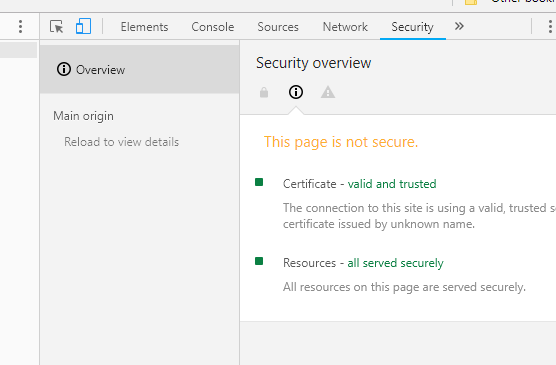

 maybe my authentication is being kept but has expired?
