The laptop I am trying to boot into Linux on is a Toshiba Satellite L755-S5246. I have tried booting from a USB on this device with ZorinOS and Manjaro, but when the PC tries to boot I get a black command-line looking screen that has some figures and the word "syslinux" sorry I don't remember what it said exactly. But when I use the same USB on my desktop it boots fine? Any ideas as to whats wrong here?
Does the laptop have Windows 8 on it? I'm guessing that it does. What you have to do is enter the UEFI bootloader by pressing F2, disable secure boot, disable UEFI mode and run it in CSM or Legacy mode. It should boot up just fine then.
There is no OS on it, however it had Win7 installed before.

Alright, looks like we have the same BIOS actually.
Ok, you need to go into Advanced, and click on System configuration. Click on Boot Mode and select CSM mode. You will also need to go into Security and disable Secure Boot. Press F10 to save and exit. Immediately after you save and exit start pressing F12. Make sure you have the USB plugged in before you do that. Select USB and it should boot up into Zorin.
Never mind, we actually have a different BIOS. Fuck. I don't have any of those options.
Can you post a picture of your BIOS? There are a few different revisions of the InsydeH20 UEFI.
It's revision 3.5
Ok, This picture should help. Everything should be under system configuration. Disable UEFI and choose Legacy mode.
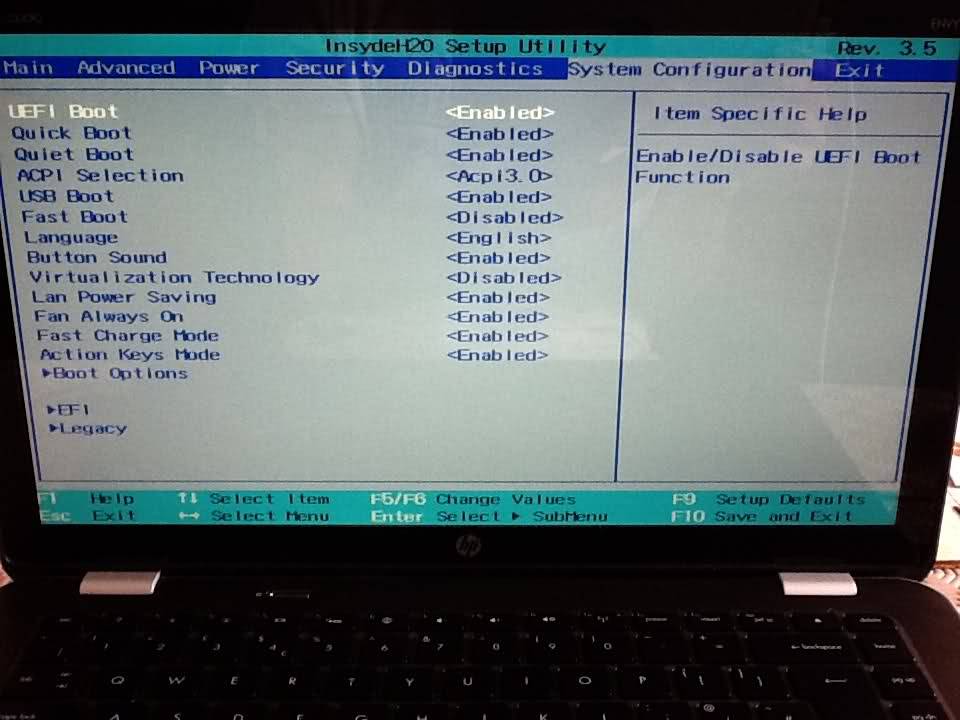
Odd, my BIOS says its the same version but mine is nerfed, I have none of those options. I don't even have system config tab, mine is a menu under advanced at it only has a few options.
Is there anyway you can take a few pictures of your bios?
Yeah, but I might be delayed a little while. I have like 3 different projects going on right now lol.
I'm not doing anything today. Take your time.
This issue still stands. It also will not boot from the optical drive.
I can't even load DBAN from a USB or disc.
Hmm, after using a different version of Zorin (6) and a different USB stick the problem seems to have resolved itself. Installing ZorinOS now :D
The problem was that you forgot to load a bootloader onto the USB. It must have glitched somewhere. Glad it worked. Have fun.
Glad you got it worked out. Hope you enjoy Zorin.
Well it's for my family computer. I was concerned because it had Windozeee on it and my parents use it for banking and shopping, and my brothers always go on bullshit websites and download spyware. So I just wanted something that's faster and more secure for them to use. So far it's a lot quicker than Win7.