Setting up an Intel NUC as my home router with OPNsense

Hello everyone, I made a bit of a mistake with a purchase I made for a new router, and I’m trying to figure out what my options are.

I’ve been using an Asus wifi router for my home router for a very long time. The router is no longer supported by Asus - I can still get updates for it via the asuswrt-merlin project, but I had been thinking about setting up an OPNsense router for a long time, so I finally decided to go for it and not have to rely on the free time of the people behind the Merlin project.

I found an Intel NUC that’s only a few generations old for a reasonable price, so I purchased it with the intent of putting OPNsense on it and using the Asus roter as a simple Wifi access point.

However, I was not thinking when I purchased the NUC, and I got one with a single ethernet port. I assume this is a problem because I won’t have a straightforward way to get an ethernet cable from the NUC to the Asus router - my chain of devices would be fiber modem → Intel NUC → Asus wifi router, but that won’t work with just the one port.

I’ve been doing some research today, and here are the options I have that I’m aware of:

1: USB to ethernet adapter. Some people say they’re flaky on FreeBSD and shouldn’t be used, and some claim they’re fine. I found a random post on the OPNsense forums that lists some very specific chipsets that should theoretically work. If this works, it seems like the most straightforward way to go, but I don’t know if it’s the best.

2: The NUC has a free M.2 slot, so in theory I could get an M.2 to PCIe adapter that sits outside the NUC, and then a PCIe network card to get me another ethernet port or two. I’m not particularly concerned about the appearance, but I am a bit concerned about putting the bottom of the case back on when there’s a cable running to the exterior of the case. This seems like the most surefire way to make the whole thing work.

3: If people think this is a viable idea, this is the one I need the most help with: putting a managed switch between the fiber modem and the NUC. I have read that putting a managed switch between the modem and NUC can work if you set up VLANs, but I only know what VLANs are in theory, and I don’t understand what this would look like in practice. The whole point of this is to use OPNsense as the router/firewall, but it seems to me like the managed switch would be handling traffic in this case, because I’d have a cable running from the fiber modem to the switch, and then three additional cables connected to the switch - one going to the NUC, one going to my desktop PC, and one going to the Asus router. I fully admit that I don’t understand how packets move across a network, but it seems to me that the traffic going to the Asus router and the PC would be managed by the switch and not by the NUC.

4: Get a different NUC. It isn’t as though I’m not willing to do this, because there are some NUCs that have two ethernet ports, but I don’t want to do this unless it’s really the only way.

5: Use a different OS for the router that has more driver support for USB to ethernet adapters. I have a USB-C to ethernet adapter that OPNsense won’t recognize, which I why I’m here writing this post rather than trying to configure OPNsense.

I sincerely thank anyone who’s willing to take some time to provide some tips and information. This is my first ever post here. I’ve watched a few Level1 videos about this and other topics, which I why I thought maybe the people here would have some ideas.
2 Likes

I’ll have a go at explaining it.

With a managed switch you can essentially split a physical switch with for example 8 ports into a 2 port switch and two 3 port switches by dedicating which physical ports belongs to which vlan. By default all ports on a managed switch is in vlan 1 meaning all 8 ports are connected to each other until you start changing things.

When the switch receives a packet or when the switch transmits a packet it can do so untagged or tagged. Tagged means that it has added a vlan tag to the packet so the receiver knows which vlan it belongs to. Untagged means that it’s a regular ethernet frame without a vlan tag added on. Default all your equipment runs untagged.

Lets say you get an 8 port managed switch.

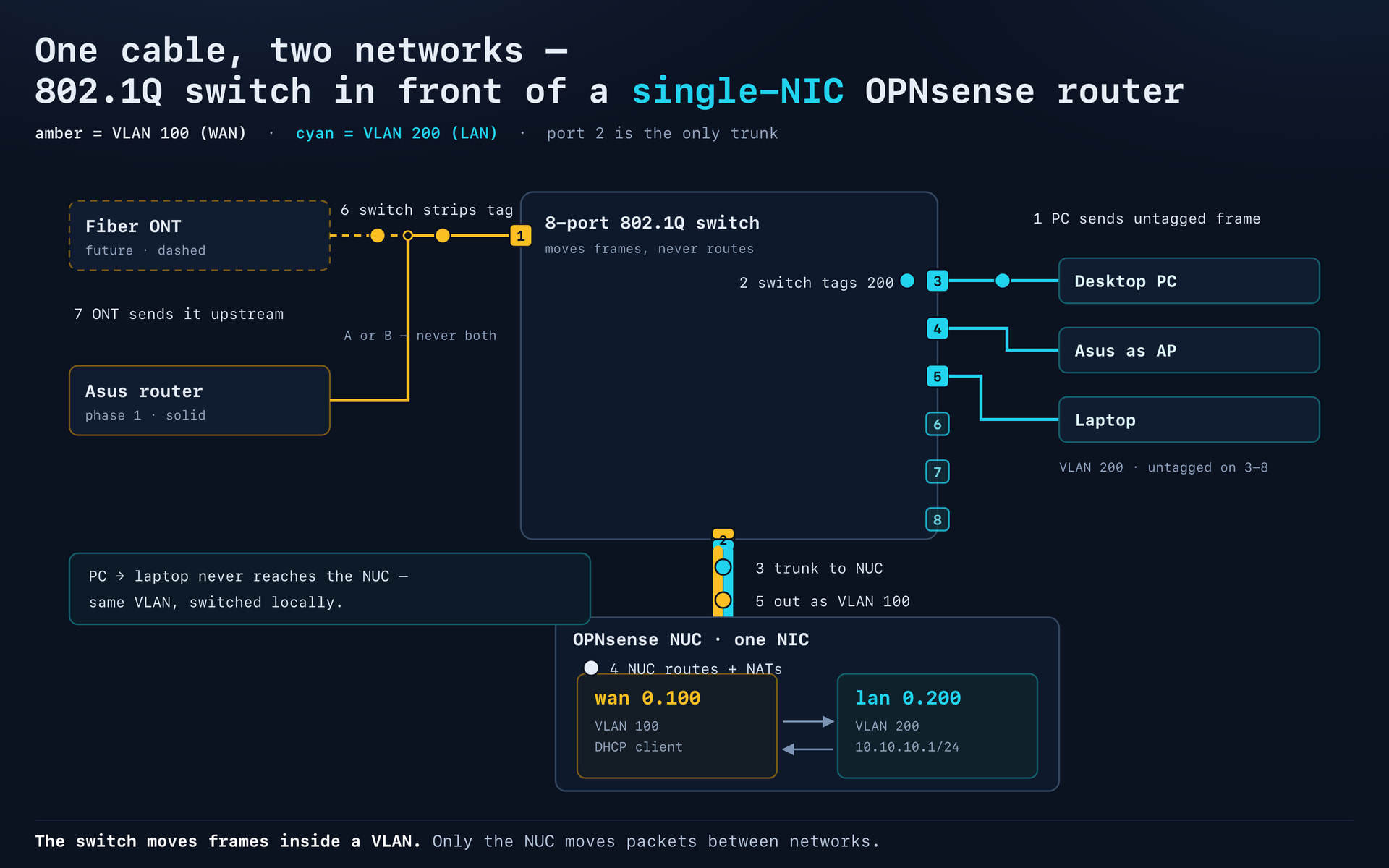
You connect the gear this way: Fiber modem to WAN on your asus. A LAN port on the asus to port 1 on your new managed switch. Port 2 on the new managed switch to the NUC.

You then set up the switch so port 1 is dedicated to vlan 100 untagged. Port 1 will be your future WAN port.

You then set up ports 3-8 to vlan 200 untagged. Those will be your future LAN ports.

Port 2 you set up to use tagged packets and allow it to listen to both vlan 100 and vlan 200. You connect your NUC to port 2.

So port 1 is vlan 100 untagged, port 3,4,5,6,7 and 8 is vlan 200 untagged and port 2 is tagged and allowing both vlan 100 and vlan 200.

Now you install OPNSense on the nuc. When the installation gets to setting up the network card it askes you if you want to set up vlans. You define that your WAN port is the ethernet port tagged with vlan 100. Have it ask for a dhcp address, usually done by not telling it which ip address to use. It means that your nucs WAN port will ask your asus router for an ip address.

Next you tell OPNSense that you want your LAN port to be the ethernet port tagged with vlan 200. Give it the ip address of 10.10.10.1/24 meaning that from now on all your internal equipment will get 10.10.10.x addresses. Ask OPN to act as a dhcp server on the LAN interface and tell it to hand out 10.10.10.100 to 10.10.10.199 addresses.

Now if you connect your laptop to port 3 on the switch you should get a 10.10.10.x ip address and be able to reach the internet by first going through the OPN router, then through the Asus router and then to the fiber modem.

Your laptop will send an untagged packet to port 3 on the switch. The switch will tag the packet with vlan 200 and send it to OPN. OPN will recognize the vlan 200 tag and say “Oh, that’s a LAN packet”. Then OPN will tag the packet with vlan 100 and send it back to the switch. The switch will say “Vlan 100, that goes out through port 1” remove the vlan tag and send it untagged to the Asus router. The Asus router will then move it from a LAN port to it’s WAN port and pass it on to the fiber modem and the internet.

Once all that is working perfectly, you disconnect the Asus roputer from port 1 on the switch and connect port 1 on the switch directly to the fiber modem. In OPN you ask the WAN interface to refresh it’s ip address and you should get an ip address from your ISP rather than from your Asus router.

Test with your laptop that the internet is still available, your laptop should still get a 10.10.10.x address.

Once that is working you disable everything except the wifi on you Asus router and connect a LAN port on the Asus router to port 4 on the switch, making it act as a wifi access point, but no longer a router.

Hope it makes sense and good luck.

Forgot to add, tagged is often referred to as 802.1Q, so look for a managed switch with 802.1Q capabilities.

Oh, and mark the ports on the switch so you don’t mess it up a year from now when you’ve forgotten which port does what.

2 Likes

My two cents.

Totally doable, ISP-side PPPoE / WAN VLAN tag / MAC binding is your biggest enemy coming from the fiber capture to your nuc either usb, cat, whatever. You can do the gentlemen, above’s suggestions in conjunction with your own intuition. This has just consistently been a problem with my own home servers. Consider a vps tunnel to get more control of the data coming into your home. If you need more info on that if its a problem lmk, otherwise have at it and document what you do brother.

attaching image for a visual of the discussed topologies, gen AI Deepseek v4.1 flash 1027

2 Likes

A m.2 pci-card slot adapter will also require power which you might find difficult to get to it.

There are however m.2 network ‘cards’, but yes you’d still have to find a way to get the cable and port outside your nuc chassis. If you’re not extremely precious, that could involve a drill. Check your slot key-type (and the spec, that it’s not sata only) before buying anything.

I’d recommend against USB adapters on infrastructure. While possibly some may exist that work reliably enough, there’s no reason for anyone to make them because they’ll all be buried under the cheapest price on amazon.

Similarly, any realtek card is not worth it on freebsd.

if you want to play with vlans it could be made to work with one port but I think that drastically complicates matters, and even if they’re not costly the managed switch may not be free either, and it also becomes part of your infrastructure.

lenovo m900 tiny has 2 m.2 slots usable on top surface of board for m.2 net cards (with very careful reading of spec). there might be locally easy/cheap.

but if you only need one more port, you can probably do it with the nuc.

1 Like

A good rule of thumb, but I’ve had an OptiPlex 390 with a Realtek 1G onboard port run TrueNAS CORE with no issues for years.

1 Like

I have a USB Ethernet dongle hanging off a pi permanently, and it really is good enough for day-to-day use.
I don’t know if I lucked out, or if Pi has better compatibility running Debian or something :person_shrugging:
It is an older dongle, and iirc USB2 so it does not give full gigabit, but it’s good enough for an access point and firewall for a lightly used spare computer

2 Likes

While I doubt you have anything else than a Broadcom based Asus router can you possibly list what model you already own?

That goes for the NUC too, please list exact model and it’ll be much easier to give advice rather than doing guesswork.

What’s also of importance is your connection speed as you can potentially workaround the fact that you only have one ethernet port.

1 Like

Thank you for the replies everyone. Some of this stuff is starting to make more sense.

I did try the M.2 adapter for a day or so, but I couldn’t get the thing to be recognized. I don’t know if I purchased the wrong one, or if it’s like exovert said and it didn’t have sufficient power, or I just didn’t try hard enough to get it to work. I didn’t want to spend too much time on that because, with all the exploits people/bots are finding out there, I didn’t want to keep running an unsupported Asus router any longer.

After posting this, I started looking around online for one of the NUCs that has two ethernet ports, and I came across a computer/phone repair shop not too far from me that has a bunch of old-ish Dell/HP PCs for cheap, and I figured it’d be easier to get one of those and put a PCIe network card in it than to deal with the NUC, and I was right. I got OPNsense installed on it and it’s now serving as my router, and I have a separate wifi access point.

I was initially hesitant to use a full tower as my router because I thought it’d use too much electricity, but this thing only uses 21-ish watts at idle, and somewhere around 35 when downloading a multi GB file. Not as low a draw as the Asus was, but it’s something I can live with.

I’m thinking I’ll keep the NUC and turn it into a modern Steam Link or something? It’ll give me an excuse to figure out how to use Moonlight/Sunlight/Apollo/whatever.

Thanks again!

2 Likes