[Please Help/Newbie] Crashes after upgrade to 128GB 3600Mhz on X570S/5900X

Hello, I am new here. Please forgive me if I posted in the wrong place.

Let me preface this by stating I have no experience with overclocking or fine-tuning hardware in BIOS. All firmware and drivers are latest.

I needed the upgrade for project work on the workstation/server. I generally run safe/stock settings for reliability, stability and longevity, as well as running cost.

Dual Boot System: Debian / Windows11
MB: Gigabyte X570S AERO G [Firmware F5h]
CPU: AMD Ryzen 9 5900X [No-OC.] (Cooling: NZXT Kraken Z73)
GPU: NVIDIA RTX 2080 Ti Founders Edition [No-OC.] (Cooling: Stock)
SSD: Samsung SSD 950 PR 500G / Samsung SSD 970 EV 1TB

Previous set: 32GB [4x8GB] (CMK16GX4M2B3200C16) 3200MHz XMP.

New set: 128GB [4x32GB] (CMK128GX4M4D3600C18) 3600Mhz XMP. *see bottom

After installing the memory and booting into BIOS, it detected the new memory and set XMP automatically (to my surprise). I booted into my Windows and went to open a web browser and got a blue screen. Rebooted. Retry. Crash again.

At this point, I was very concerned as I never had any issues with my previous memory kit.

I ran a Windows Memory Diagnostic, which took ages, but no issues were found.

I used TestMem5 and got errors. AIDA64 straight-up crashed the system during the benchmark.

I tried disabling XMP entirely and used default clocks/settings. Still got errors in TestMem5.

I found a thread on the Overclockers forum and used someone else’s memory config on timings etc, for the same kit. They are running theirs at 3800 though.

It’s a bit more stable than before but I still get errors in TestMem5, still get application & BSOD crashes. My Linux OS (Debian) also has some signs of instability with UI oddities and reloads due to graphics reset.

I could use some help, please, as I just want to get on with my work and not have to mess around too much (on my own) with things I do not understand - and end up damaging my system.

Someone suggested to me that it could be my IMC, and could use a bit more voltage. But at this stage, I want to be very careful and seek some expert guidance.

I couldn’t find any discord groups for this sort of thing so I went to Reddit, and L1. Should I also post this in the overclockers subreddit?

Thank you ever so kindly for any help !!
Is it stable at non OC speed? (What ever 4 channels says in the manual for your mobo) (Just wondering not a solution for you)

I didn’t observe any crashes during non-OC (default) speed. But I did get errors in TestMem5. I didn’t stay long in non-OC. I am wondering if I could or should return them and get a 3200Mhz kit, but part of my mind is saying that won’t make much difference, since you can downclock to 3200Mhz without harm.

It seems to me that data and information surrounding 128gb running is quite sparse online, as most people tend to run below a 32GB cap. Probably looking for Hz over max capacity. I needed capacity, not necessarily speed.

I am starting to also wonder if 128GB is just stressing out the memory controller, as I am taking things to their supported limits, and higher clocks and timing are VERY hard to tune on higher capacities… I had no idea the memory segment was this complicated.

This is what my X570 Creator board has listed for memory

That’s the official AMD specs for Zen3. That is guaranteed to work, but overclocks beyond these numbers are normal. 128GB is a different matter and my server doesn’t like anything above 2667 MT/S. But I heard of people running with 3200MT/s but that’s some effort and/or luck. I doubt 3600 is possible without both.

2 Likes

What I am failing to understand is that the board has four slots, and yet says “dual channel memory architecture”. When I went looking for whether or not “quad-channel” memory would work in a dual-channel board, I found:

When you see a four-DIMM set of DRAM advertised as quad-channel, that’s marketing at work. You can easily take that same set and run one DIMM in single-channel mode, two DIMMs in dual-channel mode, three in tri-channel mode or all four in either quad- or dual-channel mode.

Each stick of DRAM is an individual 64-bit device and runs as such. On a dual-channel motherboard, with two or four modules in the proper slots, the MC (memory controller) sees all the DRAM as a single 128-bit device. If three are in an LGA 1366-based motherboard or configured as tri-channel in an LGA 2011 motherboard, then the MC sees all the DRAM as a 192-bit device. Four DIMMs set up in the proper slots of an LGA 2011 motherboard for quad-channel mode are seen as a 256-bit device, rather than four 64-bit devices.

The box for the memory says “quad channel” and I guess because it is a set of four DIMMs. My board has four slots. I was previously occupying all four slots when I ran 32GB and never had any issues for years.

Further, MB spec shows that it can support up to DDR4-5400 OC. I have a 3600 kit and am not bothered what it runs at so long as it doesn’t impact my work or cause instability.

Is it recommended to run this high a capacity at lower speeds, I wonder?

I just saw L1 doing some TR stuff with 128 on youtube… ( in my search for a solution and guidance on what to do).

The keywords are 1DPC and 2DPC (DIMM per channel). Technically there are only two channels, but you can run two DIMMs on a single channel to increase capacity. But you always end up with less performance that way and should be avoided if performance is more important than capacity.

2DPC is strictly a capacity-focused option. Avoid it unless you really need it.

4-channel or 8-channel is the privilege of workstation/server platforms. They can run 4-8 DIMMs at full speed and also often have 2DPC option for max capacity. There are EPYC boards with 24 slots per CPU, 12+12 so to say. But even with RDIMMs, they drop in clock speed with 2DPC.

2 Likes

I’m looking through the QVL of my board now to see what I can find there that would be more suited, if any. I should have done this from the beginning I think. I had just looked at the MB/CPU spec page then went shopping.

I’d also like to say that I have been using my system, in Debian, all day (~11hrs) on the settings in the ZenTimings image and only observed some UI/rendering glitches, no crashes.

The only crash I saw today was in W11 very early this morning; I had started up BDO and just left my character standing idle whilst I made coffee. When I went back to the computer BDO crashed to the desktop.

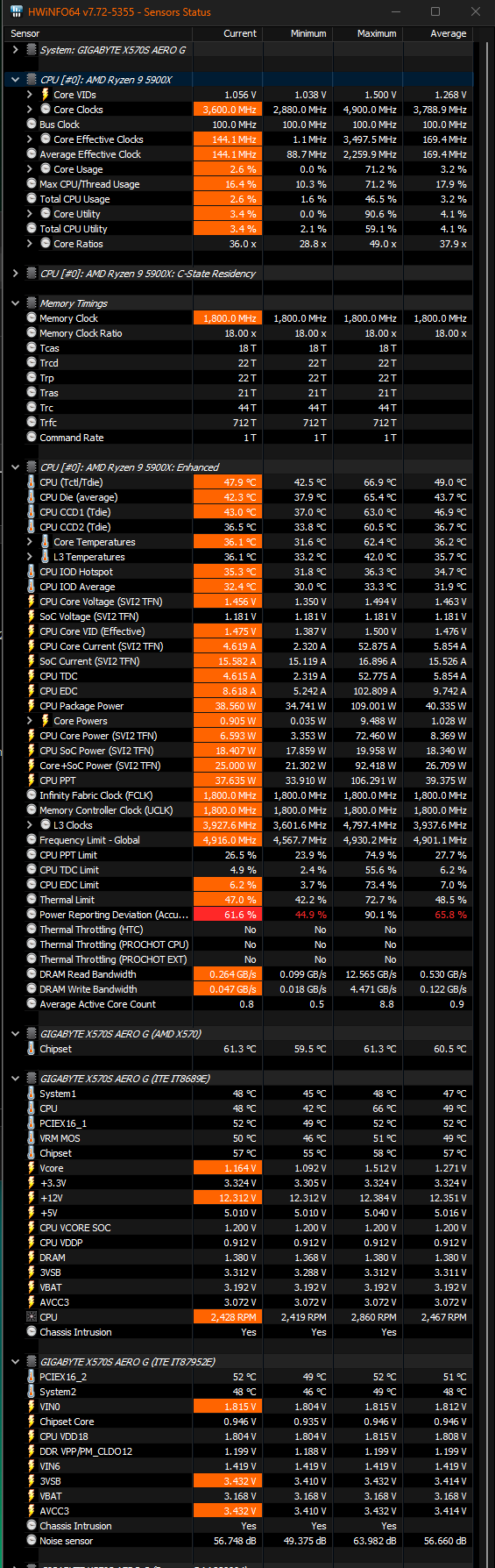
Having a look at things in W11. I noticed this in HWinfo…

I’d make sure you bump the voltage… I experienced crashes on an ASUS board with mostly stock settings when attempting to go from 64GB to 128GB ECC … it was only once I manually set the voltage on the memory slightly above spec (1.2V spec … set it to 1.25V)

I started with the lowest clocks… and just kept slowly bumping up until I hit the spec on the package… 3200 Mhz

if this doesn’t work I’d probably yes… look at getting sticks off the QVL like I did.

1 Like

Bump the voltage on the memory itself? or the IMC? Sorry, a bit confused. Is that VDIMM or VSOC/SVI2?

Here is main screen from my BIOS area. I didn’t touch any voltage settings.

But some people are advising that I adjust some things like:

  • To enable Gear Down Mode also, which I did this morning but have not noticed much. I am not really stress testing or benchmarking either, just as an FYI. Just using system normally/casually.

  • Suggested to try VDDP to 0.950 and AddrCmdDrvStr to 24ohm.

    • I don’t know what VDDP is in my BIOS.
    • All the AddrCmd stuff is set to auto in the timings section.
  • Apparently my VSOC is too high? Assuming that is VCORE SOC in my BIOS, its on auto.

    • ZenTimings: 1.181v
    • HWInfo CPU: 1.181v
    • HWInfo MB: 1.2v
  • Suggested to increase VDIMM voltage to 1.4v. Is this safe?

    • ZenTimings: 1.35v
    • HWinfo MB: 1.38v

All this readings are in idle, more or less, just web browsing and trying to figure out this situation.

I am @caminashell on discord also if anyone is able to sit with me to help. I have no idea what I am doing when it comes to this stuff, and quite nervous. Am happy to jump into the L1 VC room if thats an option.

Thank you for providing your experience, I found this rather interesting and educational. I am trying to figure out now what I should try… I have only enabled GDM for the moment.

I am actually starting to wonder if I should replace this set for CMK128GX4M4C3200C16 or not, which is listed on the QVL. Would I encounter similar issues simply due to the total capacity I am installing?

l7nbwhn8b1pa1
Try changing the dram voltage to 1.35
And setting soc to manual 1.2v
If that doesn’t improve set it to 3400mhz and then 3200mhz if still not stable

2 Likes

SOC 1.2v ok
DRAM 1.35v ok
VDDP 0.950 (currently 0.9002) dnd
AddCmdDrvStr 24ohm ok

So far so good. I also reduced to 3200 since I have been hearing that a lot from various people.

I didn’t touch VDDP because in my BIOS it’s a strange setting I have to type mV manually. When I typed 950 it went red so I left it.

Gave me some warning about not going above dram voltage. This is scary to me.

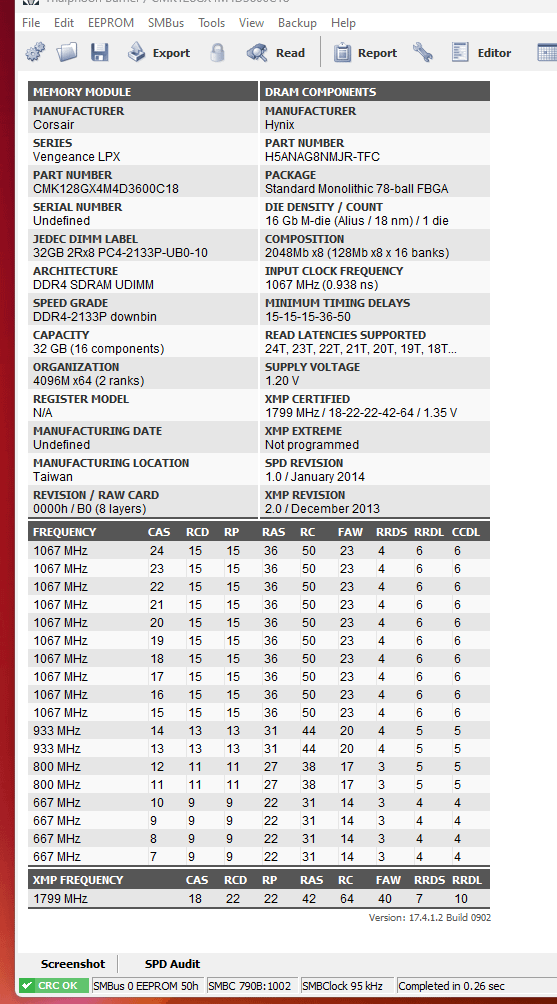
Also taiphoon says it’s apparently Mdie. I’ve read that’s the worst of the bunch??? :thinking:

All ddr4 can handle 1.35v
There are some that require 1.45 out of the box but we’ll stick with 1.35

1 Like

Thank you for explaining. Gosh this so overwhelming, as a newbie to this.

I made the adjustments and ran TestMem5 extreme for an hour with not a single error. Thank you, everyone for helping!

3 Likes