PiHole Allow (ZTN) - Need Submissions!

I have a database of easily over 14 Million unique domains/subdomains. I have come to realize after collecting family & friends privoxy logs that people barely visit >4000 unique domains in years. So that makes it much easier because

YOU CAN’T BLOCK WHAT YOU DON’T KNOW

I have a massive and somewhat vetted list of allowed sites. Its not… complete enough to be usable by the general public. Its getting close. How can I collect visited legitimate domains from more than ~12 people?

Any volunteers willing to hand over log files?

Kinda weird ? Me alone > 6000 in 45 days.

I’m filtering out some (like Microsoft) showing folders. My family and friends aren’t as active on the internet as most people. That >4000 was from my inlaws I filtered today.

I spoke too fast. Upon closer look, 6078 unique domain names in 301 days.

So perhaps yours look reasonable.

dns-allow.zip (67.0 MB)

Dump from my database in January.

To clarify a bit, I never used PiHole. I’m using a bespoke system.

Oh and the privoxy total

Allowed: 3325

Blocked: 141 (should have been higher)

Total: 3466

I was thinking of doing a python script because my lists would be getting a little big for pihole.

Talking about blocked domains, for me only 396 triggered. LOL

So to summarise in 301 days:
6078 allowed domains
396 blocked domains

On my bespoke system, the block ratio is tiny. So not effective use of resources.

Based on my allow list, the lowest percentage blocked was 10.2% (no one home), and the highest 99.6% today. So far its been very effective but I need more people.

Can I have your log file? Blocked and allowed.

Sorry, no for the obvious privacy reason. I don’t have time to sanitise the lists.

I appreciate you mentioning that. I did wonder if there would be that concern.

Ill create a filtration script:

Delete all lines with “Info: “, and all IPs (v4,v6)

Delete all after

  • :[0-9]{1,5}
  • ?,/,#

Delete before @

Replace

  • Https?://
  • All dates and prefixs

Sort out blocked URLs.

Sort, then unique.

Am I missing anything? I do realize that this doesn’t sanitize enough because of the information I’m asking for. The more people I get, the more inclusive the filter. Is this a excercise in futility?

14 million… I have a little over 3.6 million…

Having an excessive number of lists and domains doesn’t actually increase security. How many of these lists are outdated. How many contain a huge number of old domains that no longer exist, or obscure regional ones domains so unlikely to be encountered that the odds of hitting one are lower than winning the lottery.

You’re essentially trying to “sanitize” the internet. That kind of undertaking is a burden even for a large corporation, let alone in a SOHO environment.
How will you know if a domain queried by a user is actually “clean” today… And what about a year from now.

In my view, building a whitelist is generally a waste of time unless you have total control within a company and can enforce strict mandates on employees. It simply doesn’t work when it comes to family or friends.

Base your filtering policy on quality rather than quantity. Use lists with a solid reputation and keep them updated frequently. Anything beyond that is, imho, a waste of time.

PS

It all depends on the logging settings…

The “Total Queries” figure does not reflect the total number of unique domains rather, it represents the total number of requests processed by the server.
For example, if 5 users each query the server for the same domain three times over the course of a day, the “Total Queries” count will be 15. This number increases every time the server receives a request for that domain.

In theory, it is possible to reach a “Total Queries” count of 1,000 using just a single domain and a single client, it is simply a matter of time.

At least, that is how Pi-hole used to work unless, of course, something has changed.

PS2

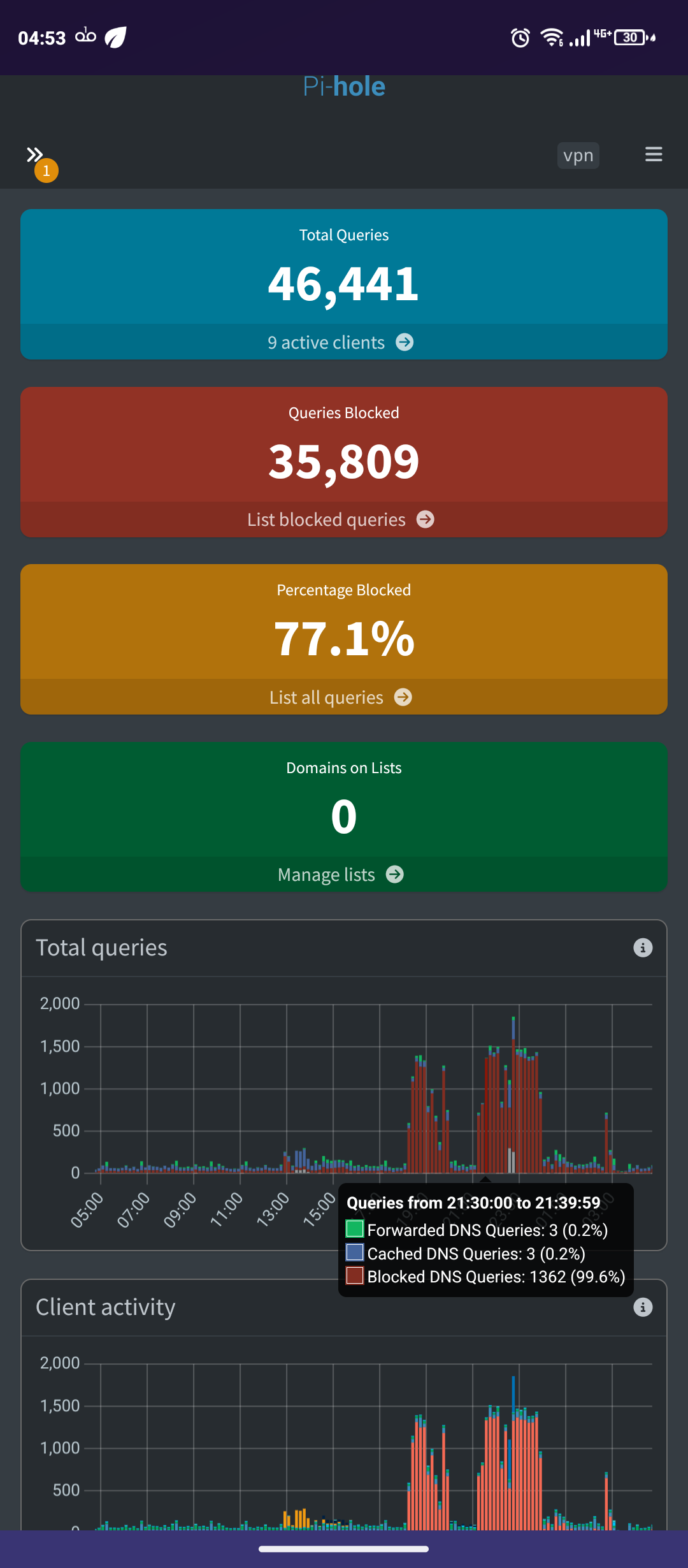
Your screenshot shows that you have 0 domains on your blocklists…

Furthermore, you have 1,362 blocked queries in the span of 9 minutes and 59 seconds? On a home network? With around 9 users/devices… that’s absurd! Something on your network is flooding your connections with junk traffic. You should focus on identifying what’s infected on your network, rather than obsessing over that figure of 14 million.
1 Like

I think you missed some key words. My lists are unique as I have organized them the best that I can. I will get the stats on my DB soon. Sanatize the internet NO, as I’m not curating what people should see. Allow lists are far easier then block lists.

Since people only visit ~6000 unique domains, that very much is easy to manage. My question was on people sharing “cleaned” log files for the project.

Now I haven’t mentioned is I have also scripted a few auditing procedures to keep the list current. If the root domain is older than 6 months its removed from the list and its subdomains.

If I had a handful of verified groups sharing their logs, it would go a VERY long way.

FYI

Those requests are usually from 1 android phone, and some stupid devices like Vision TV, apple TV, Microsoft updates. They are relentless.

Another thing is, even if its not organised. Most of the tech base aren’t clicking on spam mail or malicious locations. That list alone would save people from phishing, malware. Sadly my father likes conspiracies and my mother is almost Baptist. While I would like to filter these, it wouldn’t be right.

Fair enough, if that works for you.

6,000 domains for a home setup is still quite a lot, though.

So, do you block every domain that isn’t on your whitelist? If so, how often does it happen that your parents try to access a site, but it doesn’t work because you haven’t added it to the whitelist yet?
How do you distinguish between requests for domains that should be whitelisted and those that should be blocked? How do you verify whether a domain is “okay” and how often do you do this?

That is the crux of the problem.

Block list (allow everything) or Allow list (block everything).

I’ve gone crazy trying to block things and even added domains from spam emails… but it’s never ending. Knowing that people visit very few websites, and rarely do domains change. It’s been easier and more effective for blocking trackers, malware, pups, ads, and spam.

For my house, once I got a “baseline” of domains. It’s easy to unblock adhoc on pihole and bulk add them later. Some you will have to add wildcards because of all the virtual server sub domains (eg YouTube) . I do try ONLY selecting what’s needed to work, I’m very cocncervative like that. Once the streaming service is working, you rarely have to unblock again.

That’s when I got the idea of combining allow lists because it would help with the most known services and with enough ongoing submissions. MUCH easier to manange than blocking that I have seen.

This is why allow lists don’t really exist, there is a bit more forethought then just filtering “ad”, “track”, “metric”,”stat” blocking. Logging and sharing your visited domains is a privacy concern too….

Its not perfect, but its more effective than block lists. Especially for vulnerable people.

Another alternative is to turn your own instance of block list (say 200k entries) into a SmartDNS.

And then open your SmartDNS on DNS over TLS to the Internet with a self-signed CA and server certificate.

This setup can serve a few families and friends. They don’t have to maintain and run an Adblock systems such as PiHole.

And ad free for yourself anywhere you go.