Yeah PCIe cables are very expensive compared to all the cabling we’ve previously had.
Understood, thank you!
Is this NiC any good “Intel Ethernet Controller E810-CAM2”?
The 80mm fans arrived, but without a connector, just open wires, I also need a wire extension, the wires are too short.
Any recommendations, please?
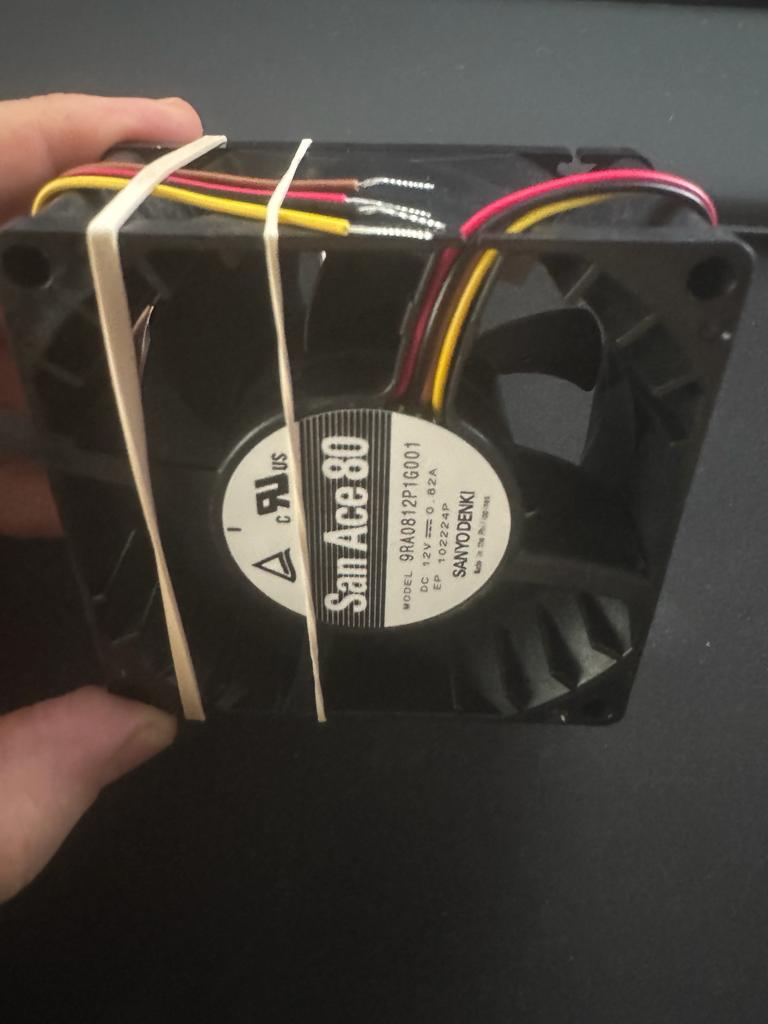
I’d get something like this to cannibalize and attach the bare wire ends to:
Solder and shrink tubing is probably the most normal way to attach, but if you’re rusty with soldering skills, these actually work pretty well (especially if wire is pre-tinned):
I discovered some cable extensions amidst the boxes and successfully connected and taped them together (though not without incident—I ended up injuring my finger due to the hazardous nature of the fans, while testing).
In a recent conversation with a friend, I learned that Rhel has withdrawn from its open-source software (OSS) activities. Consequently, I find myself unable to continue using Rhel for our project, as it would go against our moral considerations. I am now in search of an alternative operating system that can serve as a suitable replacement, providing equivalent software support and full compatibility. The chosen alternative must be a reliable derivative to avoid any complications with the ASIC tools.
Recommendations on alternative operating systems meeting these criteria would be greatly appreciated.
Thank you all.
Hello,
$8,000 later…
Here is a small update: I have been waiting for the cooler for almost 2 months, along with the OS SSD and GPU. Hopefully, everything works well. If it does, I will order the remaining parts.
@twin_savage, all the parts you recommended are very nice. The fans from SAN ACE are on another level compared to Delta, and the PPS material is great—I love it.

2 Likes
Hello,
Firstly, I’ve noticed that the Delta Fans fall short in performance when compared to the San Ace. Could you kindly recommend the larger model, 120x38, the bigger brother, of the one you suggested previously?
I’m encountering issues with the IPMI, as it seems to be malfunctioning for reasons unknown. Despite this, the CPU is functioning exceptionally well. I ran some tests, even with the notorious Windows, and it performed better than I anticipated.
The BMC led on the motherboard is flashing green, its status in BIOS is “working”, but the Activity LED of the LAN port is RED, any idea?
For the OS, I’ve decided to go with Rocky Linux 9.3. However, I need to replace the Deltas. They are much louder than expected, constantly running at 100% RPM. Moreover, the BIOS is lacking the Health/Thermal control option in the Advanced tab, the IPMI also not working, the fan speeds are default. Interestingly, the motherboard has a default setup that slows down the San Ace fans and the CPU fan to a relatively quiet level. Strangely, the Delta fans do not slow down at all. I am in need of another set of 120x38 PWM fans under 1 A and less than 3000 RPM (the lower the better and the least noisier the better).
I tested Noctua fans, and while the airflow is reasonable at 100% RPM, it seems to be on par with the air moved by the San Ace at its lowest possible speed. In fact, even at the lowest speed, the San Ace proved to be more powerful. It’s worth noting that the Noctua at 100% is noisier than a San Ace at approximately 33%.
Thank you!
9RA1212P1K001 is probably the one you’d want. At max speed (4700rpm) the 120x38mm San Ace is going to be louder than the Delta, but it should be able to throttle down and be fairly quiet at lower speeds.
Unfortunately this is the only 120mm “RA” (the good series of San Ace fans) that has PWM control; there are others that have slower speed but are not PWM controlled.
Try using the IPMIView program (available on Supermicro’s site) to access the motherboard’s IPMI, using it rules out webbrowser problems you might possibly be having.
I’ve got a 13th gen supermicro board and I’m pretty sure the only place I could change the fan profiles was in the IPMI itself instead of the BIOS. Here’s where the setting is in IPMI:

Hello,
Thank you very much; everything worked!
Regarding the fans, are there any options with lower RPM (<3000)?
I added the GPU, but there’s no video output. The VGA still works, and I also set the VGA priority to External in the BIOS, but still, there’s nothing. Is there any solution to this issue? (GPU is in slot 3 - Legacy Enabled)
The video is working, CMOS clear fixed it.
I just ran some tests and checked HwInfo, I can’t manage to understand why is the sensors showing 98 C.
Could this be an offset issue?

hmm… I think the best lower noise 120mm fan on the market right now is the Phanteks T30; it is a 120x30mm fan though as opposed to 120x38mm.
If I remember right the tCTL on AMD processors is the Die temperature plus an offset AMD added to help the system fans ramp up faster. So it isn’t an actual temperature, but a 43C offset seems really aggressive on AMDs part, perhaps its because this is an “F” CPU.
I’ll try the T30 fans.
Regarding the offset, it is very strange. It’s highly unlikely for all core temperatures to be below 50 while the Die temperature is at 90.
Now, I have a new problem. Randomly, after entering the virus (I am waiting for the boot SSD, and I installed the virus on some SATA SSD), the fans go from 30% to 100%. It stays at 30% for a few seconds, then moves to 100% for a few seconds while idling, and it keeps cycling like this without stopping.
The IPMI LAN port is still not working.
Any advice, please?
Also, would it be possible to have Fan control per Fan?
This is an experience that I wish to never repeat…
AMD programmed in the offset, basically spoofing the sensor to encourage the system to cool itself more aggressively from my understanding of Tctl.
In the BIOS/UEFI, there should be an option for the LAN setup of IPMI, what does it look like?
By default supermicro usually ships motherboards with the dedicated IPMI Lan port active and with DHCP turned on.
I don’t think so, or atleast there doesn’t seem to be an easy way to do it. I’ve got a H13SAE supermicro motherboard and I’m considering getting a 3rd party fan controller because I’m in the same situation.
Thank you!
I will be checking the IPMI in the following days. Currently, I am focused on getting everything running - stable.
I’ve replaced the Delta with 2x T30, significantly less airflow, but a much quieter operation.
However, I am a bit concerned at the moment. I am in the process of moving 3 TB of data from a slow NAS at only 10G speed, taking approximately 5 hours for the project files to move, during the operation the sensors are reporting some temperatures that are quite disturbing. Can you confirm if these numbers are accurate, particularly the 93°C? (I believe these temps are from the on-board 10 GbE NiC)
-
bnxt_en-pci-c300 Adapter: PCI adapter
- temp1: +93.0°C
-
nvme-pci-4200 Adapter: PCI adapter
- Composite: +42.9°C (low = -5.2°C, high = +83.8°C)
- (crit = +87.8°C)
-
bnxt_en-pci-c301 Adapter: PCI adapter
- temp1: +93.0°C
-
k10temp-pci-00c3 Adapter: PCI adapter
- Tctl: +54.8°C
- Tccd1: +52.1°C
- Tccd2: +49.5°C
- Tccd3: +50.0°C
- Tccd4: +52.6°C
- Tccd5: +50.1°C
- Tccd6: +50.6°C
- Tccd7: +51.5°C
- Tccd8: +51.8°C
There is a little switch on the back of the T30’s motor hub, make sure it’s in the “Advanced” position to get maximum performance.
That is too high of a temperature, I think that’s the integrated 10G network adapter’s heatsink that is right under your HBA card. Any way you can get more airflow to it?
The T30 is set to advanced, I think I need to set the FAN profile to Heavey IO (or whatever was the name of that ).
I have some small fans like 20x20 or so… but I don’t think these will make a difference, these are Noctua, I will give it a try, but it is getting way too hot, will try to put on one these above it, I got some fan stands.
I set the Fans to Heavy IO, but the temps are still high.
The temps are dropping only if I set the Fans to Full Speed, of of, this is quite a rodeo.
I will order an HHHL 10 G NiC tomorrow, it should deal better with the temps, I think it will take another 2-3 months until the 25 G will arrive, we can’t keep things like this until then…
Any suggestions on the cheapest 2x 10GbE - T NiC?
Not sure on the best dual port 10GbE -T NIC, I’ve always just got the Intel branded ones in the past and have been happy.
If you can’t get a fan pointed at the onboard NIC’s heatsink from inside the case, you could put the fan on the outside of the case:
Thank you!
That Fan… is not a solution… it looks like an ECO.
I removed the 10 GbE Card from the NAS and disabled the onboard NiC.
Now I have a problem either with the NAS or the switch, the LAN LED (NAS Cable) on the switch is Red but on the NAS is green.
Anyway, I need to find a way to check the temps of the dedicated NiC.
lol
there’s always the touch it and feel solution. 60C is the normal human threshold for pain (or atleast not being able to constantly touch something).