LG TV Block Mini-How-to

Thank you for the writeup. I got tripped up by a few things but it was pretty painless overall.

One thing I did run into when running the verify script is that the voiceAllowed and voiceAllowed2 options were reported back as being not false but after checking the option file I discovered that they are not in the file at all. If I’m reading the decline-tos script right, that seems like an ok scenario, so maybe there should be a failsafe for that in the verify script to count as passing if so.

I also had the same issue with the telemetry file not populating /etc/hosts/ as was reported above

2 Likes

3

You could also try doing this

2 Likes

I tried several times to do something similar with my Roku devices. I used my router to identify what sites the Roku and apps was sending or receiving information. I then, entered those urls into my router to block these specific web sites for a Roku device and looked to see what happened. The results were that apps stopped working on my Roku device. Some apps required Amazon, Google Analytics, doubleclick, and other trackers to even have the app on the Roku to function.

1 Like

Hey there, thank you for writing this article about the LG TVs. I’ve been following one of the guides you wrote and realized that I cannot find the “lg-lockout” folder anywhere linked in the article for step 3.1 in layer 3. Are we supposed to get that from somewhere else?

1 Like

Undisclosed AI use, with multiple mistakes in the post/scripts resulting from it.

1 Like

How did you determine AI use? More importantly, what mistakes did you find so the rest of us can avoid those blunders?

2 Likes

So looks like with my LG C2 (OLED65C2PUA) i got a different result post-reboot after running everything:

root@LGwebOSTV:/var/lib/webosbrew/lg-lockout# sh verify-lockout.sh

== 1. /etc/hosts block entries ==
[FAIL] hosts does NOT block snu.lge.com
[FAIL] hosts does NOT block nextlgsdp.com
[FAIL] hosts does NOT block info.lgsmartad.com
[FAIL] hosts does NOT block api.lgtviot.com
[FAIL] hosts does NOT block ngfts.lge.com
[PASS] hosts is a bind mount (persistent block active)

== 2. Telemetry / phone-home processes ==
[INFO] sdx is RUNNING (may be failing to reach LG now — check section 4)
[INFO] uploadd is RUNNING (may be failing to reach LG now — check section 4)
[INFO] rdxd is RUNNING (may be failing to reach LG now — check section 4)
[INFO] admanager is RUNNING (may be failing to reach LG now — check section 4)
[INFO] note: sdx/uploadd/rdxd may still run but fail to phone home — that is the goal.

== 3. Consent / ToS state ==
[FAIL] eula: networkAllowed is still true
[PASS] eula: acrAllowed=false (ACR consent declined)
[PASS] eula: voiceAllowed=false (voice consent declined)
[FAIL] option: voiceAllowed is not false
[FAIL] option: voice2Allowed is not false
[FAIL] option: usageCare is not false
[FAIL] option: dbgLogUpload is not false
[FAIL] option: watchedListCollection is not off
[FAIL] acr opt-out marker missing

== 4. Outbound connections to LG domains ==
[PASS] no established/close-wait connections to LG domains

== 5. DNS resolver ==
[INFO] resolver is the local connman proxy (127.0.0.1:53) — upstream blocking must be at the router

== 6. App-update gate ==
[PASS] updateInfo is empty (0 bytes)

Result: 5 passed, 12 failed
root@LGwebOSTV:/var/lib/webosbrew/lg-lockout#

I also had to do something similar if not exactly to what awsneed had to do to get my /etc/hosts to persist through a reboot. Claude had me update lines 137-138 of the 10-block-lg-telemetry to:

As for the consent / ToS stuff to get landed and running some output through Claude to get an idea what was going on I had to fire off these commands to get the Consent items to ‘Pass’ the verification check:

luna-send -n 1 -f luna://com.webos.settingsservice/setSystemSettings ‘{“category”:“eula”,“settings”:{“networkAllowed”:false}}’
luna-send -n 1 -f luna://com.webos.settingsservice/setSystemSettings ‘{“category”:“option”,“settings”:{“usageCare”:false,“dbgLogUpload”:false,“watchedListCollection”:“off”}}’
luna-send -n 1 -f luna://com.webos.settingsservice/getSystemSettings ‘{“category”:“eula”,“keys”:[“networkAllowed”]}’
luna-send -n 1 -f luna://com.webos.settingsservice/getSystemSettings ‘{“category”:“option”,“keys”:[“usageCare”,“dbgLogUpload”,“watchedListCollection”]}’

There’s a few other settings that I think aren’t sticking or that the verification shell script isn’t quite finding on my TV. I’m trying to narrow it down and will reply with updates when I can get it nailed down.

Otherwise amazing work this is fantastic.
2 Likes

Hello!

I’m here after watching GN’s “216,000,000 Spy TVs | The LG Smart TV Problem” video.

Even if only LG knows the answers to my questions, I’d like some 3rd party opinions & thoughts on them.

(My) context:

  • I buy an LG G6 in the United Kingdom, manufactured in Poland. I only want to use it as a PC monitor and nothing else.

  • It never gets connected to the internet through either Wi-Fi or Ethernet.

  • After turning it on for the first time and going through the basic setup (keep in mind no User Agreements / T&Cs prompts are shown as it isn’t connected to the internet), I plug in the HDMI cable and tweak the image settings to my liking, then start enjoying the TV as a PC monitor.

  • I disable the built-in microphone with the switch under the TV.

  • I use a generic TV remote which has no built-in microphone.

  • I disable the TV’s Wi-Fi in the settings.

Additional information:

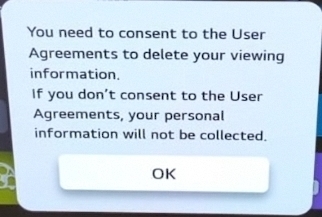
  • Within my context (see above), if you go to Settings > Support > Privacy & Terms > Delete My Personal Information > Delete Viewing Information > Delete, this is shown:

  • Due to not engaging with the voice command feature at all and not having accepted nor even seen any User Agreements/T&Cs, Delete Voice Information is missing in Settings > Support > Privacy & Terms > Delete My Personal Information, only Delete Viewing Information is present.

Questions:

  1. Is audio and video ACR still enabled, active and running in the background despite the TV being used exclusively as a dumb monitor, never being connected to the internet and no User Agreements/T&Cs having been accepted let alone even prompted?

  2. In my specific context (see above) would resetting the TV to default settings (Settings > System > Reset to Initial Settings > Reset All) permanently wipe the stored audio and video data the TV has potentially collected?

  3. In the context where an LG TV has been connected to the internet, User Agreements/T&Cs accepted, all of the TVs features have been used to the fullest extent (LG account, voice commands etc..), would resetting the TV to default settings (Settings > System > Reset to Initial Settings > Reset All) permanently wipe the stored audio and video data the TV has collected?

  4. In the context of someone who has connected their LG TV to the internet, accepted the User Agreements/T&Cs and used the Smart features but has then disconnected their TV from the internet and kept it offline. ACR has been running and still is running due to previously accepted terms - does the TV erase previously stored ACR data after a certain period of being offline to make space for fresh ACR data? If so, what is that time period or data threshold where it erases old data?

Thank you so much in advance.

I used to have this smart tv that had slightly less aggressive tracking, once I gutted all of the advertisements and tracking it no longer bogged down and lagged and overall felt snappier

I wonder what the performance implications are to doing this are

1 Like

Will then start have to start physical hardware level modifications such as de-soldering the modem if not too integrated, or applying a dummy load to all RF antenna’s to eliminate the ability to communicate. Physically removing microphones, etc.

2 Likes

Which means a Justice Department that wasn’t a bunch of cowards [1] would be hitting them with large, painful fines for violating HIPAA rules.

I’m just thinking the next step will be custom controller boards from your own favourite PC-board manufacturer (JLCPCB, PCBwaaaaay, etc) to replace the factory controller boards. You just buy a used TV from the 2nd-hand market and swap in the non-spying replacement. Buying 2nd-hand means you don’t care about voiding a warranty plus means you aren’t giving these dirtbags any money.

.

.

.

[1] don’t mistake me for some nutcase anti-Trumper. I just think the US DoJ, and most state AGs are inherently useless.

2 Likes

Less technical video that came up on my yt tl: https://www.youtube.com/watch?v=IvFu343KNek

Not restricted to LG. Seems they put sneaky terms so you agree with it. One specific brand even gaslights the customer by making the data collection to appear as “image enhancement”.

Can we just remove the LG board and replace it with something like a raspberry pi?

OR better yet just not buy a spy (smart) tv at all.
Yes i know that a dumb tv may not exist, but wall mount dumb monitors do, and they have HDMI connectors…
Yes they are more expensive, and dont have tuner inputs, but thats the price paid for not having your info collected and sold to the highest bidder.
Here are some examples.

1 Like

Am I crazy to be considering buying an LG TV, or is it an advantage to have this walkthrough already prepared (and at least LG isn’t Sony).

Theoretically, if said server has 2 physically separate ports (absolute requirement!!)

Not an absolute requirement. You could use VLANs (I do) and ensure, that the port the TV connects to goes to an isolated VLAN, that basically has no access anywhere EXCEPT for e.g. your Jellyfin server. I am on my way to implement this (I am lacking a couple OPNsense firewall rules in this regard), but other than that it’s a viable option.

What’s correct though, is, that you do need something managing the VLANs and ensuring the traffic is properly routed (I ditched my FritzBox / AVM router, installed 4 NICs (3 for LAN, 1 for WAN) into my server and put it directly behind a DrayTek Vigor VDSL2 modem - and stuff works).

1 Like

Hello,

Huge work, thank you so much.

I applied this method and those scripts to a 77 inches LG G5 bought in France in January 2026.

For the networking part, I used a PiHole container and Unifi controler firewall rules running on an (old) USG3P.

Regarding the scripts, they worked almost perfectly for my part using @awsneed and @mrcleantowels patches (the /etc/hosts entries weren’t updated using the initial script and the Consent / ToS state modifications didn’t survive after rebooting)

At this point, the verify-lockout.sh scripts passes 12 tests and 5 still fails (the remaining consents).

Once again, thank you all !

1 Like

Now I need one for TCL/Google TVs. Seems like VLAN and Unbound DNS blocker won’t be enough.

Hello,
I’m pretty sure I followed the instructions correctly, but it seems to have only partially worked on my older UK6400PLF WebOS 5.50.70.

root@LGwebOSTV:~# sh /var/lib/webosbrew/lg-lockout/verify-lockout.sh

== 1. /etc/hosts block entries ==
[FAIL] hosts does NOT block snu.lge.com
[FAIL] hosts does NOT block nextlgsdp.com
[FAIL] hosts does NOT block info.lgsmartad.com
[FAIL] hosts does NOT block api.lgtviot.com
[FAIL] hosts does NOT block ngfts.lge.com
[PASS] hosts is a bind mount (persistent block active)

== 2. Telemetry / phone-home processes ==
[INFO] sdx is RUNNING (may be failing to reach LG now — check section 4)
[INFO] uploadd is RUNNING (may be failing to reach LG now — check section 4)
[INFO] rdxd is RUNNING (may be failing to reach LG now — check section 4)
[INFO] admanager is RUNNING (may be failing to reach LG now — check section 4)
[INFO] note: sdx/uploadd/rdxd may still run but fail to phone home — that is the goal.

== 3. Consent / ToS state ==
[PASS] eula: networkAllowed=false (network consent declined)
[PASS] eula: acrAllowed=false (ACR consent declined)
[PASS] eula: voiceAllowed=false (voice consent declined)
[FAIL] option: voiceAllowed is not false
[FAIL] option: voice2Allowed is not false
[FAIL] option: usageCare is not false
[FAIL] option: dbgLogUpload is not false
[PASS] option: watchedListCollection=off
[PASS] acr opt-out marker present

== 4. Outbound connections to LG domains ==
[PASS] no established/close-wait connections to LG domains

== 5. DNS resolver ==
[INFO] resolver is the local connman proxy (127.0.0.1:53) — upstream blocking must be at the router

== 6. App-update gate ==
[PASS] updateInfo is empty (0 bytes)

Result: 8 passed, 9 failed

root@LGwebOSTV:~# cat /etc/hosts | grep -c '^0\.0\.0\.0'
0

root@LGwebOSTV:~# getent hosts snu.lge.com || echo "BLOCKED"
::1             snu.lge.com su-dev.lge.com su.lge.com su-ssl.lge.com

root@LGwebOSTV:~# grep -E 'networkAllowed|acrAllowed|voiceAllowed' /var/luna/preferences/eula
    "networkAllowed": false, 
    "voiceAllowed": false, 
    "acrAllowed": false,
 
root@LGwebOSTV:~# netstat -tn | grep -E ':(443|80|5100)' | grep -E 'lge\.com|lgsdp|lgsmartad|lgappstv|lgtviot|lgt
vcommon|lgthinq|nextlgsdp|wiselg'

Maybe I missed a step?

Or better yet, get some data privacy laws to stop this crap.

  1. all collection must be opt-in, not on by default.
  2. no dark patterns.
  3. full transparency. (I’d hardly call the average privacy policy / TOS transparent, unless you’re a lawyer or want to read 1000 pages of legaleeze)
  4. accountability. fines when companies collect without consent or use dark patterns. And not just a slap on the wrist, I mean actual consequences for once.

I don’t understand why these practices are acceptable, and why consumers bend over and accept it. We can do better. We deserve better than to be abused endlessly by corporations like this.

5 Likes

A full refund of the purchase price direct to the end user, along with the estimated financial gain they made through selling the information, including ad revenue.

Those 2 million dollar fines mean nothing when they just made 100x that by being dodgy.

2 Likes