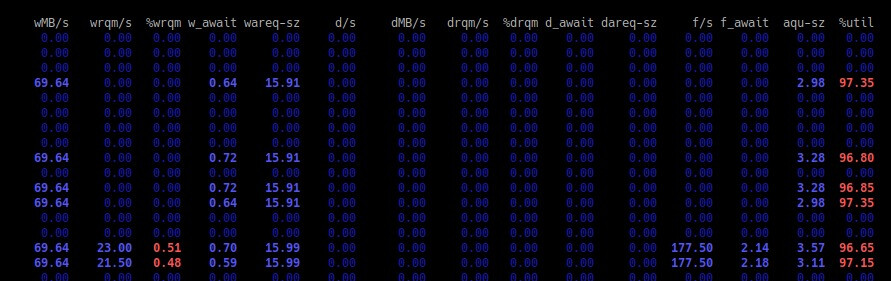
I have small 4x nvme gen 4 4TB RAID10 array. Unfortunately since I’m using LUKS and I’m a little bit paranoid and don’t want to leave patterns on my ssd - I have TRIM disabled as it is advised for security focused systems. CPU is Threadripper 5965 WX. When I’m running VMs some of them push my RAID to 100% iops utilization, even with relatively small write to disk in MB/s, as shown here:
I believe that it may be related to fact that array doesn’t have TRIM enabled so from it’s standpoint - it’s probably 100% full as it doesn’t really know that there’s free space and ssd performance degrades as they get full. In general I can live without some of this space more statically, so my question is - would it work if I just made smaller partition on each of those drives lets say 500GB and discard it? If I had 100% full 3 TB partition and 1TB empty partition vs 75% full 4TB partition with TRIM enabled - would it perform about the same?
Of course I’m not taking into account limitations coming from filesystem having harder time allocating space but that’s not the point of discussion here since I’m realistically using less than 50% of those drives. Reason why ssd may think it’s 100% full is because due to rebalancing and snapshots and stuff I’m pretty sure that filesystem did cover 100% of drive blocks at least once.
You’re running quite a complex storage stack. I recommend diagramming all the pieces involved and taking away one at a time to troubleshoot the performance degradation.
My hunch is that trim is not the (only) root cause here.
Otherwise, leaving 20-25% of SSD capacity unparitioned has been the hack that allows running without trim support.
I know but other elements of this stack are less “movable” than physical drives themselves. Also this performance drop is more visible after prolonged sustained write which those VM’s unfortunately do (they do like write-write-write for 8 hours straight and while 530’s are good drives in terms of sustained write comparing to other consumer drives it’s still well… not Kioxia CD8P). I’ll try to repartition it and report results.
Are the drives getting warm and slowing down after working hard? I have no idea on this stuff from the original pos to be honest but I have heard drives slowing in solid state with heat
That’s a deprecated recommendation, TRIM actually removes deleted data from the block device by zero’ing the sectors so writes are faster.
With TRIM disabled, your data is retained on the drive.
If you are running encrypted LUKS containers, the raw drive data will always be encrypted as 00000000’s hashed are still encrypted.
Your map table is going to show the space as free, only write speed is affected as the hardware has to write 0’s to the block prior to writing out the data. If you have write-back enabled, you’ll add more overhead.
If you have a RAID card, you’ll bottleneck the drives so the OS holds buffer while the RAID card SLOWLY churns through the write commands.
I did consider this to be an option but smartctl inspection led me to conclusion that they run at around 54-60°C which maybe is not super cold but not too hot either for ssd standards. I’ve seen the same drive in external usb enclosure reach 68 deg iirc.
I’m not sure if we’re talking about the same security concern. I’m not talking about encrypted, TRIMmed sectors being still available outside of addressable space. I mean that TRIM makes drive addressable space non-uniform (you can see that some areas of drive are unallocated/zeroed/whatever while others are not and by that you can determine that there is in fact useful filesystem laid on device. Pattern of sectors allocation can tell you what type of filesystem it is. Fact that there are randomly unmapped/unused blocks at all on ssd gives away information in itself so you don’t get plausible deniability that you get with denial encryption with detached headers.
Practicality of claiming that there’s totally no data whatsoever on those 16 ssds in workstaion and it’s just cosmic noise is another thing but hey, nobody said that being paranoid has any practical aspects to begin with right? XD
I’m using ASUS Hyper M.2 and filesystem level RAID with heavily reduced write buffers to reduce risk of data loss in event of power failure.
You should lookup case law on this, multiple people have been incarcerated for files “deleted” from their drive as the data remained on the drive itself, proving the data once existed on that device.
If you remapped the map table, you could theoretically achieve this but again: case law proves otherwise.
Logic is not what rules the courtroom, it’s case law.
Really? I thought it just added those sectors to the list that can be reused. If it’s really proactively zeroing them, that’s cool! But unfortunately that’s probably vendor/firmare specific and also I don’t trust those to “do the right thing”
I used to leave 10-30% of SSDs unpartitioned like this, before TRIM/discard was supported in all the layers of the stack (md, luks, lvm, qemu, etc). It was reported at the time that the main difference between the consumer grade and “pro” grade drives at the time was how much additional flash the device contained beyond it’s reported value i.e. you could make a consumer drive get “pro” levels of consistent write latency by just not allocating it all.
The other thing I did (and still do in some cases) for SSDs is use SATA Secure Erase to force the drive firmware to reset it’s lists of what blocks actually contain data. So if you are going to go from a used drive to this “slightly less allocated setup”, Secure Erase first. Or if you are testing or wiping drives, run Secure Erase after. The instructions I used for years are here but more recently the Arch wiki entry is the best place to start.
But you are using nvme drives, the equivalent there is using nvme-cli instead of hdparm. Bootable parted images have this included, which is an easy way to do it in cases where you don’t always have a reasonable install.
In your case you could fail a drive out of the array, Secure Erase it to reset performance, then readd it to the array. But this comes with risk and also wear on the drives, resync time, etc. Also depending on your usage patterns it might not fix things for long. But at least it would help to track down if it’s part of the problem.
As long as we’re on the subject:
Drive based encryption shouldn’t be trusted, always use luks or similar O/S based encryption for which you hold the keys
Always wipe drives for disposal by overwriting the whole drive multiple times with random, uncompressible, un-de-dup-able, data. Who knows what tricks drive firmware can do?
Even after wiping, know that the drive might still have data in blocks that it was having problems with and marked bad, or other firmware BS.
I left 466 GB free out of 4TB. Maybe it’s not 20% but considering how big those SSDs are (4TB) I decided that almost 500GB reserve should be kind of okay (also it was quite even number in terms of number of blocks and it resulted in lsblk showing “nice” 3.2T" number xD). Especially since FireCuda 530 have quite good sustained write as is. I performed blkdiscard on those 466 gb partitions so I believe it works like “trim” on whole partition if I recall correctly.
Repartitioning is done now so I’ll run some tests soon.
Yes sir, then garbage collection cycle is ran on the SSD which rewrites the block with 0’s for faster write speed later.
under
But yes, if the firmware is intelligent enough it can use unallocated blocks to fix bad blocks.
With modern NAND (last 4 years), we encounter controller failures as much as we encounter bad blocks.
At scale, it becomes better practice to buy better/bigger out the gate rather than underprovisioning. If I am adding 5 NVME drives to a machine, I will push for a 6th and leave the 2 remaining slots open for array rebuilds. We do leave space for in-place rebuilds with additional drives and do not recommend fully populating interfaces.
Rebuilds take longer, but have a higher success rate with the addition of a new drive to rebuild versus swapping.