Jojo's Quest for a More Efficient Lab

Hello All,
Wanted to start a thread on this for my own needs as well as to potentially have a more comprehensive discussion on improving the efficiency of common solutions, and the results of much of my testing of various hardware.

Given current world problems in current year I have increasingly felt the need to lower my power usage. Whether its to fit within a usage budget for solar generation, increased power bills, or concerns about availability, many of you might feel similarly. My hope is to provide some useful information and testing along my journey.

For context and my motivation: I currently live in Oregon and pay roughly 0.14$/kwh for power. I live in a 900sqft apartment, and my power bill is routinely >150$.

This thread is going to mainly focus on my homelab, but I will also be diving into other ways to save power as they become viable, but sadly no solar installation or mains usage tracking until we get a house.

I am using a Unifi PDU pro, my UPS, and Home Assistant to aggregate my usage data.
here is the current Rack usage:
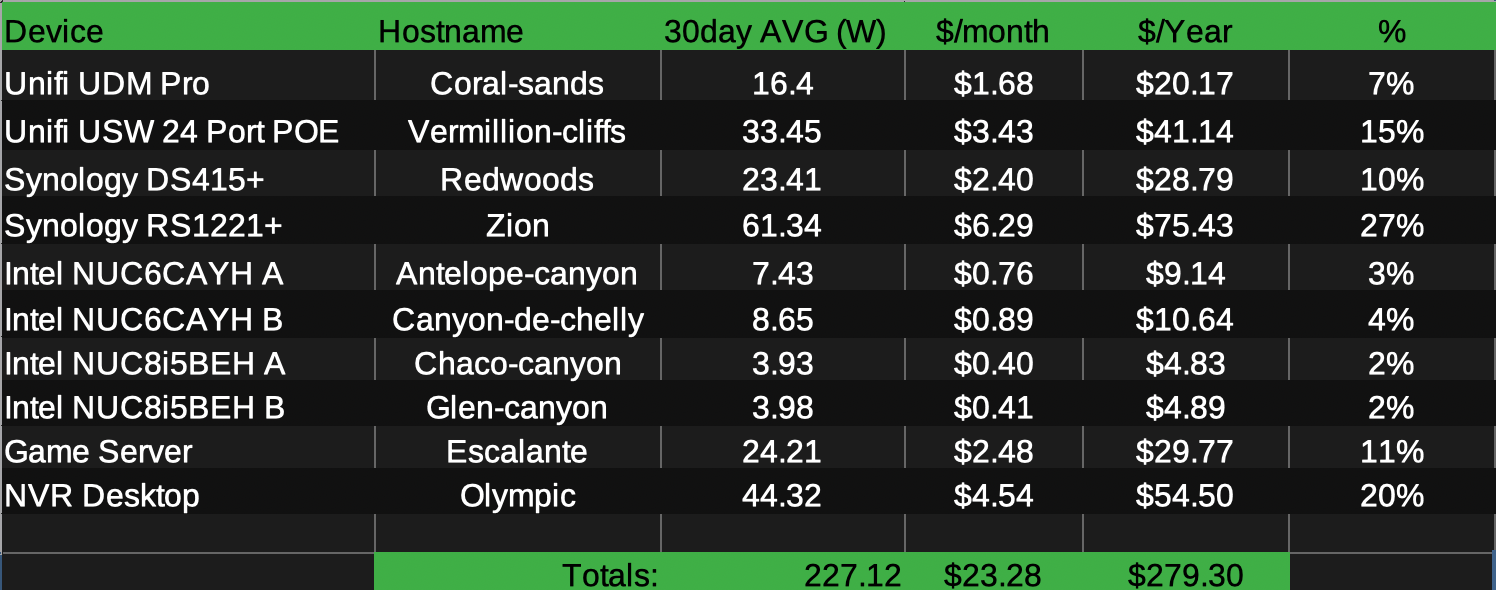
I know compared to some more beefy hardware and power users these numbers are very low already, but there are great inefficiencies here I’d like to try and resolve and document along the way.

Issue 1:
both synology units are never sleeping, the drives are always spinning. This is partly due to synology’s software, but also due to my basic single volume setup necessitating the drives always on.

Zion has a single 54TB volume containing all my media, photos, files, and programs. It also runs immich, since it has immediate access to the photos and greatly speeds up immich’s loading time as a result. However, moving docker, and perhaps the photos library to a NVMe SSD Vol would remove that interaction from the hard disk array, letting it rest when another service isnt accessing the media, files, or programs.

Redwoods has a single volume acting as a backup of the files, programs, photos, and the more annoying media (losing millions of music files might cause a mental break) and recieves a backup from Zion once a week. It is also not sleeping outside of this backup time so I need to resolve this as well.

Issue 2:
The NVR (running Frigate) is Pulling in my opinion a disproportionate amount of power for a system watching only 3 cameras (their POE budget comes from the Unifi Switch) and needs some tweaking. My use of extremely unconventional Chinese Frankenstein Laptop CPU/Desktop Mobo might not be helping.

Issue 3: resolved at this point in time but worth mentioning. I work at home, and remote into a desktop in the server room of the office. For the last couple of years I have been using my gaming desktop (Grand-Teton) to do this, but it idles at 115W, which was an enormous waste, and I set up a lightwieght NUC (Antelope-canyon) to do that task now, using 7-11W during work hours instead. This alone saves me roughly $5 a month on power.

A couple changes upcoming I’m going to report back on, I’m going to attempt to establish an SSD volume on Zion, and Redwoods is getting replaced with a RS815+, at which point I will put more time into getting it to sleep properly.

Note for anyone looking to self host: intel NUC’s are some of the best hardware I have ever used. High speed internet, great cooling, extremely stable, and relaly really low power. Chaco Canyon runs Jellyfin with often more htan 4 users simultaneously, a Wiki, Jellyseer, Joplin, and a couple other services and averages below 5W. I use one for Home assistant, one for work as mentioned, and another for all the services that need internet to run. With better networking skills than mine you could likely consolidate all this into one machine and It likely would still have plenty of headroom.

2 Likes

Update September 3rd, 2025.

NAS:
The backup NAS DS415+ (Redwoods) has been decommissioned, and re-established at my parents home to give them a bit more storage for files/photos, and me a offsite backup target.

It has been replaced by a lightly used Synology RS815+ I picked up off of ebay, that should yield better R/W and fit better into the rack than a desktop unit. It is currently running a drive check, after which I will re-establish hyper backup tasks from Main NAS (Zion), and to offsite backup target (Redwoods).

Power numbers here are not stable yet and thus useless for anything but speculation, but Redwoods averaged 23W, with numbers around 30W when active, and 15W when asleep. Bryce is currently pulling 33W, but that’s doing a full drive check, and no sleep, so once its settled in and I get it sleeping aside from backup tasks every monday, im hoping for a power savings.

Power Savings: TBD

NVR
My frigate installation on Olympic has suffered from an issue for years where the cache fills up, is unable to write out to disk and the system hangs and stops recordings until restarted. After a lot of troubleshooting the core problem appears to be a seg fault in python, which the frigate devs attribute commonly to hardware problems. Using a frankenstein erying laptop CPU dekstop motherboard was my primary suspect, and replacing that yielded no improvement except less power usage (i5-8400 vs 11850HK, surprise surprise). So I tried swapping out the ram for a spare stick I had and its now been 48 hours without issue.

I may eventually return to the laptop CPU for horsepower when we move into a house and have more cams, but now with only 3 cameras the 8400 is perfect and sipping a light 22W average, compared to 44W prior. Might experiment with using an arc a380 to do hardware transcode rather than the CPU, might use less power overall, but maybe not.

Power Savings: 22W less (-9.75%)

1 Like

Update September 29th, 2025

NAS:
The Synology RS815+ I spun up as an onsite backup(Bryce) has yielded an average of 23W, on par with its predecessor, the DS415+(Redwoods). This is excellent news considering its write speed is ~50% faster (361.33MB/s vs 225.81 MB/s). I need to sort out networking to facilitate that speed being met, same with Zion, since it has a 10GB card and I am currently only using the 1GB ports to copy my linux ISOs, speed would be nice and i paid for the hardware, might as well.

NVR
Updated Frigate install with replaced RAM stick has yet to have an issue, and I plan to move forward to more functional HA integrations now that its stable. In terms of power its averaging 26W, which is still a marked improvement from 44W.

Compute
I have been working from my desktop (Grand Teton) recently since Ive been multitasking a bit more between work and homelab tasks, but this is not a good idea as it idles at over 100W. I made a dedicated Work machine running Win10 LTSC, but it often seems to saturate its connection and bog down with remote desktop, and as I often need to present work to clients, That wasnt viable.

Its currently a NUC6CAYH, my personal favorite NUC, but its entirely possible the celeron isnt able to keep up for this workload. Considering ordering another NUC8i5BEH to better fill the purpose. They don’t consume much more power, I have 2 of them already, and fuck it more NUCs the merrier. dont have a purpose for this extra one when I spin it down though, might see if any of my friends is interested in self hosting HA, as the Celeron has been plenty for that task.

Game Server
We are now happily completely sucked into modded minecraft again (ATM10) and the server is averaging 29W, which I am happy with. Would like to look into switching to a game server focused platform like Pterodactyl, or at least to WIN10LTSC, dont want any consumer Windows machines going into 2026.

Download Laptop
This is a new mention to the list, but worth documenting. I have a laptop I use for YT-DLP, Qbittorrent, etc. Reason being its physically connected to nothing, has integrated keyboard and screen, and livs on its own VLAN and wifi network without any priveledges so potential damage for risky files is low. I used a 2016 macbook I had from school for a long time, until its battery resembled the very hungry caterpillar and It had to go. I got a used thinkpad P50 from ebay and it has been phenomenal. Need to setup power monitoring, but I did set it up with ubuntu rather than windows, and have been really enjoying using linux more.

Goals by 2026

Have no remaining Windows consumer machines. All that remain are my partners and my gaming rigs, which can switch to WIn10LTSC pending perhaps Bazzite in future, the game server (pterodactyl or win10LTSC), and my work machine, which just does VPN, RDP, and web browser, I need to test using linux for this task, maybe if I get a Nuc8 I can set it up with Ubuntu and test that while still having the old machine setup for when issues arise short term.

Establish proper offsite backup routine
We have the hardware, and the site to site VPN working, I just need to sit down and setup Hyperb on the offsite.

pray to GabeN that jellyseer adds music support
I currently have 3 spreadsheets for my partners, my dads, and my own apple music libraries right before we stopped paying for it, and have been working through them, but its awful and hard for my partner to request new music. Its currently in Beta branch but not yet pushed to the main release.

Clean off gaming desktops
Far too many files are being stored on the desktops, and I plan to migrate that to network shared storage on Zion, not so much to save space but prevent data loss and make wiping those machines less of a chore when needed.

Hey Everyone! long time no update, big changes. Update March 25th, 2026

Compute:

This issue was solved for me by work issuing Work From Home laptops. Its Windows 11 but its on its own little Vlan and works well enough just connected to my desktop monitors and slotted into the server rack. seems to average around 20W which is way better than the 100W of my desktop and provides good isolation between work and play. A simple KVM handles switching between it and my desktop for gaming.

Desktop:

I am happy to report that rather than kick the windows 10 can down the road with Win10 LTSC I switched to linux Mint 22.3 a couple months ago and have never been happier. Everything has been really straightforward with the exception of some games, and a bit of fiddling with proton solved all but the most invasive games, which I no longer want to play or support anyway. I offloaded all tasks from this machine except gaming to my laptop, but its still setup for file browsing and such on the NAS if needed, but no files live locally except games.

I plan to switch my partner’s gaming desktop to Mint as well in the near future, she played with mine a bit and enjoyed it, and all her games are listed as gold or better on ProtonDB. (Also ProtonDB is the best!)

This leaves only the game server as windows 10, and my WFH laptop that I cant do much about. Everything else is running linux except my macbook.

Download Laptop

Now running Mint 22.3 as well, used it as a test platform to learn basics of system use, and after a couple months of enjoying it and no issues, followed suit on my desktop.

Cluster:

Prior to this I had 2 NUC8i5BEH units running ubuntu server and docker as dockerhosts for all homelab services. This worked fine but was limited in terms of failover, backups, and compute. After quite some trial and error I spun up a new NUC of the same variety running Kubernetes K3s, and began the process of migrating. This was a lot of work, I wont downplay that, but It is now up and running and one of the two dockerhosts has been fully migrated. I got some additional NUCs to fill out the cluster and now the system is as follows:

  • 2 NUC8i5BEH units (Chaco Canyon, Antelope Canyon) and 1 NUC7i5BEH (Shafer Canyon) running k3s as control nodes. all services formerly hosted on chaco canyon via docker are now running here with high availability, storage through longhorn with backups to the NAS, and centralized DNS via Traefik.
  • 1 NUC8i5BEH unit (Glen Canyon) still running docker on ubuntu server, I had some issues with the cluster that caused me to slow the migration and work more carefully.
  • 2 NUC8i5BEH units (Lavender Canyon, Happy Canyon) standing by to be added to cluster as workers to increase redundancy and compute.

All NUCs listed above have 16GB of RAM and a 500GB NVME for storage. This provides well more than enough compute and plenty of room for Longhorn to have 3 copies of everything.

The plan now is to migrate Glen canyon services the same way I did Chaco’s (spin down, dump DB’s, backup to NAS, spin up on k3s, establish PVCs and PVs, then load from a migration workload to those PVC’s).

Services:

This is what I am hoping will be useful the most to other folks. my hardware decisions are laced with my own biases, but the software can be applied to whatever you have at home.

Jellyfin is no longer serving music. The way it organizes based on file structure makes sense for movies and TV shows but not for music.

Navidrome has been spun up and has done a wonderful job with the music. It utilizes metadata rather than folder structure so you need to make sure your metadata is in order(musicbrainz picard is awesome) but then its good to go.

Booklore has been an excellent Ebook management software, I know there are die hards that love calibre web or kavita but booklore does what I need with an easy setup and nice UI. I know the creator has a crash out over being called out on AI use but I maintain copies of the repo on my local gitea instance so will just continue to use it in its current version while I wait for the community forks Im sure will come.

If you are thinking of selfhosting, I can recommend these three pieces of software highly. Theres about 20 other things I host but will go into that more in a future update.

Working on getting grafana setup to collect metrics from everything in my homelab, at which point I will have all the data centrally and can make better decisions to mitigate power use, but for now I will note the NUCs running k3s use about 3x the power they were running docker. This is the cost of High availability and failover, and it is one I am willing to pay.