I have updated the above guide for flex, and newer kernels, and its working! no need for strongtz and they seem not to want to support flex anyway.
Just went through the 2025-10-19 update with a Flex 140 in a PowerEdge R640 on a fresh Proxmox 9.0.3 install - it got me closer but still no dice.
Everything builds great and goes smoothly until I try to do any vgpu commands in xpu-smi. They all fail the SR-IOV check:
root@arctest:~# xpu-smi vgpu --precheck
+----------+---------------------------------------------------------------------------------------+
| VMX Flag | Result: Pass                                                                          |
|          | Message: N/A                                                                          |
+----------+---------------------------------------------------------------------------------------+
| SR-IOV   | Result: Fail                                                                          |
|          | Message: SR-IOV is disabled. Please set the related BIOS settings and kernel command  |
|          |   line parameters.                                                                    |
+----------+---------------------------------------------------------------------------------------+
| IOMMU    | Result: Pass                                                                          |
|          | Message: N/A                                                                          |
+----------+---------------------------------------------------------------------------------------+
Last commit on that backport/main driver branch was a month ago so we should be running the same driver, but for some reason it doesn’t seem to be exposing any usable SR-IOV capabilities:
root@arctest:~# ls /sys/bus/pci/devices/0000:de:00.0/ | grep sriov
sriov_drivers_autoprobe
sriov_numvfs
sriov_offset
sriov_stride
sriov_totalvfs
sriov_vf_device
sriov_vf_total_msix
root@arctest:~# cat /sys/bus/pci/devices/0000:de:00.0/sriov_totalvfs
0
I did get my card upgraded to the 2280 firmware:
root@arctest:~# xpu-smi discovery -d 0
+-----------+--------------------------------------------------------------------------------------+
| Device ID | Device Information                                                                   |
+-----------+--------------------------------------------------------------------------------------+
| 0         | Device Type: GPU                                                                     |
|           | Device Name: Intel(R) Data Center GPU Flex 140                                       |
|           | PCI Device ID: 0x56c1                                                                |
|           | Vendor Name: Intel(R) Corporation                                                    |
|           | SOC UUID: 00000000-0000-0000-23ae-406300a51a54                                       |
|           | Core Clock Rate: 1950 MHz                                                            |
|           | Stepping: B1                                                                         |
|           | SKU Type: Production PRQ                                                             |
|           |                                                                                      |
|           | Driver Version: 1.25.2.25.250224.31+i1-1                                             |
|           | Driver Package Version: 1.25.2.25.250224.31+i1-1                                     |
|           | Kernel Version: 6.14.8-2-pve                                                         |
|           | GFX Firmware Name: GFX                                                               |
|           | GFX Firmware Version: DG02_2.2280                                                    |
|           | GFX Firmware Status: normal                                                          |
|           | GFX Data Firmware Name: GFX_DATA                                                     |
|           | GFX Data Firmware Version: 0xe7                                                      |
|           |                                                                                      |
|           | PCI BDF Address: 0000:de:00.0                                                        |
|           | PCI Slot: PCIe Slot 3                                                                |
|           | PCIe Generation: 4                                                                   |
|           | PCIe Max Link Width: 8                                                               |
|           | PCIe Max Bandwidth: 15.75 GB/s                                                       |
|           |                                                                                      |
|           | Memory Physical Size: 5068.00 MiB                                                    |
|           | Max Mem Alloc Size: 4095.99 MiB                                                      |
|           | ECC State: enabled                                                                   |
|           | Number of Memory Channels: 2                                                         |
|           | Memory Bus Width: 128                                                                |
|           | Max Hardware Contexts: 65536                                                         |
|           | Max Command Queue Priority: 0                                                        |
|           |                                                                                      |
|           | Number of EUs: 128                                                                   |
|           | Number of Tiles: 1                                                                   |
|           | Number of Slices: 1                                                                  |
|           | Number of Sub Slices per Slice: 8                                                    |
|           | Number of Threads per EU: 8                                                          |
|           | Physical EU SIMD Width: 8                                                            |
|           | Number of Media Engines: 2                                                           |
|           | Number of Media Enhancement Engines: 2                                               |
|           |                                                                                      |
+-----------+--------------------------------------------------------------------------------------+
The only real difference in output I’ve seen between us is in my dmesg logs, where force_probe doesn’t seem to be a recognized argument. I am able to remove the force_probe arg from /etc/modprobe.d/i915.conf without any noticeable change too, besides the “unknown parameter” line going away:
root@arctest:~# dmesg | grep -e i915 -e I915
[    0.000000] Command line: BOOT_IMAGE=/boot/vmlinuz-6.14.8-2-pve root=/dev/mapper/pve-root ro intel_iommu=on iommu=pt i915.enable_guc=3 quiet
[    0.609138] Kernel command line: BOOT_IMAGE=/boot/vmlinuz-6.14.8-2-pve root=/dev/mapper/pve-root ro intel_iommu=on iommu=pt i915.enable_guc=3 quiet
[    9.249601] Loading modules backported from I915-25.2.25
[    9.249602] Backport generated by backports.git I915_25.2.25_PSB_250224.31
[    9.468298] i915: unknown parameter 'force_probe' ignored
[    9.468534] [drm] I915 BACKPORTED INIT
[    9.704008] i915 0000:de:00.0: Using 24 cores (1,3,5,7,9,11,13,15,17,19,21,23,25,27,29,31,33,35,37,39,41,43,45,47) for kthreads
[    9.704686] i915 0000:de:00.0: VT-d active for gfx access
[    9.704731] i915 0000:de:00.0: Attaching to 131072MiB of system memory on node 1
[    9.704793] i915 0000:de:00.0: Using Transparent Hugepages
[    9.704864] i915 0000:de:00.0: GT0: Local memory { size: 0x0000000140000000, available: 0x000000013cc00000 }
[    9.800275] i915 0000:de:00.0: GT0: GuC firmware i915/dg2_guc_70.44.1.bin version 70.44.1
[    9.804962] i915 0000:de:00.0: GT0: local0 bcs'0.0 clear bandwidth:106663 MB/s
[    9.811706] i915 0000:de:00.0: GT0: local0 bcs'0.0 swap bandwidth:5669 MB/s
[    9.812108] [drm] Initialized i915 1.6.0 for 0000:de:00.0 on minor 1
[    9.864456] i915 0000:e2:00.0: Using 24 cores (1,3,5,7,9,11,13,15,17,19,21,23,25,27,29,31,33,35,37,39,41,43,45,47) for kthreads
[    9.864985] i915 0000:e2:00.0: VT-d active for gfx access
[    9.865004] i915 0000:e2:00.0: Attaching to 131072MiB of system memory on node 1
[    9.865038] i915 0000:e2:00.0: Using Transparent Hugepages
[    9.865079] i915 0000:e2:00.0: GT0: Local memory { size: 0x0000000140000000, available: 0x000000013cc00000 }
[    9.999885] i915 0000:e2:00.0: GT0: GuC firmware i915/dg2_guc_70.44.1.bin version 70.44.1
[   10.003674] i915 0000:e2:00.0: GT0: local0 bcs'0.0 clear bandwidth:106381 MB/s
[   10.009751] i915 0000:e2:00.0: GT0: local0 bcs'0.0 swap bandwidth:5685 MB/s
[   10.010050] [drm] Initialized i915 1.6.0 for 0000:e2:00.0 on minor 2
[   10.137651] [drm] I915 SPI BACKPORTED INIT
[   10.140932] Creating 4 MTD partitions on "i915.spi.56832":
[   10.140937] 0x000000000000-0x000000001000 : "i915.spi.56832.DESCRIPTOR"
[   10.143903] 0x000000001000-0x0000005f0000 : "i915.spi.56832.GSC"
[   10.147270] 0x0000005f0000-0x0000007f0000 : "i915.spi.56832.OptionROM"
[   10.150268] 0x0000007f0000-0x000000800000 : "i915.spi.56832.DAM"
[   10.153179] [drm] I915 SPI BACKPORTED INIT
[   10.155991] Creating 4 MTD partitions on "i915.spi.57856":
[   10.155994] 0x000000000000-0x000000001000 : "i915.spi.57856.DESCRIPTOR"
[   10.158743] 0x000000001000-0x0000005f0000 : "i915.spi.57856.GSC"
[   10.161450] 0x0000005f0000-0x0000007f0000 : "i915.spi.57856.OptionROM"
[   10.164157] 0x0000007f0000-0x000000800000 : "i915.spi.57856.DAM"
[   11.303551] mei_pxp i915.mei-gsc.56832-fbf6fcf1-96cf-4e2e-a6a6-1bab8cbe36b1: bound 0000:de:00.0 (ops i915_pxp_tee_component_ops [i915])
[   11.381514] mei_pxp i915.mei-gsc.57856-fbf6fcf1-96cf-4e2e-a6a6-1bab8cbe36b1: bound 0000:e2:00.0 (ops i915_pxp_tee_component_ops [i915])
Is this just a difference in platform? Would one of the Supermicro superservers just work better for Intel SR-IOV than a Poweredge or what else am I missing here?
Extra outputs for sanity:
Kernel Version:
root@arctest:~# uname -a
Linux arctest 6.14.8-2-pve #1 SMP PREEMPT_DYNAMIC PMX 6.14.8-2 (2025-07-22T10:04Z) x86_64 GNU/Linux
SR-IOV Enabled:

Kernel Command:
GRUB_CMDLINE_LINUX="intel_iommu=on iommu=pt i915.enable_guc=3"
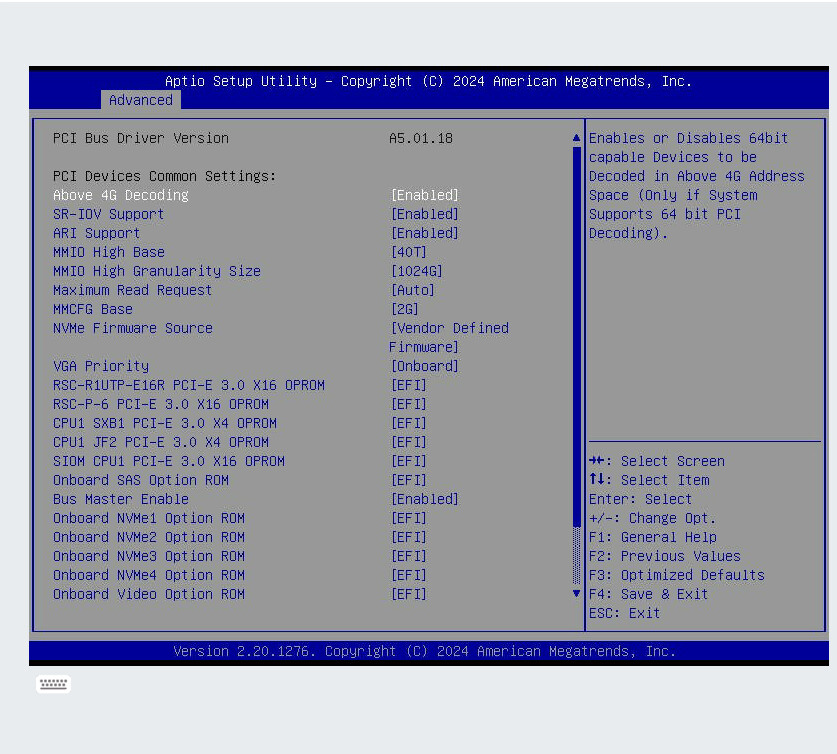
try another/older bios. you need resize bar and sr iov both. likely a dell bug if rebar and sriov claim they’re on in that system
Unfortunately I ran into the same issue as @Jellayy above on completely different hardware. I’m running a supermicro x11 board with rebar support and sr-iov 100% enabled. I confirmed that sr-iov was enabled with a network card.
root@pve:~# xpu-smi vgpu --precheck
+----------+---------------------------------------------------------------------------------------+
| VMX Flag | Result: Pass                                                                          |
|          | Message: N/A                                                                          |
+----------+---------------------------------------------------------------------------------------+
| SR-IOV   | Result: Fail                                                                          |
|          | Message: SR-IOV is disabled. Please set the related BIOS settings and kernel command  |
|          |   line parameters.                                                                    |
+----------+---------------------------------------------------------------------------------------+
| IOMMU    | Result: Pass                                                                          |
|          | Message: N/A                                                                          |
+----------+---------------------------------------------------------------------------------------+
The rest of my output is essentially identical to his:
root@pve:~# dmesg | grep -e i915 -e I915
[    0.000000] Command line: BOOT_IMAGE=/boot/vmlinuz-6.14.8-2-pve root=/dev/mapper/pve-root ro quiet intel_iommu=on iommu=pt i915.enable_guc=3
[    0.301155] Kernel command line: BOOT_IMAGE=/boot/vmlinuz-6.14.8-2-pve root=/dev/mapper/pve-root ro quiet intel_iommu=on iommu=pt i915.enable_guc=3
[    8.781605] Loading modules backported from I915-25.2.25
[    8.781606] Backport generated by backports.git I915_25.2.25_PSB_250224.31
[    8.991769] i915: unknown parameter 'force_probe' ignored
[    9.186044] [drm] I915 BACKPORTED INIT
[    9.370989] i915 0000:41:00.0: Using 40 cores (0-19,40-59) for kthreads
[    9.371519] i915 0000:41:00.0: VT-d active for gfx access
[    9.371533] i915 0000:41:00.0: Attaching to 65184MiB of system memory on node 0
[    9.371565] i915 0000:41:00.0: Using Transparent Hugepages
[    9.379447] i915 0000:41:00.0: Using dma engine 'dma0chan0' for clearing system pages
[    9.379502] i915 0000:41:00.0: GT0: Local memory { size: 0x0000000140000000, available: 0x000000013cc00000 }
[    9.474058] i915 0000:41:00.0: GT0: GuC firmware i915/dg2_guc_70.44.1.bin version 70.44.1
[    9.477527] i915 0000:41:00.0: GT0: local0 bcs'0.0 clear bandwidth:106451 MB/s
[    9.483432] i915 0000:41:00.0: GT0: local0 bcs'0.0 swap bandwidth:5699 MB/s
[    9.483726] [drm] Initialized i915 1.6.0 for 0000:41:00.0 on minor 1
[    9.538113] i915 0000:44:00.0: Using 40 cores (0-19,40-59) for kthreads
[    9.538631] i915 0000:44:00.0: VT-d active for gfx access
[    9.538648] i915 0000:44:00.0: Attaching to 65184MiB of system memory on node 0
[    9.538680] i915 0000:44:00.0: Using Transparent Hugepages
[    9.538684] i915 0000:44:00.0: Using dma engine 'dma0chan0' for clearing system pages
[    9.538725] i915 0000:44:00.0: GT0: Local memory { size: 0x0000000140000000, available: 0x000000013cc00000 }
[    9.670978] i915 0000:44:00.0: GT0: GuC firmware i915/dg2_guc_70.44.1.bin version 70.44.1
[    9.674532] i915 0000:44:00.0: GT0: local0 bcs'0.0 clear bandwidth:106663 MB/s
[    9.680397] i915 0000:44:00.0: GT0: local0 bcs'0.0 swap bandwidth:5698 MB/s
[    9.680684] [drm] Initialized i915 1.6.0 for 0000:44:00.0 on minor 2
[    9.736415] [drm] I915 SPI BACKPORTED INIT
[    9.739798] Creating 4 MTD partitions on "i915.spi.16640":
[    9.739809] 0x000000000000-0x000000001000 : "i915.spi.16640.DESCRIPTOR"
[    9.742975] 0x000000001000-0x0000005f0000 : "i915.spi.16640.GSC"
[    9.745743] 0x0000005f0000-0x0000007f0000 : "i915.spi.16640.OptionROM"
[    9.748461] 0x0000007f0000-0x000000800000 : "i915.spi.16640.DAM"
[    9.751250] [drm] I915 SPI BACKPORTED INIT
[    9.754019] Creating 4 MTD partitions on "i915.spi.17408":
[    9.754023] 0x000000000000-0x000000001000 : "i915.spi.17408.DESCRIPTOR"
[    9.756757] 0x000000001000-0x0000005f0000 : "i915.spi.17408.GSC"
[    9.759495] 0x0000005f0000-0x0000007f0000 : "i915.spi.17408.OptionROM"
[    9.762233] 0x0000007f0000-0x000000800000 : "i915.spi.17408.DAM"
[   10.898265] mei_pxp i915.mei-gsc.16640-fbf6fcf1-96cf-4e2e-a6a6-1bab8cbe36b1: bound 0000:41:00.0 (ops i915_pxp_tee_component_ops [i915])
[   10.976018] mei_pxp i915.mei-gsc.17408-fbf6fcf1-96cf-4e2e-a6a6-1bab8cbe36b1: bound 0000:44:00.0 (ops i915_pxp_tee_component_ops [i915])
I’ve also confirmed that ReBar is enabled and working on this setup. I do have one last thing to try. I’ve got a c6525 blade system from dell with epyc 7302 cpus, which should be a newer platfrom than the r640 or supermicro x11 systems. I will report back later today on the results from that system
- MMCFG base
- MMIOH base
- MMIOH size
You may need to try some different settings there. try also pci=realloc on your grub default kernel line.
I think I remember having this problem once and set to 56T, 512g, and something else for the mmcfg base.
In the yt video https://youtu.be/azD69QdEW7E?si=ubsDyqDsZ-GyDqUQ @wendell mentioned AMD on the SYS-111E-FWTR but I can only find it beeing Intel on supermicro.
What server is it really?
d’oh! my bad! I was super tired when I shot this. I had setup two systems in the proxmox cluster, one intel one amd, the pizza box is indeed intel. But I can confirm it works just fine on AMD hosts as well. If you watched the 45 drives live stream or creator summit stuff, I was doing this with these on epyc sienna then as well, so my brain was in a mode.
Running here on AMD with Proxmox 9.0.11:
Linux pxvdi01 6.14.8-2-pve #1 SMP PREEMPT_DYNAMIC PMX 6.14.8-2 (2025-07-22T10:04Z) x86_64 GNU/Linux
DMESG:
root@pxvdi01:~# dmesg|grep i915
[ 0.000000] Command line: BOOT_IMAGE=/boot/vmlinuz-6.14.8-2-pve root=/dev/mapper/pve-root ro quiet amd_iommu=on iommu=pt i915.enable_guc=3 i915.max_vfs=31 pci=realloc
[ 0.097940] Kernel command line: BOOT_IMAGE=/boot/vmlinuz-6.14.8-2-pve root=/dev/mapper/pve-root ro quiet amd_iommu=on iommu=pt i915.enable_guc=3 i915.max_vfs=31 pci=realloc
[ 4.376853] kexec-bzImage64: Final command line is: root=/dev/mapper/pve-root ro quiet amd_iommu=on iommu=pt i915.enable_guc=3 i915.max_vfs=31 pci=realloc
[ 4.943786] i915: unknown parameter ‘force_probe’ ignored
[ 4.997217] i915 0000:03:00.0: Running in SR-IOV PF mode
[ 4.997252] i915 0000:03:00.0: Using 32 cores (0-31) for kthreads
[ 4.997781] i915 0000:03:00.0: VT-d active for gfx access
[ 4.997812] i915 0000:03:00.0: Using Transparent Hugepages
[ 4.997835] i915 0000:03:00.0: GT0: Local memory { size: 0x0000000400000000, available: 0x00000003fa000000 }
[ 6.176146] i915 0000:03:00.0: GT0: GuC firmware i915/dg2_guc_70.44.1.bin version 70.44.1
[ 7.202040] i915 0000:03:00.0: GT0: local0 bcs’0.0 swap bandwidth:5675 MB/s
[ 7.202088] i915 0000:03:00.0: 31 VFs could be associated with this PF
[ 7.202490] [drm] Initialized i915 1.6.0 for 0000:03:00.0 on minor 1
[ 7.202610] i915 0000:03:00.0: SPI access overridden by jumper
[ 7.209617] Creating 4 MTD partitions on “i915.spi.768”:
[ 7.209618] 0x000000000000-0x000000001000 : “i915.spi.768.DESCRIPTOR”
[ 7.210538] 0x000000001000-0x0000005f0000 : “i915.spi.768.GSC”
[ 7.211374] 0x0000005f0000-0x0000007f0000 : “i915.spi.768.OptionROM”
[ 7.212060] 0x0000007f0000-0x000000800000 : “i915.spi.768.DAM”
[ 8.013104] mei_pxp i915.mei-gsc.768-fbf6fcf1-96cf-4e2e-a6a6-1bab8cbe36b1: bound 0000:03:00.0 (ops i915_pxp_tee_component_ops [i915])
When trying to set the virtual functions via xpu-smi:
root@pxvdi01:~# xpu-smi vgpu --create -n 7 -d 0
±---------±--------------------------------------------------------------------------------------+
| VMX Flag | Result: Fail |
| | Message: No VMX flag, Please ensure Intel VT enabled in BIOS |
±---------±--------------------------------------------------------------------------------------+
| SR-IOV | Result: Pass |
| | Message: N/A |
±---------±--------------------------------------------------------------------------------------+
| IOMMU | Result: Pass |
| | Message: N/A |
±---------±--------------------------------------------------------------------------------------+
Being on AMD there is no VMX …
root@pxvdi01:~# xpu-smi discovery -d 0
±----------±-------------------------------------------------------------------------------------+
| Device ID | Device Information |
±----------±-------------------------------------------------------------------------------------+
| 0 | Device Type: GPU |
| | Device Name: Intel(R) Data Center GPU Flex 170 |
| | PCI Device ID: 0x56c0 |
| | Vendor Name: Intel(R) Corporation |
| | SOC UUID: 00000000-0000-0000-61a4-e0fd7e5afba5 |
| | Core Clock Rate: 2050 MHz |
| | Stepping: C0 |
| | SKU Type: Production PRQ |
| | |
| | Driver Version: 1.25.2.25.250224.31+i37-1 |
| | Driver Package Version: 1.25.2.25.250224.31+i37-1 |
| | Kernel Version: 6.14.8-2-pve |
| | GFX Firmware Name: GFX |
| | GFX Firmware Version: DG02_1.3271 |
| | GFX Firmware Status: normal |
| | GFX Data Firmware Name: GFX_DATA |
| | GFX Data Firmware Version: 0x492 |
| | |
| | PCI BDF Address: 0000:03:00.0 |
| | PCI Slot: N/A |
| | PCIe Generation: 4 |
| | PCIe Max Link Width: 16 |
| | PCIe Max Bandwidth: 31.51 GB/s |
| | |
| | Memory Physical Size: 16288.00 MiB |
| | Max Mem Alloc Size: 4095.99 MiB |
| | ECC State: disabled |
| | Number of Memory Channels: 2 |
| | Memory Bus Width: 128 |
| | Max Hardware Contexts: 65536 |
| | Max Command Queue Priority: 0 |
| | |
| | Number of EUs: 512 |
| | Number of Tiles: 1 |
| | Number of Slices: 1 |
| | Number of Sub Slices per Slice: 32 |
| | Number of Threads per EU: 8 |
| | Physical EU SIMD Width: 8 |
| | Number of Media Engines: 2 |
| | Number of Media Enhancement Engines: 2 |
| | |
±----------±-------------------------------------------------------------------------------------+
Not sure if updating to a newer firmware would help? Is the Flex140 firmware compatible with Flex170?
Thanks!
Not sure how it sees VMX Pass for you as I have also an AMD and for me VMX is Fail … ?!?
I’m running an Intel 6138 system in these logs here. Still no luck with sr-iov on this one but I have another system with amd stuff to try
It is my turn to join the fun. I have recently acquired a lot of these cards and have been trying to get them working. Once I get the correct power cable for my R740 I will try the Flex 170 GPU.
Test Server
Dell PowerEdge R640
2x Intel(R) Xeon Gold 6248
384GB DDR4-2666
8x 1TB SATA SSD
1x Intel Flex 140 GPU
BIOS: 2.23.0
Proxmox Kernel Version: 6.14.8-2-pve
I am currently having the same SR-IOV precheck fail. This is preventing me from creating the virtual functions.
root@phx01:~# xpu-smi vgpu --precheck
+----------+---------------------------------------------------------------------------------------+
| VMX Flag | Result: Pass                                                                          |
|          | Message: N/A                                                                          |
+----------+---------------------------------------------------------------------------------------+
| SR-IOV   | Result: Fail                                                                          |
|          | Message: SR-IOV is disabled. Please set the related BIOS settings and kernel command  |
|          |   line parameters.                                                                    |
+----------+---------------------------------------------------------------------------------------+
| IOMMU    | Result: Pass                                                                          |
|          | Message: N/A                                                                          |
+----------+---------------------------------------------------------------------------------------+
I know SR-IOV is enabled as there other virtual functions attached to PCIe devices on the host. When looking at the lspci output I can see that it looks like it’s enabled (perhaps in a broken state) on the GPU.
root@phx01:~# lspci -vvvnnn | grep -A 69 ATS
41:00.0 Display controller [0380]: Intel Corporation ATS-M [Data Center GPU Flex 140] [8086:56c1] (rev 05)

...

        Capabilities: [420 v1] Physical Resizable BAR
                BAR 2: current size: 8GB, supported: 256MB 512MB 1GB 2GB 4GB 8GB
        Capabilities: [220 v1] Virtual Resizable BAR
                BAR 2: current size: 8GB, supported: 256MB 512MB 1GB 2GB 4GB 8GB
        Capabilities: [320 v1] Single Root I/O Virtualization (SR-IOV)
                IOVCap: Migration- 10BitTagReq+ IntMsgNum 0
                IOVCtl: Enable- Migration- Interrupt- MSE- ARIHierarchy+ 10BitTagReq-
                IOVSta: Migration-
                Initial VFs: 31, Total VFs: 31, Number of VFs: 0, Function Dependency Link: 00
                VF offset: 1, stride: 1, Device ID: 56c1
                Supported Page Size: 00000553, System Page Size: 00000001
                Region 0: Memory at 000038be00000000 (64-bit, prefetchable)
                Region 2: Memory at 0000387e00000000 (64-bit, prefetchable)
                VF Migration: offset: 00000000, BIR: 0

...

        Kernel driver in use: i915
        Kernel modules: xe, intel_vsec, i915

--
45:00.0 Display controller [0380]: Intel Corporation ATS-M [Data Center GPU Flex 140] [8086:56c1] (rev 05)

...

        Capabilities: [420 v1] Physical Resizable BAR
                BAR 2: current size: 8GB, supported: 256MB 512MB 1GB 2GB 4GB 8GB
        Capabilities: [220 v1] Virtual Resizable BAR
                BAR 2: current size: 8GB, supported: 256MB 512MB 1GB 2GB 4GB 8GB
        Capabilities: [320 v1] Single Root I/O Virtualization (SR-IOV)
                IOVCap: Migration- 10BitTagReq+ IntMsgNum 0
                IOVCtl: Enable- Migration- Interrupt- MSE- ARIHierarchy+ 10BitTagReq-
                IOVSta: Migration-
                Initial VFs: 31, Total VFs: 31, Number of VFs: 0, Function Dependency Link: 00
                VF offset: 1, stride: 1, Device ID: 56c1
                Supported Page Size: 00000553, System Page Size: 00000001
                Region 0: Memory at 0000387c00000000 (64-bit, prefetchable)
                Region 2: Memory at 0000383c00000000 (64-bit, prefetchable)
                VF Migration: offset: 00000000, BIR: 0

...

        Kernel driver in use: i915
        Kernel modules: xe, intel_vsec, i915
I ran the diagnostic check and got some interesting results… It appears that there is an issue with the PCIe integration, power management, and media codec.
root@phx01:~# xpu-smi diag -d 0 -l 3
+-------------------------------+------------------------------------------------------------------+
| Device ID                     | 0                                                                |
+-------------------------------+------------------------------------------------------------------+
| Level                         | 3                                                                |
| Result                        | Fail                                                             |
| Items                         | 12                                                               |
+-------------------------------+------------------------------------------------------------------+
| Software Env Variables        | Result: Pass                                                     |
|                               | Message: Pass to check environment variables.                    |
+-------------------------------+------------------------------------------------------------------+
| Software Library              | Result: Pass                                                     |
|                               | Message: Pass to check libraries.                                |
+-------------------------------+------------------------------------------------------------------+
| Software Permission           | Result: Pass                                                     |
|                               | Message: Pass to check permission.                               |
+-------------------------------+------------------------------------------------------------------+
| Software Exclusive            | Result: Pass                                                     |
|                               | Message: Pass to check the software exclusive.                   |
+-------------------------------+------------------------------------------------------------------+
| Computation Check             | Result: Pass                                                     |
|                               | Message: Pass to check computation.                              |
+-------------------------------+------------------------------------------------------------------+
| Integration PCIe              | Result: Fail                                                     |
|                               | Message: Fail to check PCIe bandwidth. Its bandwidth is 5.109    |
|                               |   GBPS. Threshold is 6 GBPS. Fail on copy engine group 1. Width  |
|                               |   on 0000:3a:00.0 downgraded to x8.                              |
+-------------------------------+------------------------------------------------------------------+
| Media Codec                   | Result: Fail                                                     |
|                               | Message: No sample_multi_transcode tool.                         |
+-------------------------------+------------------------------------------------------------------+
| Performance Computation       | Result: Pass                                                     |
|                               | Message: Pass to check computation performance. Its              |
|                               |   single-precision GFLOPS is 2645.488.                           |
+-------------------------------+------------------------------------------------------------------+
| Performance Power             | Result: Fail                                                     |
|                               | Message: Fail to check stress power. Its stress power is 0 W.    |
|                               |   Threshold is 18 W.                                             |
+-------------------------------+------------------------------------------------------------------+
| Performance Memory Bandwidth  | Result: Pass                                                     |
|                               | Message: Pass to check memory bandwidth. Its memory bandwidth    |
|                               |   is 98.411 GBPS.                                                |
+-------------------------------+------------------------------------------------------------------+
| Performance Memory Allocation | Result: Pass                                                     |
|                               | Message: Pass to check memory allocation.                        |
+-------------------------------+------------------------------------------------------------------+
| Memory Error                  | Result: Pass                                                     |
|                               | Message: Pass to check memory error.                             |
+-------------------------------+------------------------------------------------------------------+
Not sure what else can be done from here. I have all the correct BIOS settings, but no way to debug the actual SR-IOV error so I’m taking shots in the dark. I updated the card’s firmware to DG02_2.2357 on both “devices”.
I may try to get this working on RHEL. I’m going to also see if I can get newer (3rd/4th/5th Gen Xeon) servers to test it on.
Hi SegFault,
Can you also point out to the other people here from where you got the firmwares for the cards? 140/170?
Thanks!
root@pxvdi01:~# xpu-smi vgpu --precheck
+----------+---------------------------------------------------------------------------------------+
| VMX Flag | Result: Fail                                                                          |
|          | Message: No VMX flag, Please ensure Intel VT enabled in BIOS                          |
+----------+---------------------------------------------------------------------------------------+
| SR-IOV   | Result: Pass                                                                          |
|          | Message: N/A                                                                          |
+----------+---------------------------------------------------------------------------------------+
| IOMMU    | Result: Pass                                                                          |
|          | Message: N/A                                                                          |
+----------+---------------------------------------------------------------------------------------+
root@pxvdi01:~# xpu-smi diag -d 0 -l 3
+-------------------------------+------------------------------------------------------------------+
| Device ID                     | 0                                                                |
+-------------------------------+------------------------------------------------------------------+
| Level                         | 3                                                                |
| Result                        | Fail                                                             |
| Items                         | 12                                                               |
+-------------------------------+------------------------------------------------------------------+
| Software Env Variables        | Result: Pass                                                     |
|                               | Message: Pass to check environment variables.                    |
+-------------------------------+------------------------------------------------------------------+
| Software Library              | Result: Pass                                                     |
|                               | Message: Pass to check libraries.                                |
+-------------------------------+------------------------------------------------------------------+
| Software Permission           | Result: Pass                                                     |
|                               | Message: Pass to check permission.                               |
+-------------------------------+------------------------------------------------------------------+
| Software Exclusive            | Result: Pass                                                     |
|                               | Message: Pass to check the software exclusive.                   |
+-------------------------------+------------------------------------------------------------------+
| Computation Check             | Result: Pass                                                     |
|                               | Message: Pass to check computation.                              |
+-------------------------------+------------------------------------------------------------------+
| Integration PCIe              | Result: Fail                                                     |
|                               | Message: Fail to check PCIe bandwidth. Its bandwidth is 5.799    |
|                               |   GBPS. Threshold is 11 GBPS. Fail on copy engine group 1.       |
|                               |   Width on 0000:01:00.0 downgraded to x4.                        |
+-------------------------------+------------------------------------------------------------------+
| Media Codec                   | Result: Fail                                                     |
|                               | Message: No sample_multi_transcode tool.                         |
+-------------------------------+------------------------------------------------------------------+
| Performance Computation       | Result: Pass                                                     |
|                               | Message: Pass to check computation performance. Its              |
|                               |   single-precision GFLOPS is 11121.622.                          |
+-------------------------------+------------------------------------------------------------------+
| Performance Power             | Result: Fail                                                     |
|                               | Message: Fail to check stress power. Its stress power is 0 W.    |
|                               |   Threshold is 80 W.                                             |
+-------------------------------+------------------------------------------------------------------+
| Performance Memory Bandwidth  | Result: Pass                                                     |
|                               | Message: Pass to check memory bandwidth. Its memory bandwidth    |
|                               |   is 357.370 GBPS.                                               |
+-------------------------------+------------------------------------------------------------------+
| Performance Memory Allocation | Result: Pass                                                     |
|                               | Message: Pass to check memory allocation.                        |
+-------------------------------+------------------------------------------------------------------+
| Memory Error                  | Result: Pass                                                     |
|                               | Message: Pass to check memory error.                             |
+-------------------------------+------------------------------------------------------------------+
I’m on mobile right now.
It’s a pain in the butt to get them, but you can download the latest windows driver for Datacenter GPU. Then on your windows PC, launch the driver and have the installer extract the files. Go to the location of the extracted files and you can pull the SOC2 .bin file and image the card using xpu-smi.
Once I’m home I can write up the instructions, but currently out all day at a RedHat event.
Tried with a newer C6525 dell system with epyc Gen 3 cpus and no luck. Same sr-iov not enabled message you get. I may go look at the xpu-smi code that generates that to see what it’s looking at.
You can open the installer with 7zip and browse through it:
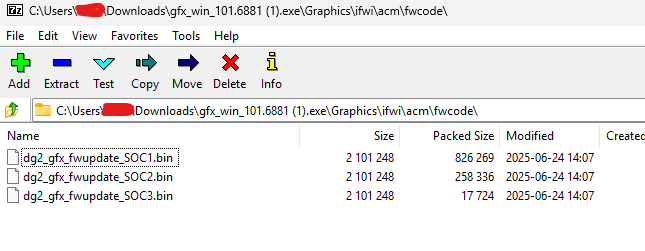
But I dont think that’s the correct file though …
root@pxvdi01:~# xpu-smi updatefw -d 0 -t GFX -f dg2_gfx_fwupdate_SOC2.bin
Device 0 FW version: DG02_1.3271
Image FW version: DG02_2.2357
Do you want to continue? (y/n) y
Error: The image file is a right FW image file, but not proper for the target GPU.
If your current firmware is DG02_1 then use the SOC1 bin file. I suspect the firmware “flavor” may be different if it’s a 170 since they have some significant differences.
What a huge brainfart …
root@pxvdi01:~# xpu-smi discovery -d 0
+-----------+--------------------------------------------------------------------------------------+
| Device ID | Device Information                                                                   |
+-----------+--------------------------------------------------------------------------------------+
| 0         | Device Type: GPU                                                                     |
|           | Device Name: Intel(R) Data Center GPU Flex 170                                       |
|           | PCI Device ID: 0x56c0                                                                |
|           | Vendor Name: Intel(R) Corporation                                                    |
|           | SOC UUID: 00000000-0000-0000-61a4-e0fd7e5afba5                                       |
|           | Core Clock Rate: 2050 MHz                                                            |
|           | Stepping: C0                                                                         |
|           | SKU Type: Production PRQ                                                             |
|           |                                                                                      |
|           | Driver Version: 1.25.2.25.250224.31+i37-1                                            |
|           | Driver Package Version: 1.25.2.25.250224.31+i37-1                                    |
|           | Kernel Version: 6.14.8-2-pve                                                         |
|           | GFX Firmware Name: GFX                                                               |
|           | GFX Firmware Version: DG02_1.3266                                                    |
|           | GFX Firmware Status: normal                                                          |
|           | GFX Data Firmware Name: GFX_DATA                                                     |
|           | GFX Data Firmware Version: 0x492                                                     |
|           |                                                                                      |
|           | PCI BDF Address: 0000:03:00.0                                                        |
|           | PCI Slot: N/A                                                                        |
|           | PCIe Generation: 4                                                                   |
|           | PCIe Max Link Width: 16                                                              |
|           | PCIe Max Bandwidth: 31.51 GB/s                                                       |
|           |                                                                                      |
|           | Memory Physical Size: 14248.00 MiB                                                   |
|           | Max Mem Alloc Size: 4095.99 MiB                                                      |
|           | ECC State: enabled                                                                   |
|           | Number of Memory Channels: 2                                                         |
|           | Memory Bus Width: 128                                                                |
|           | Max Hardware Contexts: 65536                                                         |
|           | Max Command Queue Priority: 0                                                        |
|           |                                                                                      |
|           | Number of EUs: 512                                                                   |
|           | Number of Tiles: 1                                                                   |
|           | Number of Slices: 1                                                                  |
|           | Number of Sub Slices per Slice: 32                                                   |
|           | Number of Threads per EU: 8                                                          |
|           | Physical EU SIMD Width: 8                                                            |
|           | Number of Media Engines: 2                                                           |
|           | Number of Media Enhancement Engines: 2                                               |
|           |                                                                                      |
+-----------+--------------------------------------------------------------------------------------+
Flashed out of lack of paying enough attention a FW which is older in the latest driver than it was on the card … damn …
Please let me know if you manage to pass sr-iov prechecks on your system
I’ve submitted a PR to the xpumanager repo. That SR-IOV message pops up when the number of total_vfs is 0, and may not indicate actual problems with SR-IOV on the system. I have a feeling that I’ve done something wrong with the driver and that’s why I have 0 vfs in that file. Hopefully that ends my wild goose chase and I can focus more on why the drivers don’t seem to be loading quite right, despite seeing messages saying that they are.