Yep
3 Likes
I just wanna say that I love this stuff and cant get enough. 
1 Like
yep.
just thought it a bit odd is all. didnt know it was a feature of the forum and your membership.
2 Likes
Well, I had weird behavior here, the File Explorer came up in a remote app, sure, then it shrank and rapidly left my screen in a downward direction. Error in the XRDP terminal window was something about recursive X11.
Edit: “recursive lock from xf_UpdateWindowArea”. Got it from both versions 2.20 and 2.3.2.
1 Like
Having the same. File explorer opens in a small window and trying to resize causes this behavior though it moves to the right for me.
2 Likes
GoFundMe for the devs when?
2 Likes
Have they acknowledged your video/guide yet?
2 Likes
Not that I’m aware of
1 Like
I’m having the issue in both awesomewm and fvwm, don’t have a full desktop environment installed here though, do you think that’s it?
(My system is running Gentoo because I wanted to see what it was like on a Threadripper system with an optane ssd build-drive, but even then KDE and GNOME are going to be annoying, GNOME because of its reliance on systemd doubly-so.)
1 Like
I’m experiencing the issue on KDE though I can usually stop it by interacting with the “moving” window by dragging it or resizing it (while holding alt and mouse button).
1 Like
Thanks Wendell for making this guide/video, there is a lot of potential here to help Linux users who want Windows apps.
I’m wondering why was RDP used over SPICE or VNC? Is RDP the only protocol that can run Windows apps on Linux in seamless mode?
Does anyone know if it’s possible to follow this guide for a GVT-g hardware accelerated VM? I want to try it out myself because it theoretically sounds amazing for Intel laptops.
1 Like
Since RDP is built into Windows it received support for “remote apps” from MS. Same can’t be said for spice or vnc which are purely open source projects and still have work to do to fully support their main focus which is screen sharing. VMWare had the best chance and financial support to offer this kind of seamless experience but they dropped it.
3 Likes
I might be missing something basic … how do I know the IP address to use in the xrdp command? When I do ipconfig, I get a strange IPv4 … 10.0.2.15, which I’m sure is just some virtual IP address that the host can’t touch.
I am running Ubuntu 21.04 (Wayland) as the host OS, Windows 10 Pro as the guest. I haven’t activated Windows, as I just set it up for testing.
I have set up Windows Explorer as a RemoteApp inside the guest.
1 Like
the host can see the “virtual ip” (should be able to) so if you get the ip of the guest it should work from the host (only the host). You can enable bridge mode networking in the guest and it’ll get an ip on the same subnet as your host if it is giving you trouble.
1 Like
Thanks for writing back! A big fan of your videos, and a recent migrant to Linux from Windows, so I apologize for my basic questions.
I’m using Gnome Boxes to do the local Windows 10 VM. I can’t seem to locate anywhere in the properties where I can see the virtual IP.
Perhaps Boxes can’t do this? A search didn’t reveal much, but an answer (can’t link unfortunately) on Unix Stack exchange seems to suggest that I need to move to virt-manager?
For sure bridge mode networking is not easily enabled in Gnome Boxes.
1 Like
Thanks for this.
I have been experimenting, and have difficulty with the following: I try to pass through a USB Bluetooth dongle to the Windows 10 Pro guest. I don’t know how to pass it through except using the Spice console display, but then I close the Spice console display window and connect by RDP protocol, the passthrough stops, reverting to the host, not the guest. Do you have any tips on USB passthrough when accessing applications by the method you’ve described above?
The problem of USB device passthrough ending on closing the Spice window is common to any USB device I connect, not just the Bluetooth dongle.
Don’t connect it via spices usb redirection feature. If you use libvirt (virt-manager) it has built-in usb ‘passthrough’ which then requires it upon boot and will stay passed through till you disconnect it or shutdown the VM.
Thanks @Celmor
I have been looking long and hard for such a thing, and I still have not found it. I must be overlooking it, and I’ll kick myself when I finally spot it.
The only “redirect USB device” I can find is through the spice display console window. No such option presents itself in the virt-manager GUI, only the spice console display window and only when the VM is running. Where do I find this, or is there a command line option to accomplish the same?
 My goal is to be able to plug a USB bluetooth dongle, thumbdrive, webcam, scanner, etc into the host (which happens to be Fedora 34) and make it available to the guest (which happens to be Windows 10 Pro) as and when needed. I had this set up previously on Fedora 31, with Windows 10 (not pro) guest, but was only using the spice display. Non-pro Win 10 made RDP unavailable.
There are three reasons I use Windows at all:
- I log into a remote desktop for my day job (which is preparing construction contracts)
- I need MS Word for my side gigs. LibreOffice or other alternatives can’t be used – it’s a long story.
- I still use iTunes to manage my music on my phone, as I have a large collection of albums going back 40 years. Yeah, I know – foolish old guy clinging to his physical media.
I have been using a Windows 10 home edition VM for a few years for items 2 and 3, and was using it for item 1 for a couple of months, but the RDP to my company desktop won’t allow me to choose a window size except full screen, or a resolution, or a display scale factor if I connect to it with Windows 10 home, only if I use Windows 10 Pro. Who knew? I discovered this by trial and error in various VMs and on an old laptop I used to relay RDP over my home network.
1 Like
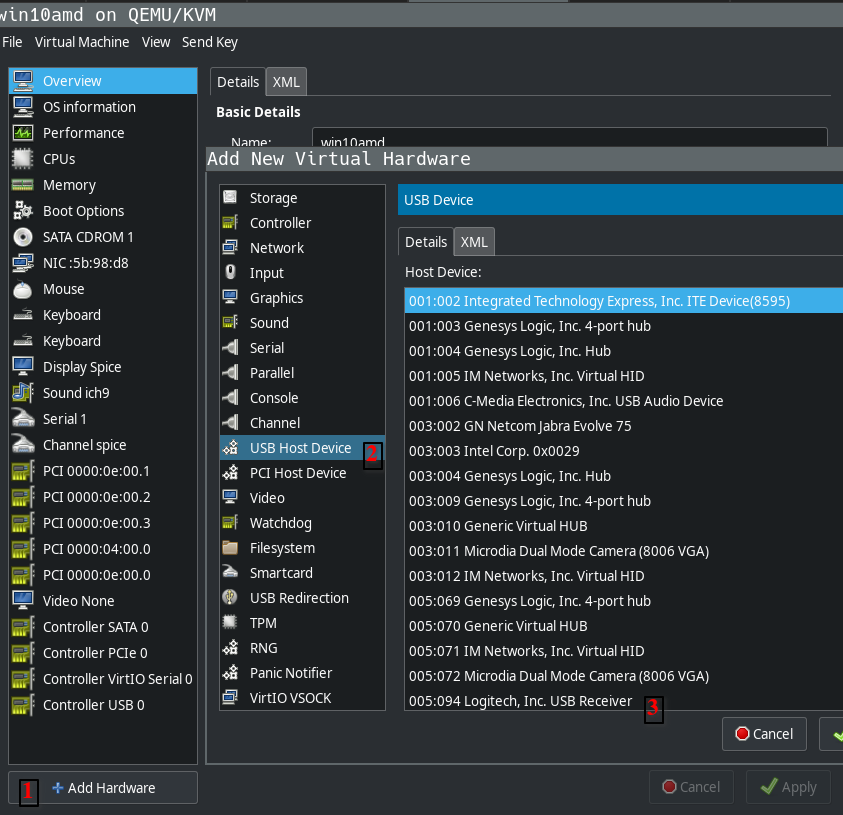
Make sure you connect to qemu:///system in virt-manager
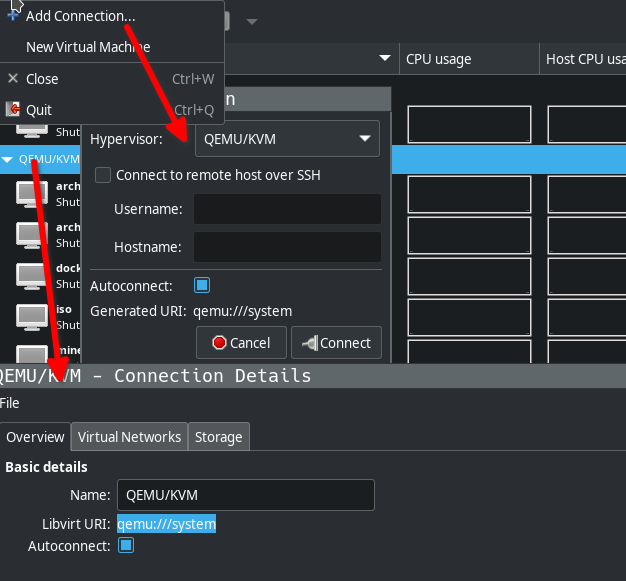
I have something similar, as sort of work vm, but I pass through an entire usb controller (PCI device) to which I connect Level1Techs KVM (thanks for that!) and have my peripherals switched between host and VM.
2 Likes
Success, thanks!