Mine is in a T320 case, because I found it on the side of the road and it has stand-offs for many board hole variations. Wish down draft coolers comparable to the Noctua C14 could be had for cheap; that with their industrial version fan would be pretty good.
since this
Need these:
- ECC
- Good IOMMU groupings
- 4x4x4x4x bifurcation
- Enough PCI slots/lanes for:
a. GPU (for NVR encoding of camera streams)
b. SATA HBA card to passthrough all HDDs to TrueNAS
c. PCI-to-M.2 card for a 4x Optane array ( 2x mirrors of 2) which is also what I need 4x4x4x4x bifurcation for.
d. 10Gbe NIC if the motherboard has a slow built-in NIC or a 10G built-in NIC with non-Intel chipset (it seems, from my research, that both Realtek and Broadcom chipsets are hated for 10G networking)
epyc 8-16 Core Rome and above, there are some nvidia tesla p4 out there for 90€ ish or even an ARC GPU AV1?
10Gbe is more than affordable even on Mellanox NICs and they mostly are sriov’able (what you want in VMs)
According to this post here:
Does QuickSync matter with direct-to-disk recording? | IP Cam Talk
Quick Sync was basically designed for the purpose of decoding ONE video stream and re-encoding it as quickly as possible. (such that you could transcode a 2 hour movie in a matter of minutes)
Does it mean QuickSync is not suitable for multi-camera encoding direct to disk?
Also, I would not be able to pass it through to 2 separate VMs at the same time (e.g., JellyFin AND BlueIRIS), correct?
Is it safe to buy these Chinese cards?
Also, is there a huge speed and latency overhead due to PLX switching? Or any other issues?
My head was already hurting from all the data and multi-variable constraints. The new options do not make it any easier. I also have work crunch and family obligations, so apologies in advance if it takes me time to respond to any of you guys - I literally do not have enough ours in my 24/7  .
.
Thank you for the ideas! I will need time to process it.
Oh I understand. It’s a lot, especially when new.
I vaguely remember some creative use of VLC (media player). not the biggest fan of networking out of PC to go between VMs, but that’s a thing that can be done. If you can find the right info, might be able to adapt Looking Glass in some way; that;s intended for a very direct path of transferring frame buffer from VM to host.
The lane count is the part I am most confused about.
According to this:

The max count on B650 is 36. Is that not true, or am I misunderstanding the chart?
X670 is even higher, but questionable IOMMU according to threads here.
Also, according to this manual:
E20246_ROG_STRIX_B650E-E_GAMING_WIFI_UM_WEB.pdf (asus.com)
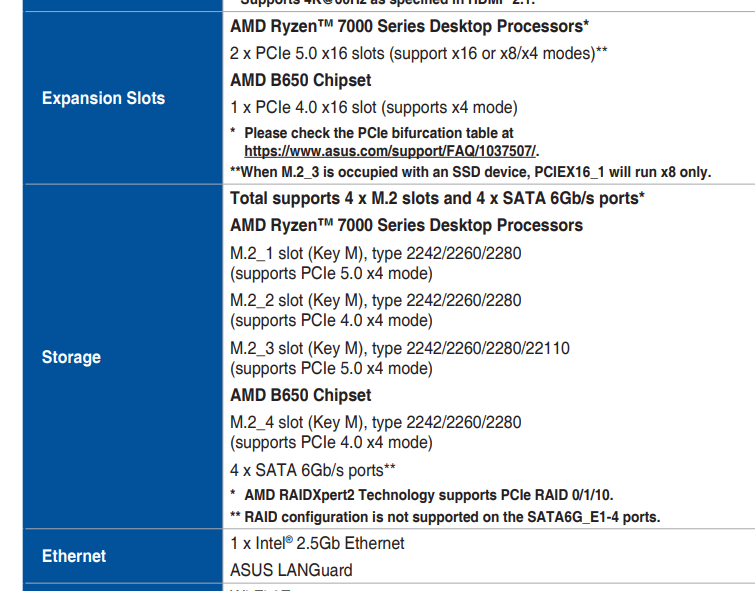
There are THREE x16 slots (2x PCIe 5 and 1x PCI 4).
And only 1 of these slots competes with only one of 4 M.2 slots.
Isn’t it way above the 28 limit you mention?
3x 16 is 48, no? What am I missing?
Also, can I connect TWO x8 PCIe cards (say, one HBA controller and one 10Gb NIC) to the same single x16 PCIe slot on the Mobo?
Do such adapters exist?
Tried googling, and got confusing/contradicting info.
Read further…x16 “supports x4 mode”. Means it’s a long (x16 long) plastic slot with 4 lanes connected.
These are the tricks to sell boards to appear to have more than they actually have.
The x16 slot can be split into x8/x8 I think. It’s a wierd notation even for board vendors.
And in case you use x16 on the first slot, the second slot drops to x4 (chipset lanes).
Thank you…
I though it meant that it can work in 4x4x4x4x bifurcation mode.
This is why this stuff is confusing - they proactively try to confuse you with these marketing gimmicks.
1 Like
How many lanes does a 10Gb NIC need?
They are usually PCIe 3.0 x4 cards. Older ones can be x8. There is virtually no PCIe 4.0 NICs with 10Gbit+. Even 100Gbit NICs run on 3.0 x16
Typically have have gen 3 x4. But gen 5 x1 would be about the same. 1 gen 3 lane is like 8Gbit - some overhead. Each gen roughly doubles per lane bandwidth.
I live in an apartment, so noise is of concern (don’t have a basement to keem the server in). I read that server cases are very noisy, like a jet plane. So, I already bought DEFINE 7 XL case. It’s huge size wise. But as far as the form factor itself – can it house all these Xeon/Rome/Epyc builds you guys mentioned?
But there are no such cards and there probably won’t be for a long time. We don’t even have PCIe 4.0 cards atm except for some expensive Intel NICs.
It’s about what fans you put in there. If you buy a new server from the OEMs or some old enterprise gear off ebay…yeah, that’s datacenter mode noise. If you build it yourself, choose silent fans? A case itself doesn’t produce any noise, it’s just metal and plastic.
In my server, I only hear the HDDs.
The ones I linked are standard ATX size. Throw a big cooler on it, and just fill your case with fans that aren’t complete garbage.
so, 28x lanes is the hard limit of Ryzen? Motherboard cannot add any more somehow?
If so, can I run GPU with x8 lanes just to encode streams from multiple cameras and JellyFin?
Then 8x for HBA.
4x for 10Gbe NIC
and just use Optane directly on-board via 4x M.2s for the Optane array without a PCIe-to-M.2 card like Asus Hyper V?
Or will Proxmox passthrough of those directly-on-MoBo-Optanes not work without the PCIe card?
Dying here. 
What is the lane limit for the Intel’s i-Core CPUs on 1700LGA platform?
Also, can I connect 8x HBA card and 4x 10Gbe NIC to the same PCIe slot somehow?
Thank you guys!
The number to focus on for that, is 20. Older mainstream, 16. Older (2011 socket) Xeons, 40. Anything that says those have more than that, are counting bullshit chipset lanes. Chipset lanes are good for bullshit, like a sound card, 1 Gig NIC, anything totalling up to 4 lanes, but that includes motherboards integrated ports, like SATA and networking. Some newer stuff has more than gen 3 x4 bandwidth, but I don’t remember enough specifics to way which has what.
To keep it simple, don’t consider chipset lanes. Just don’t.
check out those chipset block diagrams. They are comprehensable and show how those lanes are connected
this is an easy one
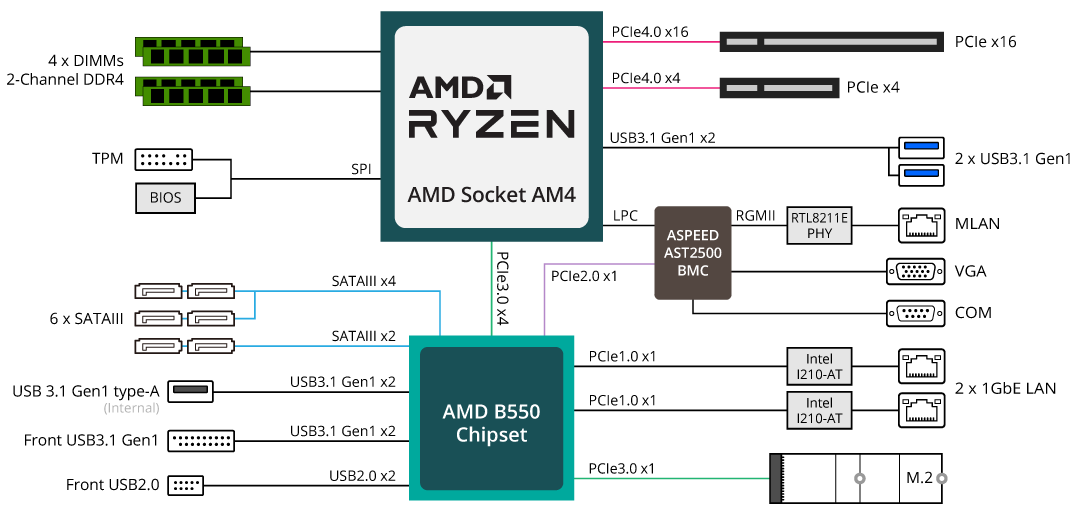
basicly a CPU provides PCIE lanes and a Chipset brings it own PCIE lanes with it BUT no matter how much PCIE Lanes the Chipset brings, it connected with a PCIE 3.0 4x Lane to the CPU.
1 Like