Hello there,
I’ve been encoding some videos with AV1 using Handbrake witht he AV1 SVT encoder which uses your CPU. I recently encoded a video that was for a tutorial, for which I would like to have the user be able to quickly seek between different points in the video, because I timestamp them to the different parts. This way the user can go back and forth quickly between the sections they care about.
Unfortunately, on the last video I encoded, when one jumps to some of the timestamps, it takes a noticeable time to buffer before it loads. I had this in the past with some defaults I had with webm, and with that I found that the fix was to configure the “max interval” or GOP size, so that there was never a long time between keyframes. That way if one jumped to a certain point in a video, there was usually a keyframe close-by in the past, that the video would start from internally, before working through the intermediary frames and starting at the point you wanted.
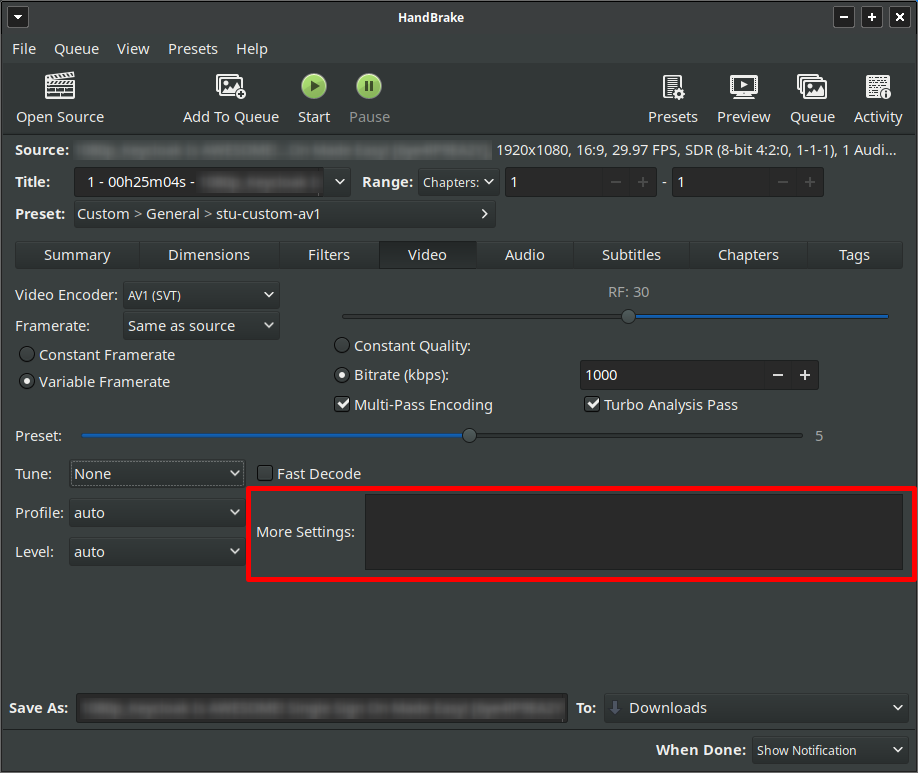
Does anybody know how to configure the max “I-frame” interval or the “GOP” setting in handbrake? I’m guessing that I need to put some custom text in this box:
Keep in mind that Handbrake is mostly a GUI that wraps other encoders. For AV1 it appears to use the SVT-AV1 encoder, so maybe look at --keyint here - https://gitlab.com/AOMediaCodec/SVT-AV1/-/blob/master/Docs/Parameters.md.
Also I’d suggest looking into “Constant Quality” encoding if you don’t have a hard size to meet. It’s always given me better results for other formats, and you don’t have to think about resolutions and bitrates.
Also just to check, what mux format are you using. MKV? Whatever you do just don’t use AVI.
Thanks for your help. I have added --keyint=120 to the More Settings: box and have started the encode (which will take some time). FIngers crossed it works. To be able to check/test that it works, I figured out how to use ffprobe to output the keyframes, and ran this on the original video. It appears my kefyrames were pretty consistently 10 seconds apart, which would explain the issue I was experiencing. With the video being 60ps, setting a value of 120 should mean the keyframes are 2 seconds apart and I reckon this will have a noticeable impact.
The container output format I am using is MP4 which has worked well so far for me putting videos on the web for playback. This should work in the latest versoins of Safari, Firefox, and Chrome/Chromium.
Ah yep, MP4 works too. AFAIK AVI doesn’t have an index of time codes, so anything seeking related is worse than MKV and MP4.
Also if you haven’t seen it, MediaInfo might show you the info you’re looking for.
1 Like
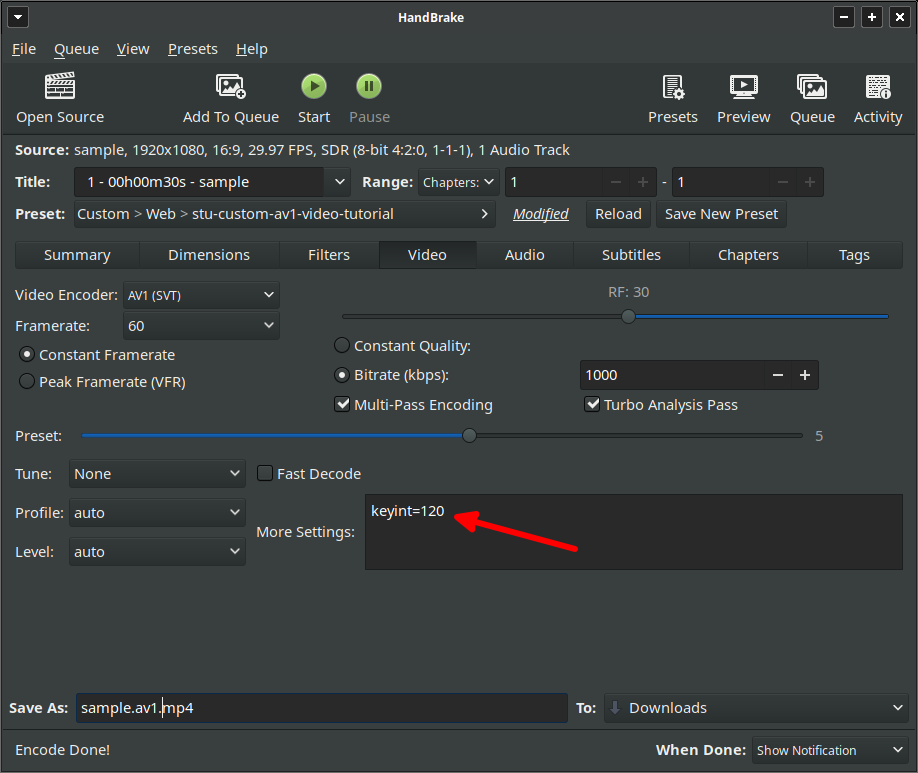
So it turns out I was slightly wrong and one should not include the -- and then it works! Just to make things easy for people all one has to do is add the text as shown in the picture below where 120 represents the desired number of frames between keyframes:
I made sure to check/test the output with ffprobe and the frames are at 1, 121, 241, 361 for 0, 1, 2 seconds etc.
Just a heads up that Handbrake never outputs constant framerate even if it says it does. If you check Mediainfo later it will always say it’s variable framerate.
A better FFmpeg frontend is FastFlix:
Hey all,
sorry to bring up an old thread, but I noticed that when one specifies keyint=120, then the keyframes are always exactly 120 frames apart, regardless of what is going on in the video. I would like to be able to set the “max” possible number of frames between keyframes, not the exact interval. I have been trying to attach other parameters such as enable-dg=1 as outlined here, but haven’t been having much luck.
Does anyone know how to specify the max distance between keyframes, but allow the video encoder to choose whether it wants to have keyframes more frequently than this if it makes sense? e.g. i could set keyinto to 120, and it may choose to put a frame at 1, 100, 220, etc. Those distances are never more than 120 apart, but are variable.