
1 Like
fwiw it seems like they had it over a year ago too https://www.youtube.com/watch?v=TYOkJFOL5jY
there appear to be some Azure instances available with the MA35D, I am hoping to get on eventually to test it out
Numbers from this video? Please give a TL;DW.
… Dude
Sorry, I only want the data.
So you want me to go back and watch the video again and take notes for you then report back… get real.
I’m happy to share a link to the video I found because I was also interested in the content and thought others may share that interest but I’m not your secretary.
I’m sorry, but there’s currently very bad blood between me and this creator and I’d rather not with the drama and just want hard data. The anger actually led to a meltdown big enough to result in an eviction from my previous place of living.
If you don’t wish to do that it’s fine too. I’ll just never know the data.
How close to the Alveo is it? if it’s very close that’s actually impressive.
… Dude
I think these are the relevant moments from the video
fwiw I dont really know the significance of these metrics myself, especially since the video files in question were video game live stream clips so it may not be as comparable to something like your saved movie and TV show episodes
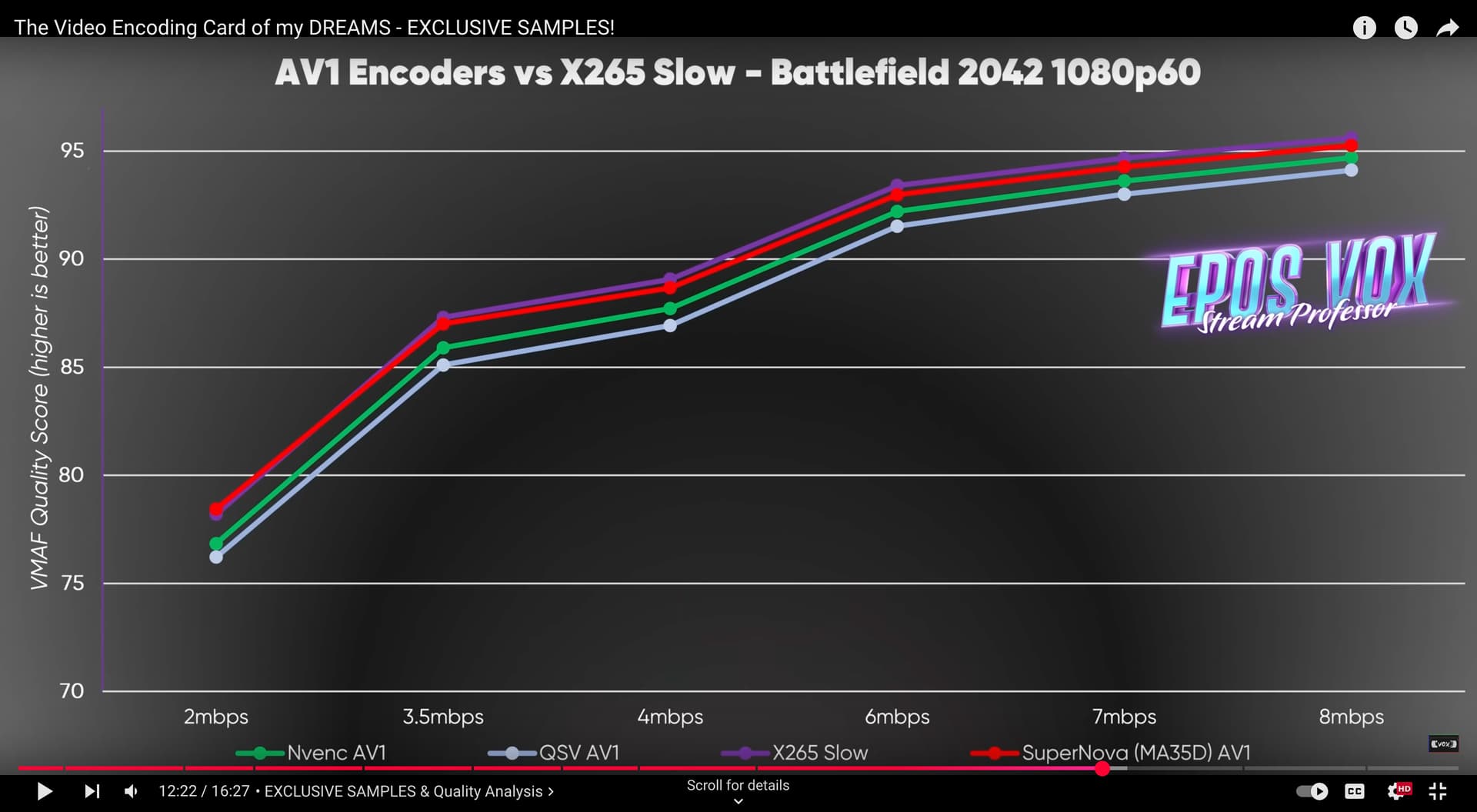

Anything from the 9070 to compare? I know the Alveo is REALLY good.
that video came out a year+ ago so it predates the new Radeon 9070 by quite some time, and I have not seen many other resources or videos on the AMD MA35D to use as comparison.
However there appear to be some MA35D instances available on Azure https://techcommunity.microsoft.com/blog/azurehighperformancecomputingblog/introducing-the-azure-nmads-ma35d-exclusive-media-processing-powerhouse-in-the-c/4262008 so I did have a plan to eventually attempt some benchmark tests on there which might hopefully be usable to compare with the more recent AMD GPU’s such as 9070
Yeah, a more broader range of test footage with indexable graphs and data in a blog post would be extremely useful. I look forward to your data. I personally am just looking for VMAF graphs for the 9070 at the moment cause my current plan is to use the RDNA 3.5 of the 8700G.
Can someone explain to me what the advantages and/or disadvantages of deinterlace filters’ (bwdif specifically since it seems to combine the best of every other filter) send_frame vs send_field are? And subsequently why send_field is the default?
I know roughly what they do but I don’t see much of a practical difference.
The ffmpeg docs say:
mode
The interlacing mode to adopt. It accepts one of the following values:0, send_frame
Output one frame for each frame.1, send_field
Output one frame for each field.The default value is
send_field.
Searching around I find posts like this on reddit:
Never use bwdif=mode=send_frame. Always bwdif=mode=send_field
- random chatter joins the room
- leaves definitive statement
- does not elaborate
- leaves
Thanks, I guess? Anyway, onwards…
Since the whole point of deinterlacing is building a full frame from 2 half-frames (fields), sending a full image per field would result in 2 frames per frame, no?
This post seems to agree, but doesn’t elaborate on why one would use one over the other either:
0, send_frame → Output one frame for each frame.
=> So the filter will first create one frame per field and then drop one of the interpolated fields. <> same-rate-deinterlacing.)
1, send_field → Output one frame for each field.
=> So the filter will first create one frame per field. <> double-rate-deinterlacing <> bob-deintelacing.
“bob deinterlacing” seems to refer to another deinterlace method that is very simple, but also not very effective, as per ffmpeg docs:
‘bob’
Naive bob deinterlacing, simply repeat each field line twice.
Which I don’t see how that applies given that the frames are already deinterlaced and therefore “full” frames?
As a practical example, I ripped a couple episodes of an animated series from a PAL-DVD. So the original file is 576i50, i.e. 25 frames per second, and therefore 50 fields per second:
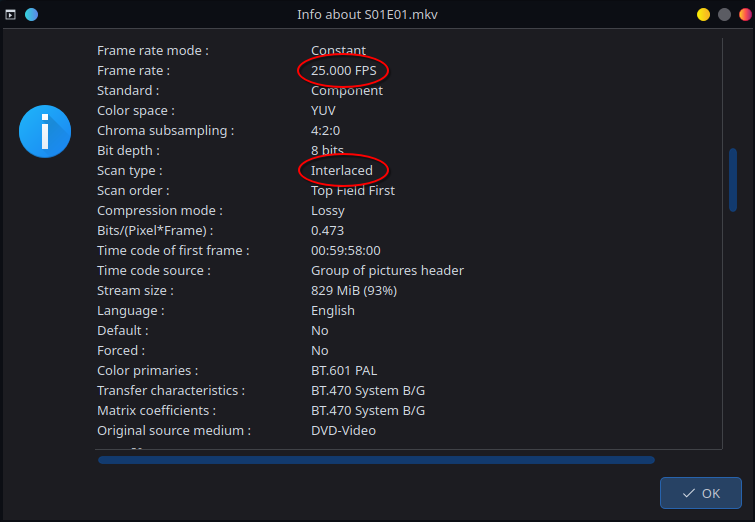
I ran this through bwdif once with send_field and once with send_frame, and the result is as expected:
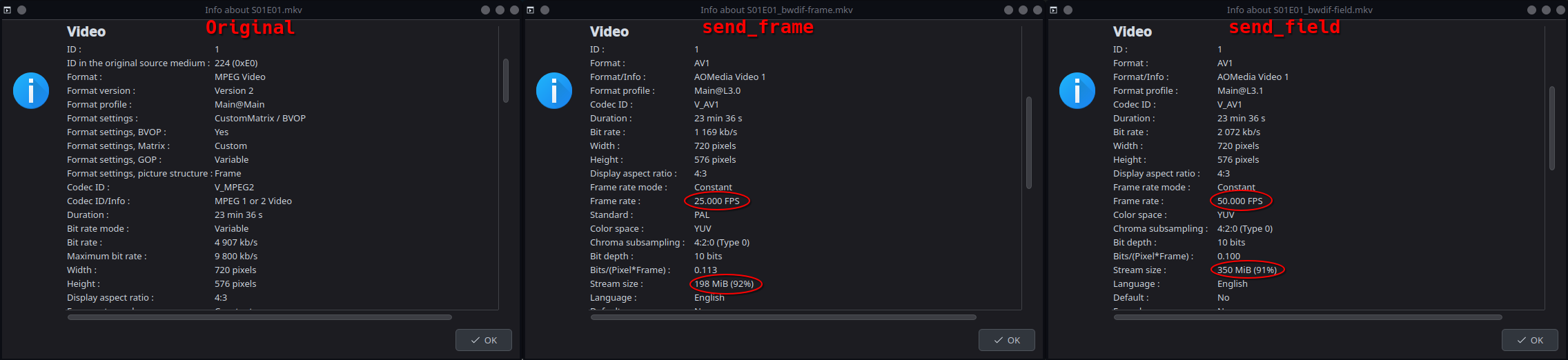
So as expected send_field has double the frame rate because it’s delivering each deinterlaced frame twice, i.e. once per field.
This results in a significant (well… as significant as SD resolution can be) increase in filesize, but watching the video I don’t really notice a difference.
In fact when going frame-by-frame the send_field variant seems to look worse, but it’s not noticeable during normal playback.
So what exactly is the point of this? Going back to random reddit chatter, why are they convinced to “never use send_frame?” What are the downsides? I don’t really get it.
Also crossposted to the Video Stackexchange, but no luck so far 
Animated content is poor source material to expose the benefit of saving an entire frame per field because the content is inherently progressive. Similar issue with film but telecine complicates the issue. Using send_field can retain more temporal resolution but that temporal resolution generally doesn’t exist unless the content was recorded by an interlaced video camera.
Ideally using send_frame reconstructs a series of progressive images from pairs of fields. Fields from two different images can accidentally get re-combined which is why deinterlacing filters sometimes have an even/odd setting.
In contrast to interlaced content created from progressive source material some interlaced content is captured the same way it’s presented. First one field then the next. Deinterlacing content that was recorded interlaced using a complete frame per field retains the temporal resolution of an interlaced recording at the expense of doubling the spatial resolution.
1 Like
Hm ok that’s kind of what I figured.
But that also means that realistically using send_frame is the right choice in most cases (for commercial media), since the original filming will have been progressive.
I mean especially in the NTSC/PAL/(RIP SECAM) era pretty much evrything commercially available will have been filmed on film and not digitally, so unless the digitization was interlaced for some reason, the source material would have been progressive, no?
Which would also invalidate randomredditor123 and it seems in most cases send_frame is the logical choice.
I guess the default in ffmpeg makes sense though because they can’t know what the source material was.
It really depends on the source material. For content that was created from a progressive source that was interlaced by creating two fields per frame (which does cover a lot) deinterlacing using send_frame is ideal.
Unfortunately a lot of filmed content doesn’t just use two fields per frame because interlacing and frame rate conversion are often part of the same process. To reconstruct filmed content properly rather than deinterlacing the process needed may be more accurately referred to as detelecine.
Yeah, that’s exactly the problem. Not knowing how interlaced content was created makes undoing it challenging. Even when it’s not ideal creating a frame for every field often tends to work better.
It’s all a bit of a mess…
1 Like
I have been suffering migraines on a routine basis. So if grammar and punctuation are poor just let it be. Or you can help me read and help me fix the mistakes.
Anyways. The below is my up to date guide for av1 (what I use personally in 2025). I used libaom between 2021 and 2025. In march of 2025 I switched to svt-av1. A much faster option for cpu encoding. All the while looking better and reducing file sizes more than gpu encoding.
1 Like