Due to a friends influence I ended up wasting money on an anime figure, so I decided to do something interesting with it.
I once made a Lego turntable and since Lego later made some specialized parts for this I have been wanting to try this out again. So my plan was:
- Make a turntable
- Put figure on top
- Record a video of it turning
- Plop it on a website with a slider making it look like a 360 view instead of a video
TLDR: Final result: Kurisu spin
Turntable
The piece I wanted to use are these 11x11 curved gear racks. With those you can make a 21 studs wide turntable which is enormous compared to Lego’s old turntables which are 5 studs wide. The problem with those 5x5 turntables is that they can’t handle much load unless it is completely centered in the middle. So my old design used wheels instead (8 of them for bragging rights):
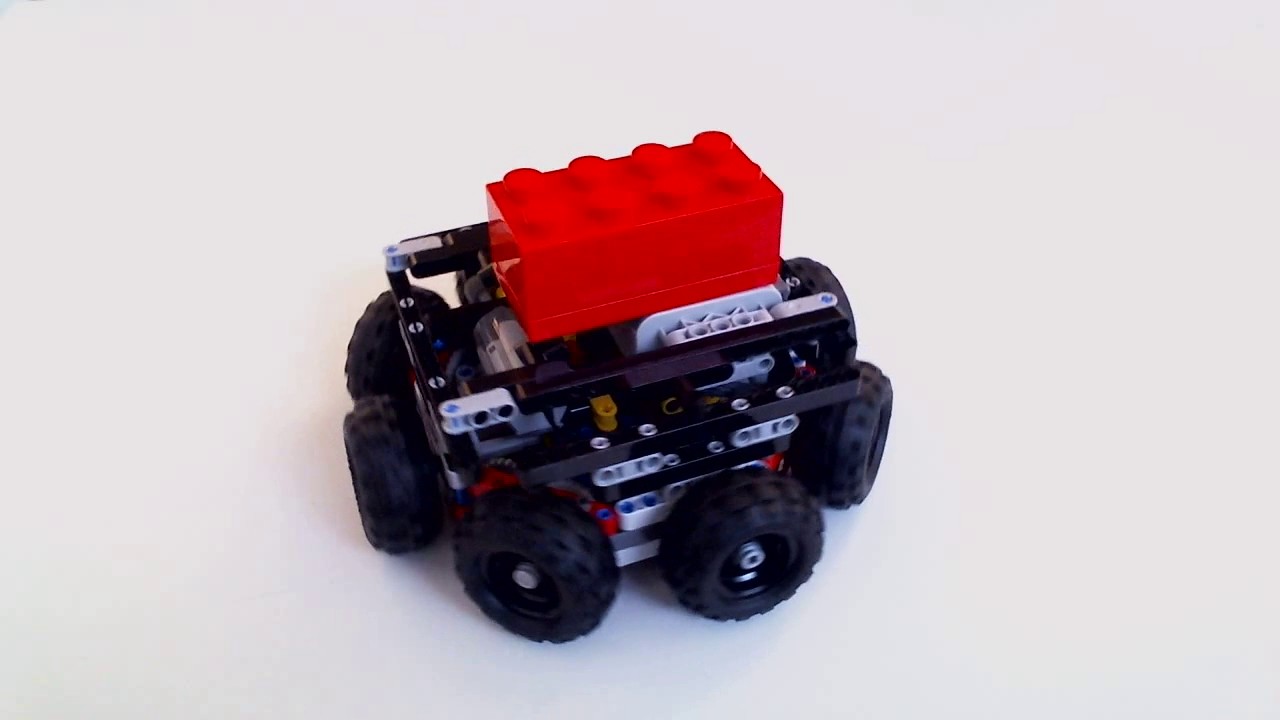
This was inspired by a much older creation of mine btw: http://www.brickshelf.com/gallery/Spiller/RoboArm/v0.1.1_-_1.jpg
My first try (shown below) was a complete failure. While it wasn’t hard to make it turn, the motion was not smooth. With a tall figure on top it was especially noticeable. I tried a few different things, but I couldn’t figure out what was causing it.

I then tried my old solution using wheels which does not require as many moving parts. The issue however persisted. I noticed however that the knob wheel which I like to use for transferring power across 90 deg angle gave an uneven transfer of power if they were not hold completely in place. They are gears with 4 teeth and each time a teeth connects it would move the gear back and forth. However using a gear with 12 teeth instead (the black gears in the middle of the image below) did not resolve the issue either.

So I gave up the motorized version. (I did not try using grease, but I would rather not have to use it.) So I made it with manual turning, using the 4 teeth knob wheel seen to the right to make it easy to turn it an consistent amount.

Photo shooting

A light box would be perfect for this, but since I don’t have one (nor any proper lights) used my old trick of using an unused blackout curtain to create a smooth background. My room light is shining shining upwards and reflected on the ceiling, which seems to have avoided hash shadows. This was far from an optimal setup, but it worked much better than I expected.
I quickly noticed that the images did not have consistent light levels. I don’t know if it was the slight movement when handling the camera or small variances in the light level from my lamp, but the shutter speed would differ in some images. So I put the camera in full manual (for the very first time) and took the images by tethering it to my computer.


I took 50 images which resulted in 47 unique images. I used RawTherapee to process the images and since the images were consistent due to the manual settings it was quite easy just to batch modify everything.
After fixing the white balance the images looks decent. I’m quite uncertain on how to find the correct white balance though, especially since my monitors currently are not calibrated. But even with calibration it feels like once you find something nice on one monitor it doesn’t look right on the other one… Any help on this would be appreciated.
Things I would like to improve if I tried this again:
- F-stop were not sufficient in some images. I should have done test shots from several angles before taking 50 images.
- A slight blue tint appears on the reflective base in some images which might be light from my computer monitors.
- I should try to cover up the turntable with something. I did not see it as an issue when shooting, but now I think the Lego parts really doesn’t fit into the image…
Webpage
I wanted to get some experience with making UI with JavaScript. (I mainly use C++.)
The idea was to use HTML 5 video to do the heavy lifting and use seeking to rotate the image.
The images were encoded to a video using FFMPEG. One thing to watch out for however is seeking performance, as video players usually are not optimized for playing backwards. Compression schemes such as H264 use keyframes containing the entire image and predictive frames using content from previously decoded frames. To seek to a predicted frame you need to first decode all the frames it depends on. To improve seeking performance to can limit the maximum amount of predicted frames with FFMPEGs -g option which defaults to 250. I used 10, but it is a tradeoff between seeking performance and file size.
For moving and zooming on the video element I tried to use the jquery based panzoom library. It worked, but I noticed I started spending a lot of time trying to figure out how to get it to do certain things and eventually decided to drop it and just implement it myself. It is not really that complicated since the browser is doing the heavy lifting.
If someone could look at the JavaScript code and give me feedback on what not to do and best practice I would appreciate it a lot since I’m quite green at JavaScript.
I tried Font Awesome for the icons, but since it constantly restricts you by requiring a Pro plan randomly for some icons I quickly got annoyed of it. Looking for alternatives I found Material Design which are completely free and also have a large variety of icons as well. I really like the way it uses font ligatures to turn a piece of text like “cake” into the corresponding icon.
Result
You can try it out here: Kurisu spin It is a 4K video (portrait orientation) so you can zoom in quite a bit. It did not work on my mobile so there is a 1080p verision here: Kurisu spin
Further ideas
- Try to convert the images to a 3D model. Seems like the available software do not support the turntable approach though.
- Use video interpolation to smooth out the video