So when questioned for a source you have alluded to there being mythical information on MSDN about how UAC’s design principles have changed, but declined to cite a specific source and want me to take you seriously?
Claims without sources or that are not easily verifiable have no merit.
Perhaps not, but it is certainly wanted when prompting the user for information that must be secure, such as credentials. Any security product worth its salt uses the secure desktop for data entry by the user.
Elevation does not ever give you access to interact or hook the secure desktop even if you’re application is the one using it. The only caveat to this is if your program has been signed as an accessibility program by MS as stated earlier.
Turning off UAC also turns off the “Dim the desktop” feature, which IS secure desktop and as such by turning off UAC you are also compromising the “Secure Desktop” feature which IS both designed to be and is a security feature.
Is this a design flaw? Yes! No doubt about that, turning off UAC should not cripple the Secure Desktop security feature. Is it worth turning off UAC to avoid it’s “broken by design” prompts with the side effect of crippling a real security feature? NO!
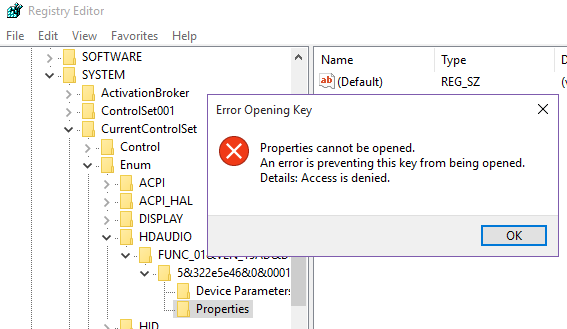
I am not saying that UAC prevents you from viewing a key, I am saying that even a trusted signed executable when given full elevation by UAC still can not get total and complete access to everything, there is still a limit to what UAC can allow. As an example key, try accessing any device’s Property key under:
The difference between a troll and someone having a conversation with you is that a troll will never admit they are wrong or do trolly things like changing the goal post when they burden of proof is met.
So here is the burden of proof to change my mind on this topic:
Demonstrate that UAC provides an effective means of managing security boundary for these cases:
Domain user needing occasional elevation
Domain user not needing elevation
Local user needing admin rights (e.g. initial system setup)
Local user with a single application/purpose in mind (steam)
local user with multiple applications for their computer system
temporary VMs
long-standing VMs
Security means both OS security and Data security, which is why depending upon the importance of each, one user may choose to leave it enabled, and the other disabled. Or in contexts like #1 or #2 where local data security is meaningless that it should not be used as the basis by which one could say it should be disabled. Conversely, on say #3 and #4, It makes more sense to disable it because UAC interferes with the basic functioning of the system presented in those scenarios. OS security is meaningless in those contexts and especially meaningless in #6. #5 is a toss-up.
As I have said all along: there are cases where it makes sense to disable it and the user’s preferences should take precedence in all cases. Context is important!
Keep in mind that this thread started when @thro quoted me out of context saying that UAC should be disabled in scenario #3 and I did not back down on that claim that it is pointless in that scenario. #5 however, is a tossup, and I am not saying users within that context should disable UAC if they feel it is a benefit to them. However, since it does not provide any protection against data integrity, VMs should be used instead.
Can we at least agree that UAC should be disabled for #6?
I am not in a place to do that right now. Hence why I said that you can sign up for Microsoft’s Developer Network and look at their published documents about programming with UAC in mind.
But yeah, I am a person on the internet, you should never take anyone seriously. I think that we are no longer having a discussion.
Screenshot is from on an an old Win 10 LTSB I booted up. I tried it on Win 7 VM with UAC off and it gives the same error. The error does not seem related to how UAC functions regardless of being enabled or disabled, so these OS protections that Windows has are not an example of “a limit of what UAC can allow” because it is not UAC allowing/not allowing it, but rather the underlying OS irrespective of how UAC is configured.
I do understand that Windows has designated APIs (pub/priv) for how to interact with its structures, especially kernel ones. However, I am curious how much of what you posted above is genuinely related to UAC, and how much of this is offtopic. If the setting does not change regardless of UAC setting then it cannot be described to be a function of UAC and hence cannot be counted as a merit of UAC.
In AAM, after process elevation from low il->high il a program just needs to use the correct API to talk to windows to get it do what it wants right? Having to use the correct function calls to manipulate OS structures is not going to be bypassed by disabling UAC, however enabling UAC does not limit calls to those functions either from an elevated process.
Lastpass in a web browser does not use secure desktop. Are you saying that lastpass is not worth its salt from a data security perspective? Interestingly, Veracrypt does have this option.
With Veracrypt, even if you do not know the user’s password, the decryption keys can still be obtained by from memory manually or read/write/delete/encrypt the contents of the mounted volume. So what real value in either OS security or data security does Secure Desktop provide in that scenario?
What about in other applications? Credentials are a means to an end. If you can compromise that end, then there is no real benefit to not being able to peak at the credentials themselves.
Like NTLM passwords can take a while to crack, but it is lazier to just zero it out or set a new one. So it does not really matter whether or not you can crack the password if you can just bypass it afterwards? Is Secure Desktop really useful from a data security or os security point of view or one of those marketing gimmicks that MS is always parading around?
In terms of the Secure Desktop providing a useful service, I will think about this more.
Yeah so “security vision.” Again, that is distinct from calling UAC directly a security feature in and of itself so is not enough and exactly in line with MS using deliberately vague language when talking about UAC.
That does not contradicts what Mark is saying that it is not a security boundary, and hence not a security feature by itself.
The info from 2007 is especially valuable in understanding why MS implemented the way it did.
I like the discussions on this forum and when people actively recognize and then call out the “Appeal to authority” and other fallacies and biases, (see https://yourlogicalfallacyis.com/ for a useful poster you can hang in your office). I just wish it was done more formally with less fingerprinting and more facts and references.
The issue with calling people out on their fallacies/biases -by name- is that people then think you are not listening to them or understanding what they wrote. Technically, if you can give a name to the error in reasoning they are using, then you understand their argument better than they do.
Part of that is because if they were also convinced that they were committing an error in reasoning, they would not be committing it in the first place. The ones who never read up on fallacies/biases explicitly do not know what “ad hominem” is as well. It is like you suddenly started speaking a different language and are talking about something else instead of responding to what they said.
So I have found it is more tactful to write around the issue and not use the fallacy names directly.
So correct me if I’m wrong in understanding your position, it sounds like you don’t consider user elevation and admin usage consent to be a security function?
I do not consider elevation to be a security boundary or security feature because elevations themselves do not provide OS security or increase data integrity.
In order for “admin usage consent” to be a security feature, the consent must cross a security boundary. An admin account running UAC with an elevation prompt does not cross any security boundary (it is by design that low level IL processes can manipulate high IL processes), and thus cannot be considered a “security function”. This mode is called Admin approval mode or AAM, and is very problematic from an security perspective (regardless of context).
A standard user account with an elevation prompt asking for admin elevation is a “security function” because then the process can cross between one boundary that has a predefined security policy into another boundary with a distinct policy. The OS/data security here is not provided by the elevation, but by what limits the crossing between one boundary and other: the standard user account.
Therefore, since what provides the security function in this case is the standard user account with limited rights, UAC cannot be said that it is -itself- a security feature, merely one that helps facilitate this process. In this sole configuration, UAC is a “convenience” feature that asks for admin usage consent for processes and the user is also plays a key role in enforcing the security policy. This is in contrast to having permissions automatically denied (Win XP, UAC off) and having to launch the process again using the “run as” functionality that was present in Win XP.
You’re aware though that what you’re saying isnt whats standard in industry? And that a user in admin approval move isnt running as an administrator. they have a user and admin token, and the approval is for the use of the admin token to perform elevated tasks. UAC is a boundary control between account modes and types.
You would view the likes of sudo as the same I presume?
I think he is trying to say that it’s not like SELinux or AppArmor, or perhaps even a chroot, where some level of elevation can be given but there are still controls/boundaries in place to limit access & damage.
All I can say is that there is no such thing as a “secure” system, there is always going to be flaws and/or design issues. Finding a balance between being secure and not annoying users is extremely difficult and there will never be a perfect solution. It will always annoy someone, and it will always be insecure in some way if improperly used.
UAC is annoying to people, but not as much as typing your password all the time.
UAC is insecure if people just blindly click Allow to every prompt they get.
What I am referring to here is a local admin account with UAC enabled asking for elevations. This mode, which I call AAM, does not enhance OS security because it is possible -by design- for processes that has not been elevated to manipulate processes that are elevated. This is intentional, not a bug in UAC, and fataly defeats it as security feature in this mode by not setting up distinct security boundaries. It also does not provide any data integrity.
Cite sources.
This is incorrect. The boundary control is done by the different accounts which define a security policy. The different security policies and their enforcement is what provides the boundary between different security contexts and hence real OS security and data integrity.
In other words, UAC is not boundary control, but rather convenience in switching between those boundaries. Switching between those boundaries was possible before UAC, and is still possible by relogging.
Yeah sudo is the same. Is convenient to not have to do su - change directories, run the command, then log out to go back to the standard user account. Using UAC in admin approval mode (as I defined it), is like running as root and then using sudo to change into root. It is a very… confusing and pointless configuration from an OS security and data integrity perspective.