Confessions of a lazy assistant (to the) tech janitor

AI Disclosure:
nothing to disclose, this is all 100% organic stupidity


project start - starting is the hard part

Put in some awesome stuff here… before the harsh reality of despair and disappointment set in.

This is more of a to-do list of things that I have been putting off:

  • clean up cabling and power cables I have been buying cable ties and holders to tidy up the rack, but I have just been putting them on the shelf, rather than actually using them. I might have to sort through the pile first.
  • upgrade file server it’s not horribly out of date and is still receiving patches.
  • clean up backup scriptsI’m not even sure if these are still running- it might be humming along, or maybe I turned off the cron job temporarily and that is why there are not error messages?
  • test backups and backup scripts
  • test ups I can’t remember when I replaced the batteries, so I need to use the fail safe method of writing the date on the front of the UPS.
  • clean up/test ups/power down scripts I’m using nut to shut things down sequentially, but it’s been a while since I tested this. I also have a desktop that is on a UPS, so there are a few checks to determine if it gets woken up/shutdown or just waits out the power outage if it is sleeping.
  • clean up files/duplicates I have some music and photos that might be duplicated. I also need a better system to store it all, I mean I already have a system, but usually the first step is stick a bunch of files in a folder called temp or xfer and the second step is to forget to actually move them to where they are supposed to be stored.
  • clean up and sort through error/warning messages I’ve been getting a few SMART errors and undeliverable email messages that I have been ignoring. It’s for disks that I know are bad or servers that I need to set up email addresses for- nothing critical, I just haven’t taken the time to fix them or turn off smart monitoring for that drive.
  • clean up monitoring - I have a dashboard, but I’ve just left it at the defaults and there are a lot more graphs than I actually pay attention to. I want to pare this down to have a high level snapshot to make it faster to tell when something is running a little off - think CPU usage, memory, and network traffic at a high level. I don’t need to see NFS stats for all computers regardless if they are serving NFS.
  • I just checked the dashboard and one server is at 95% disk capacity - time to add more storage!
  • check backup email server I have a self hosted email domain and I set up a failover mail server to receive mail in case the main server is down. I’ve never tested this, so why not?
  • decommission minecraft map website turn off website, remove DNS entries, and reclaim space from minecraft map server.
  • chrony and GPS time set up computers on home network to use GPS time from raspberry pi via chrony.

Well, this turned out to less of a Devember project and more of a confession of a lazy tech janitor.

I added more things to the to do list, and will cross them off if/when they are completed.
8 Likes

OK, I thought I would start with the easiest item first, especially since it could cause more severe issues if I don’t fix it now…

I just checked the dashboard and one server is at 95% disk capacity - time to add more storage!

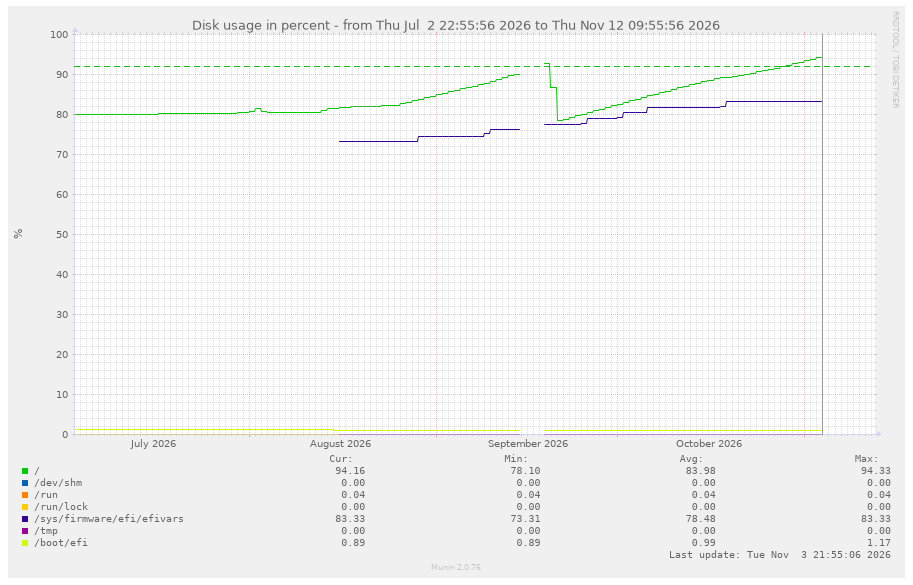
I have a VM that is running a node for a blockchain. In theory, this should be as simple as shutting down the VM, allocating more space to the the disk image, running fdisk/fsck/resizefs, then Bob’s your uncle and done. In reality, I could do this, but it would be a short term band-aid fix since I don’t have a lot more space to allocate and the blockchain seems to be growing much faster in recent months. So the plan is to see if there is something that is inflating my copy of the database in an effort to check the low hanging fruit first. Reports from the internet say that the database should be about 220 GB, but my filesystem is reporting 330GB (see graph below). It looks like the size is ballooning starting in August. There is a dip in September where I deleted a bunch of files that were no longer needed. So something seems off… time to shave the yak.

There is a torrent of the database available, so I thought this would be a good test to see if the sizes are similar. Maybe my database has 50% more corruption or something, or maybe the database really is just that big. I checked around for any computer in the house with enough empty space to download the torrent - I have a raspberry pi with some disk space - great! but that would require either setting up a tunnel or opening a port on the firewall. I can do either, and there are other computers on the home network that have that exact same configuration, but I am looking for the path of least resistance - Linode is the answer!

I fired up a $5 nanode and added 400GB for storage for the blockchain database. I just have to remember to shut it off when I am done, so I don’t cry when I get the bill.

I might have made a small miscalculation and the extracted file might not fit on the extra storage. Here is my lazy way to check the file size without actually extracting it to disk. Extract it to standard out, pipe it to dd, and let dd count how many 1M blocks there are. I just need a ballpark idea of the size to see if I should replace/reload my database. Of course, I think it will only read it at about 100MB/s, so best case scenario will be just over half an hour… time to take the dogs out.

tar xf mainnet.2026-10-01.tar.gz -O | dd of=/dev/null bs=1M status=progress

1 Like
  • any self-respecting UPS has a menu item where you can specify when batteries have changed or should be changed and then pester you about it until you relent and silence it. failing that, some Scotch tape and a sharpie will do too
  • Linux has the uniq command that sorts out duplicates. I don’t use it, but I know it exists. Read the man page for more info :wink:

HTH!

The UPS does have a battery change setting - I might have reset it once already. I need the tape and sharpie method.

The uniq command is good for sorting text or file names, but can’t tell if image.jpg and copy_of_image.jpg are the same file. I do use it for my ad blocking script - I download a lot of block lists, combined them all together and then sort out duplicates to generate a host file to block ads through bind/named. There is a little more going on, but uniq plays a role to sort the duplicates.

I think I have a few options here for the duplicates:

  1. find the right tools to do this?
  2. use a script to hash each file and use the hashes to find duplicates. This will only work with exact files and low res/high res versions of the files will be different. I’ve done something like this in the past, but I can’t remember what it was for? This probably works best for a relatively small number of files.
  3. catalog (SQL?) the metadata to find all files that are the same size, since these will be candidates for duplicates, then check hashes and/or image metadata for uniqueness. This is probably faster and less compute intensive, and has the added benefit of learning more about SQL and scripting in the spirit of Devember.
  4. there are tools and image hashing functions that will find similar images. This might be interesting, but a little beyond the scope of finding duplicates.
  5. something else? vibe coding? outsourcing?

The power of Devember compels me to choose option 3!

1 Like

OK, the good news is that I got the disk usage down below the 92% warning level. The bad news is that it is just about 90%, so this is really just kicking the can down the road.

There were a few database tools that were part of the blockchain that I used to clean up the database, although it really only saved a few dozen GBs. I think that I will have to bite the bullet and just assign more space to the VM so that the database has some room to expand. I will probably restructure the drives so that the OS is on it’s own smaller partition and the database will be on its own partition so that if it fills up, it doesn’t take down the OS with it.

The plan sounds good, but now I have to clean up some files to make space. The low hanging fruit are the linux ISOs- All of my machines run debian and all but 2 are on trixie now. I’ve been putting off upgrading the last 2 holdouts that are still on bookworm (see list above). I have a debmirror of the debian repos and it’s set to mirror bookworm and trixie. I can save several hundred GBs by only mirroring trixie, so I turned off bookworm and rsync did its thing. OK, so it’s not literally linux ISOs, but close enough. For the last 2 machines that are still running bookworm, I just updated the /etc/apt/sources.list to point to a debian mirror instead of my own locally hosted mirror. There is now more incentive to upgrade the last 2 holdouts to trixie.

I did turn off the linode that I used for testing. I think it cost me about USD$1.50, mostly for the storage to download the blockchain database.

The drive that I need to clean up has 2 files that are used for VM storage. The plan is to clean up one and shrink it down, then enlarge the other image file. The image file that will shrink goes to another VM that runs a web server and Nextcloud. It’s less than 50% full and about 20% of that is from a minecraft map website for a minecraft server that is no longer running. I had a map website that would display minecraft worlds as a map. I shut down the minecraft server a few months ago, and I need to take down the map website and reclaim the space.

The drive resizing will be a tomorrow project, but I’ll add the website decommissioning to the to do list…

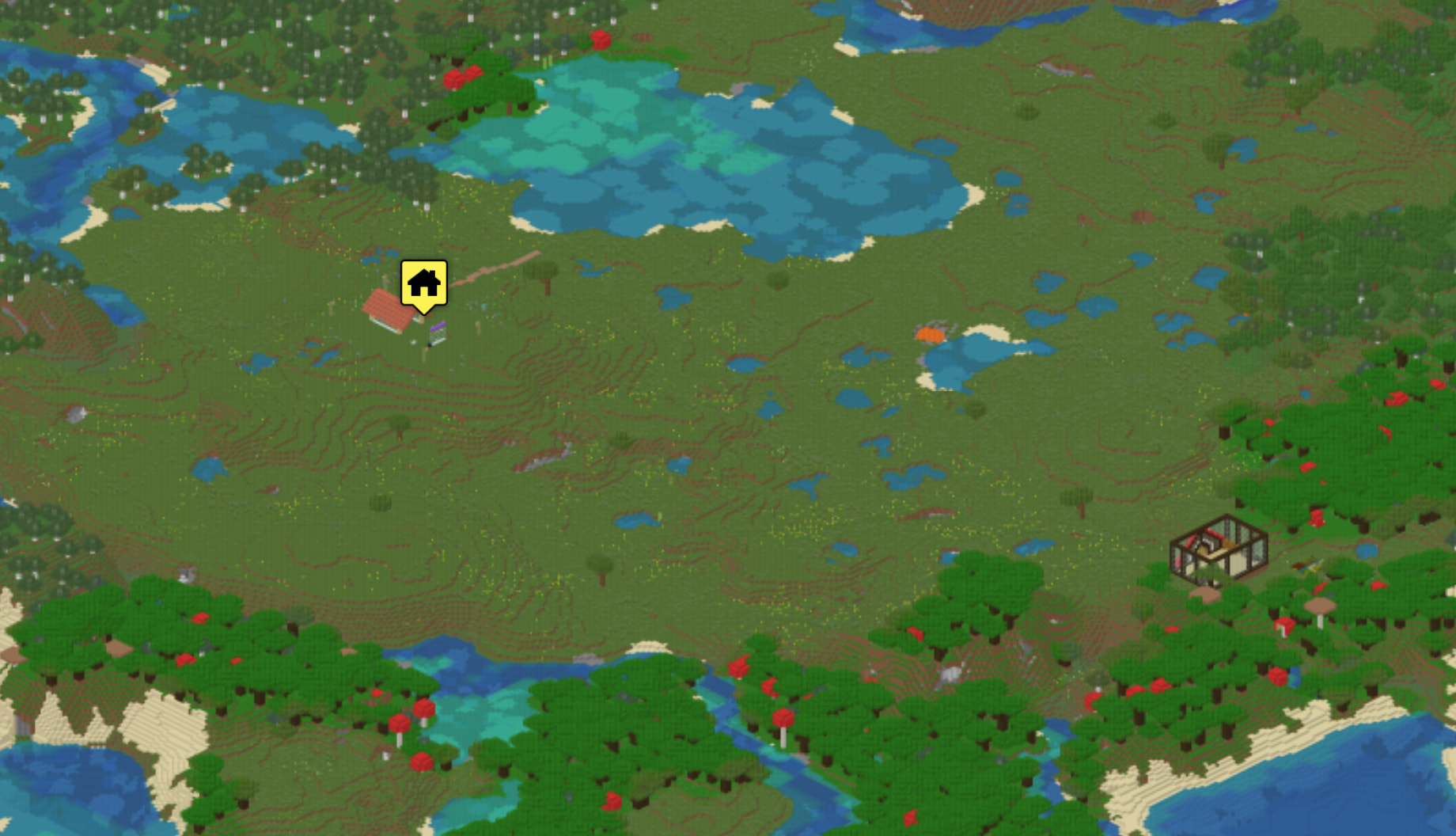
Here is a little bit of the minecraft map… You can zoom in and also see caves/underground, if it’s enabled.

2 Likes

OK, so I have checked off 2 items from the list. I turned off the minecraft map webserver and harvested the space and moved it to the blockchain node. It went mostly smoothly, although it’s always slow when copying/moving around large files. I would say the only hiccup was that I had to boot from the grub command line after swapping the disks to the VM. It’s set up as EFI, so it’s a bit picky when things get changed. I just used the grub.cfg file as a cheat sheet for the grub commands. I also used losetup a lot to be able to copy files from one image to another. The VM images are just raw image files, some with partitions, so losetup makes it very easy to get to access the partitions. “Back in the day,” I had to use the mount offset option and a calculator to mount a specific partition.

Next up will probably be some of the easier clean ups.

1 Like

OK, using the method of productive procrastination (tackling easy, low priority tasks to avoid doing harder tasks), I cleaned up/fixed the warning messages that I was getting.

I run an email server and would get occasionally get undeliverable messages from another server because the email server wasn’t properly configured to receive email from them. One machine was trying to send a message and it gets dumped to the admin mailbox because it is considered undeliverable. Well, I do see it in the admin mailbox, but it’s just not getting sent properly, so problem resolved, I guess??? Actually, I looked in my inbox and there haven’t been any in a while, so I guess I have been fixing these along the way after all. I just have to use a little SQL magic to add the server name as an allowed sender.

Next up, I’ve been getting smartd error messages because I have 1 drive that has a few bad sectors and the smartd daemon is set up to diligently report every 24 hours that the bad sector is, still indeed, bad.

This message was generated by the smartd daemon running on:

   host name:  [redacted host]
   DNS domain: [redacted domain]

The following warning/error was logged by the smartd daemon:

Device: /dev/sdi [SAT], 2 Currently unreadable (pending) sectors

Device info:
[redacted WD Red 2.00 TB]

For details see host's SYSLOG.

You can also use the smartctl utility for further investigation.
The original message about this issue was sent at Sat Jan 17 08:46:59 2026
Another message will be sent in 24 hours if the problem persists.

This is the message that I have been getting (and ignoring) every 24 hours. I checked my inbox and the oldest message that I have is from April. I can’t remember if this started in April, or if I just deleted the older emails. Either way, I’m a terrible person for either ignoring these messages and/or not cleaning out my inbox for so long. There is nothing valuable on the drive and it just has some plots for farming chia/crypto, so, by my calculus, I can safely ignore the error.

The fix isn’t too hard - I use smartd to monitor the drives, and the default in debian is to scan for all drives and monitor everything. To fix this, I simply had to comment out the DEVICESCAN line that tells it to monitor everything, and set up individual directives for each drive. I also added a little special sauce so that it would ignore the pending sectors for /dev/sdi. I’ve been ignoring it manually, but now I can automate the process… that’s progress!!!

/dev/sdi -a -I 197 

This will tell smartd to monitor all attributes for /dev/sdi, but ignore #197, which happens to be pending sector count.

Done and done, and I deleted all the old warning messages too!

In case anyone is curious…

# smartctl -A /dev/sdi
smartctl 7.4 2023-08-01 r5530 [x86_64-linux-6.12.113+deb13-amd64] (local build)
Copyright (C) 2002-23, Bruce Allen, Christian Franke, www.smartmontools.org

=== START OF READ SMART DATA SECTION ===
SMART Attributes Data Structure revision number: 16
Vendor Specific SMART Attributes with Thresholds:
ID# ATTRIBUTE_NAME          FLAG     VALUE WORST THRESH TYPE      UPDATED  WHEN_FAILED RAW_VALUE
  1 Raw_Read_Error_Rate     0x002f   200   200   051    Pre-fail  Always       -       10
  3 Spin_Up_Time            0x0027   176   171   021    Pre-fail  Always       -       4166
  4 Start_Stop_Count        0x0032   100   100   000    Old_age   Always       -       37
  5 Reallocated_Sector_Ct   0x0033   200   200   140    Pre-fail  Always       -       0
  7 Seek_Error_Rate         0x002e   200   200   000    Old_age   Always       -       0
  9 Power_On_Hours          0x0032   063   063   000    Old_age   Always       -       27060
 10 Spin_Retry_Count        0x0032   100   253   000    Old_age   Always       -       0
 11 Calibration_Retry_Count 0x0032   100   253   000    Old_age   Always       -       0
 12 Power_Cycle_Count       0x0032   100   100   000    Old_age   Always       -       37
192 Power-Off_Retract_Count 0x0032   200   200   000    Old_age   Always       -       35
193 Load_Cycle_Count        0x0032   194   194   000    Old_age   Always       -       20695
194 Temperature_Celsius     0x0022   113   096   000    Old_age   Always       -       34
196 Reallocated_Event_Count 0x0032   200   200   000    Old_age   Always       -       0
197 Current_Pending_Sector  0x0032   200   200   000    Old_age   Always       -       2
198 Offline_Uncorrectable   0x0030   100   253   000    Old_age   Offline      -       0
199 UDMA_CRC_Error_Count    0x0032   200   200   000    Old_age   Always       -       0
200 Multi_Zone_Error_Rate   0x0008   200   200   000    Old_age   Offline      -       0

It is odd that this drive only has about 3 years of power on hours, since it is probably over 10 years old. I think it might have failed early and I set it aside, then re-purposed it as a YOLO drive since it was still usable for low-value blockchain stuff. I have other drives from this vintage that have over 10 years of power on hours.

This one is over 11 years of use!

9 Power_On_Hours          0x0032   001   001   000    Old_age   Always       -       97906

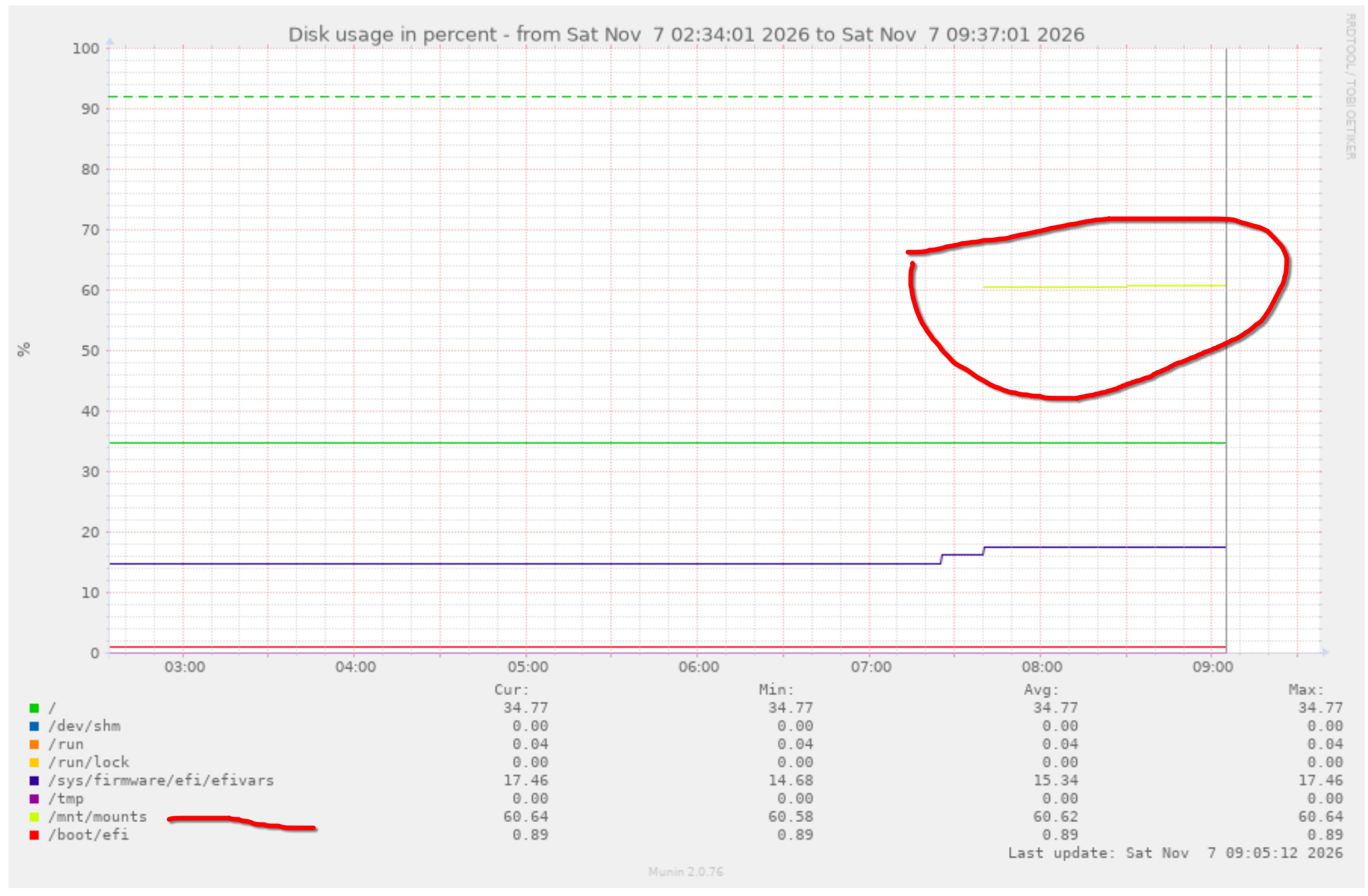
Lastly, an update on the free space issue that I fixed earlier. The reporting wasn’t working properly, so I had to adjust that too. The new space is on /mnt/mounts and and the OS is on a separate virtual drive. The bright yellow is hard to see on the white background, but it’s currently at 60%.

OK, so for today, I thought I would tackle upgrading the last 2 computers that are on bookworm so that everything would be running trixie.

The first computer that I upgraded is a file server and host for several VMs. This is basically the heart of the homelab. I used to run a minecraft server for the nephews and nieces, but we all stopped playing as much as we got older. This computer also powers a VM that is connected to a TV in the “home gym” for watching links with friends while walking on the treadmill… more on that later.

With the file server, I do like to do a clean, bare metal install every few years, but I’m also very lazy and Debian’s release cycle is about 2 years long. I decided that I should just do an in place upgrade by updating /etc/apt/sources.list and yolo’ing the apt dist-upgrade. In debian fashion, it was fairly uneventful. There were a few differences/updates from the maintainer scripts, so I had to review the changes and pull forward anything that was actually specific to my machine. I am testing out chrony on this computer since I have a raspberry pi running adsb software with a GPS module. The raspberry pi runs chrony and uses the GPS as a stratum 0 timeserver, and serves it to the rest of the network (umm akshually.. I’m still testing this, so it’s just the fileserver that gets GPS time for now). Reading between the lines, this means that I’m just too lazy to apt install chrony and change a few configs on my machines. Fine, I’ll add it to the to do list!

where was I? yes, the upgrade for the file server went smoothly and rebooted with no issues. The VM that runs the workout computer is another story…

This VM has a passthrough GTX 750 ti (2gb of vram, don’t tell Sam!) to the TV so that it can be used as a media PC. There is also a separate passthrough keyboard/mouse since the host is headless. I tried the same upgrade trick as the fileserver and got a lot of errors and brokeness from apt because of some firmware-nvidia-graphics ownership issues. So the project for today is to do a bare “metal” install for this VM in hopes that it will resolve the driver issues. I think the 750 ti went through some support issues recently and might be dropped from the proprietary NVidia support, although I think the open source community might have patched it. I suspect that I either have to use older kernels/drivers from before the EOL or new kernels/drivers from after the patching.

I’m also going to partition the virtual drive to make it easier to upgrade in the future. I’ll make a dedicated home partition and 2 partitions for the the base OS. This way, I can test the install on 1 partition and fall back to the other one if the testing is no bueno. I have another media PC that is set up this way and it makes it easy to upgrade, especially since I like the keep the HTPCs relatively up to date.

basic overview of the upgrade process:

  1. repartition VM drive to have a separate home partition and a spare OS partition
  2. migrate the existing (bookworm) install to that drive - test that it is working.
  3. install trixie on the other partition and test
  4. if it works great, if not, I can just set grub to pick the original partition

I’m not sure where the time has gone, but what a rabbit hole! I’ve been trying to get this VM to use the GTX 750 ti and it’s been quite the journey!

There are some driver shenanigans going on, so I had to figure out if I need the current nvidia proprietary drivers, the current open drivers, or the legacy drivers. The GTX 750 ti is technically a Maxwell card, but I think it was marketed with the Kepler series, so you have to pay attention as to what each driver specifically supports.

I decided for my use case and because of all the quirks, that I would install the current proprietary drivers, but I would have to pin my kernel version to 6.12. Anything higher than 6.12 doesn’t compile the dkms module. I had already install the 7.2 kernel from backports, so I had to roll that back first, so that the dkms modules would compile.

Then it turns out that the nvidia dkms modules don’t include the linux-headers as a dependency and will happily compile them for whatever headers you happen to have installed, even if it’s not the running kernel. I think there was also a kernel security update, so I had one last round of compiling dkms modules, checking it, then installing more headers, and then finally actually compiling the modules. It was additionally confusing because the security update has a nearly identical kernel name.

# dkms status
nvidia-current/550.163.01, 6.12.107+deb13-amd64, x86_64: installed
nvidia-current/550.163.01, 6.12.115+deb13.1-amd64, x86_64: installed
nvidia-current/550.163.01, 6.12.115+deb13-amd64, x86_64: installed
# uname -r
6.12.115+deb13.1-amd64

So at long last, it boots, using the correct driver and not throwing any errors. This is just the basic install with just ssh. I still need to install a desktop and things like kodi and vlc.

+-----------------------------------------------------------------------------------------+
| NVIDIA-SMI 550.163.01             Driver Version: 550.163.01     CUDA Version: 12.4     |
|-----------------------------------------+------------------------+----------------------+
| GPU  Name                 Persistence-M | Bus-Id          Disp.A | Volatile Uncorr. ECC |
| Fan  Temp   Perf          Pwr:Usage/Cap |           Memory-Usage | GPU-Util  Compute M. |
|                                         |                        |               MIG M. |
|=========================================+========================+======================|
|   0  NVIDIA GeForce GTX 750 Ti      On  |   00000000:05:00.0 Off |                  N/A |
| 31%   36C    P8              1W /   38W |       2MiB /   2048MiB |      0%      Default |
|                                         |                        |                  N/A |
+-----------------------------------------+------------------------+----------------------+
                                                                                         
+-----------------------------------------------------------------------------------------+
| Processes:                                                                              |
|  GPU   GI   CI        PID   Type   Process name                              GPU Memory |
|        ID   ID                                                               Usage      |
|=========================================================================================|
|  No running processes found                                                             |
+-----------------------------------------------------------------------------------------+

Once I finish installing the desktop, I’ll scratch another item off the list.