[Build Log] New Home, New Network and Server Configs

QEMU and KVM :wink:

Useless details

Proxmox uses its own toolkit, called qm (built on top of those 2), while pretty much all Linux distros have libvirtd in their repos (which is just another toolkit, built on top of QEMU and KVM - you can switch VMs between those, albeit you need to create the VM resources manually and just replace the target disks if you’ve got raw or qcow2 vdisks, then you’re good to go, I did a mass migration from OpenNebula which was administering many CentOS boxes with libvirt).

Well, technically, you would be using 3 ports of the Protectli, 1 for WAN (OPNsense) connected to your ISP’s modem / router / switch, 1 for LAN with at least 3 vLANS (OPNsense) connected to another 1 port for Proxmox, configured with the same vLANS. Alternatively, you could use a managed switch in-between OPNsense port and Proxmox port, so that you can connect other devices behind the OPNsense router.

Edit: also, I think you can bridge the 2 Proxmox ports and connect an unmanaged switch to the last port for your normal LAN / other devices (or a router / AP / switch combo, preferably one with WiFi 6). I would not recommend this setup if you have smart devices in your network though.

I would still recommend using the device as a dedicated router, since Proxmox updates requiring reboots are more frequent than OPNsense updates, so that your whole network won’t go down just because of Proxmox, but that’s just me. I find it especially important when things break and need to search the internet and you can’t do that when your router is down.

Manjaro sucks ass. Arch / Artix are way better, but Arch is not without faults from time to time, albeit way less often than Manjaro (at least that was my experience with it). Artix may be more beginner-friendly to install, due to Manjaro openrc folks joining with the Artix team. To beginners, I’d recommend their default openrc variant, you can find more documentation for it (since it’s the default init and service manager for Gentoo and Alpine as well). Runit is also used by Void, it has ok documentation, but it doesn’t need much, since it’s very easy to understand for intermediate Linux users. Never used s6, it’s the new kid on the block, supposedly better than everything else according to its developer. I never used Artix, but I don’t see why it wouldn’t be just as good or better than Arch (because honestly, systemd does too many stuff).

Another personal rant about Manjaro

When I used Manjaro for about 2 years (?, I forgot), I had lots of freezes. I couldn’t debug them, because it was a hard lock most of the time. Sometimes it was because of KDE Kwin_wayland, all I needed to do was ssh from my phone and kill the display, then SDDM would come right up. Other times, I also had to kill SDDM before it worked. But most of the time, it was Manjaro just being garbage and freezing. Manjaro was the only OS that upon reboot / shutdown stage, would refuse to unmount my /home partition, which was just basic ext4, nothing special. Systemd would not time it out and force unmount, I literally waited ~30 minutes twice and ~40 min once and after those 3 times with Manjaro being an ass, I distro-hopped. I’m not a fan of distro-hopping, I try to stick with whatever I have for however long, but sometimes it’s just not possible.

It apparently is pretty standard in some enterprises, but I would still advice against it. Especially since the poor device won’t be able to hold a lot of VMs (maybe it can do with an OPNsense VM and lots of LXC containers in a pinch).

Not necessarily a bad idea. Just that you have to assume that the internet may go down more often than usual compared to if the box was dedicated to OPNsense - unless you run OPNsense behind another router and it’s just a test setup, then it’s fine. But otherwise, I’m pretty certain it wouldn’t be a wife-approved setup.

What CPU does the Protectli has again? I recall it being a 4 core low powered embedded APU or a Celeron quad-core (based on Atom cores)? If so, it won’t take you very far.

Yeah, that might be a rare instance. My gut feeling tells me that dhcpd might not be enabled and / or NetworkManager doing stupid stuff. But I could be wrong. Yeah, debugging Linux networking as a beginner is very annoying.

The BIOS does nothing other than verify that all hardware is present / works (POST) and load up an OS bootloader, so no. If you installed an open source firmware, then it should be even better for Linux.


If I needed a small and portable setup (which I probably will soon), as a beginner I’d sell all the chunky server, get a small NAS (4x HDD bays max, as compact as possible, preferably 2 bays and getting larger HDDs, since mobility is more important), something like the Protectli as a router, a 12 to 24 port managed switch, a wireless AP (or an old router in bridge / AP mode) and an i5 Intel NUC or more (at most 3) for Proxmox. You should easily fit all those in a backpack. An additional thing that won’t fit in a backpack, but keep my sanity in check would be a 700-1000W UPS. I would risk not having local backups and backing up stuff only in a remote location, but that’s just me.

As an advanced user, I’d replace the Proxmox NUC (server or cluster) with a Pi cluster and run LXD and k3s. Probably the NAS as well, in favor of a DIY NAS using the RockPro64 and a SATA add-in card. Going all ARM is not for everyone, which is why I recommend NUCs for portable setups for beginners.

1 Like

Yep, that’s using Atom cores (Braswell), it should turbo to 2GHz+ most of the time though. Could run Proxmox, an OPNsense VM and a few LXC containers.

That would be great for more VMs. And you can run a Windows VM in it and remote to it from a Raspberry Pi. Unfortunately I don’t think you can pass the GPU. Or alternatively, however much I hate this, you could use Hyper-V if you have a Windows 10 Pro license and install OPNsense and other stuff in Hyper-V. Just make sure you make a vSwitch first and foremost, before making any VMs.

1 Like

Yeah I do have a pro license on the ryzen machine… I’d really like to stick with linux… I want to push cli on myself as much as possible and try to get it to be second nature.

I really wanted to get a node 304, use my x470i mobo and the 3700x I have as a spare cpu…I dunno if the wife would approve it…I could rob parts from another build maybe…

1 Like

I don’t consider ITX portable, maybe with very few exceptions, such as the NFC SkyReach 4 Mini and a microATX I know and used (InterTech IT-607).

Personally, I’d sell those. And if not buy a NUC, at least I’d get an i5 / i7 Dell Optiplex 9020 USFF or Optiplex 7040 Micro (I’m somewhat of a Dell fanboy, but not really, I just like their products more, because on average I had more issues with HP, Lenovo and Toshiba in the past compared to Dell).

Ryzen is cool and all, but do you really need 8 cores 16 threads? I would argue that a quad core ivy bridge i5 with 16 GB of RAM is more than enough for a couple Linux VMs. Heck, I had servers with 50-70 VMs running at once with 10 cores 20 threads and they didn’t exceed 20% CPU usage at peak, scale that down to 4 cores 4 threads and you would get about 100% CPU utilization… for 50 VMs - and that’s at peak. RAM was always the issue for us with VMs, we had 192+ GBs of RAM and couldn’t get enough (because inefficient React front-end and Node back-end programming, fugging JS, Oracle DBs required less RAM for 5-8 dbs on a server than just 1 web server). And we never kept RAM at more than 60-70% utilization, it’s bad practice to let the server without at least 30% RAM (if you want HA, then you need less than 50% RAM usage, we didn’t have HA for 99% of the stuff, because they were just dev environments).

2 Likes

Yeah, I’m very happy with my Dell t320 which I converted to the dual cpu t420 by buying a used motherboard. All the other components were the same. The used price for a t420 was 600-800 more, and I got the motherboard for 120 :slight_smile: I then put two 2470v2 10 core 20 thread cpus in it…and converted it noctua tower coolers and modified the intake and exhaust… its probably overkill, but the cpus barely get to 60c running prime 95… however, this gen of intel is vulnerable security wise from what I read, even if hyper threading is disabled. I kinda went overboard… I also am not so good with all the optional software you can use that ties in the iDRAC and system monitoring software and hardware… there’s a ton of cool stuff there that I haven’t fully utilized. I really hope to keep it, and maybe set it up as the primary server then used the ryzen 2700 with the asrockrack x470d4u with ipmi as the test server.
I don’t think my xeons can do x265 encode and decode… x264 is fine I think though (I’m tired might have names wrong for video codecs)…I could put a newer card in like the gtx 1650 I have or the quadro m2000.

Lots to consider… thanks again for the great info and detailed explanation.

From earlier: I did plan to run opnsense as a vm for testing, and rely on my current router to be the primary for the rest of the network besides whatever machine I route to the opnsense vm. I could learn some internal routing between vms in this way as well which might be insightful for me.

I do have two managed switches, and there are 4 ports plus a com port on the protectili…and to clarify I had installed coreboot as the bios. Supposed to be more secure to keep people out of bios to mess with the device from what I read. Its another open-source project.

I will look at the distros you recommended. I wanted to try one of those two packages because they use pacman… I have never used it so thought I’d give it a whirl so to speak. I was under the impression manjaro was fairly secure, but the updates killed my install 4 times in a row… I may have said yes to a package update I didn’t understand that broke it. So probably user error. I got fairly good using fedora (till 34), debian is good, but I need the testing branch or experimental on the b550 for it to work. Ubuntu is easy to use… I know there aren’t huge differences between distros besides package managers, and some packages themselves, plus command differences (minor syntax changes etc)… but I like to learn. I also could be wrong or over simplifying.

1 Like

Do you really need that much power? Are the electricity costs worth it? These are questions you should probably ask. Yeah, it’s cool to get a cheap “junk” server, but sometimes, the power requirement kinda breaks the deal, unless maybe you get the server for free and run it just a very few years.

Not really an issue in the real world. We all like to bash Intel, AMD and now even ARM for architectural exploits, but these are hard to pull if you secure your network and don’t install untrusted software.

Hyper-threading is another can of worms, OpenBSD developers recommend disabling it, but the current hot exploits everyone talks about are based around branch prediction / speculative execution, which is a technique for “predicting” future execution stuff and loading the cache up, which is then read by a malicious program, which has nothing to do with HT.

Look into colocation services, maybe with an ISP or an internet exchange, try to see if you can find anything cheap, so you don’t run your server at home. Rack space and power will cost you a monthly fee, more than a VPS, but you have a dedicated server for yourself. You will need a domain name though, most likely, unless they offer a VPN plan that you can use to remote to your server and play around. I don’t know how fast that would be, compared to if you hosted the VPN on your server.

The serial port, I don’t consider it a connection port, just an interface for management. Yep, coreboot is open source bios, good choice.

You mean stable? Yeah, I thought so too, especially after all the praise that Manjaro waits 2 weeks before rolling updates to people, so nothing breaks for the end-user. Oh, how wrong I could be, I’ve used Arch for probably longer than Manjaro and don’t remember how it got borked that time (probably too many AUR stuff).

Ouch. By the 2nd time, I would have ditched it. Also, I hate Manjaro’s 2GB weekly updates, wtf. On Arch it was more bearable, because I did almost daily updates (3 days at most of not doing updates and rebooting).

I’d still recommend Fedora rather than Arch frankly.

Technically speaking yes, however, the way things are packaged, their names in the repo, the repo software selection, the combination of programs given, all contribute to a somewhat different experience. Unless you do Linux From Scratch or Gentoo first and understand how the system works, then you can safely say that not all distros are different. Inherently, they aren’t, but if you don’t know what you are doing, they definitely are.

1 Like

Fedora 34 installed, now to figure out VMs with QEMU and KVM… I’ll be searching for a guide…LOL

No, not yet at least. I’m also certain the Ryzen 2700 x470d4u system I have is WAY more efficient even with only 64GB of ram vs the 192GB I have with the DELL T420.

I guess it was an experiment I wanted to try…it’s a very unique generation with DDR3 ram still. Both my servers run ECC. I know it’s not needed really for my needs, but I’m attempting to mirror actual hardware I would use in a production environment. The real “Goal” was to possibly teach myself enough to be employable from home as I can’t leave easily, or work on a set schedule sometimes for a number of reasons. It’s also a way to learn so I can feel productive with my days at home retired technically at my age.

Good to know about the CPU vulnerabilities. My hopes are to secure my home network enough for this to be a non-issue. I really hope to produce a very very VERY secure network. Https, Cerificates validation, ssh keys… whatever I can do to secure things besides just password protection. Set up sniffers and wifi monitoring, possibly limit IP’s that can connect on my network etc… I’m learning what I can do, then attempting to implement it. I hope to be able to learn some penetration testing too for fun.

I do have a domain name I haven’t been able to use yet. I know I could rent server space, but the hope is to really host my own services. I know it will be a pain, but I want something to do and learn. Even if it’s hard, and my memory hinders me. Why I take detailed notes, down to every bit of input I put in setting up a system. A “playbook” so I can reproduce it faster without having to look up all the commands again or find resources for what item or program I want.

I realize this for sure. All I have is information from what I have been reading, NOT hands on experience.

I can say I am reallllllllyyyyy proud that reading terminal intputs, outputs, arguments, pipes and other segments of code are starting to make sense. I still end up needing the gui for directory assistance from time to time because I cant keep that all in my head…yet. I am trying.

Another fun thing is this has been a fun bonding experience for my father and I because he worked for a few big data storage and software companies like Burrows/Unisys, Oracle, Lucent, and a number of others, then worked freelance setting up data centers or implementing new tech in different fields… I know he migrated a data center for a children’s hospital and implemented new tech like touch pads e records etc.

@ThatGuyB Thanks again for all the great information. I enjoy being able to get as much knowledge as I can.

4 Likes

I don’t remember writing a guide for VirtManager + libvirt, but it should be just a dnf update and install away:
sudo dnf check-update && sudo dnf install libvirt virt-manager && systemctl enable --now libvirtd
then add your username to the virtualization group
sudo usermod -a -G libvirt $your-username

Following that, opening virt-manager should be pretty intuitive. Just set a storage location for future images, then create a VM template (i.e. give resources), select an .iso from your PC and you’re good to go.

Sniffers are overkill, but if you enjoy it, definitely go for it. And you mean MAC addresses, you can select to deny DHCP leases by MAC addresses. Technically not WiFi security though, as most devices can be forced to connect to a WiFi network and be given a static IP address and still function. Some routers and APs support WiFi filtering by MAC though.

I’m guessing you mean hosting your own infrastructure at home. Colocation is still self-hosting, you still manage your server and if you’ve got more devices, router, switch, network and servers and services running on them obviously. Just that the Internet connectivity, power and power redundancy (UPS and gas / diesel generator) and cooling are provided by the data center rack space providers. You also get some perks, like 24/7 support most of the time. Colocation makes a lot of sense when you have few servers and want to save costs on UPS and cooling maintenance. After a point, it becomes better to do your own. When you don’t care about cooling and not so much about power redundancy, hosting your own may be better. I only suggested colocation as an alternative option to not run a loud and hot server in a small apartment (like I did and still do).

1 Like

Seems to have worked great installing VirtManager Thank you!.. Attempting some power management for the 3900XT… shes a little warm… attempting to change governor for cores to see if that works…nominal success, but will take a while for water to cool completely.

I also see 2.2Ghz is my lowest the cores can go… I need to see how to allow some of the 12 cores/24threads to sleep if thats even possible in linux. I like being efficient with my cpu useage.

Yes this. I am sorry in advance if I appear ignorant and use terms improperly. It’s either my damaged brain, or my ignorance hard to tell at times. lol

I have the laundry list at the beginning of this post lol. There’s a lot to play with and learn about.

As far as redundancy- The dell T420 is overkill. If the internet or power goes out all I really need is a UPS for safe shutdown. I wont be able to use services if powers out for long lol. This is also SUPER rare in my area. I have had it happen once in 4 years in a newer development with fairly new infrastructure.

I also have at least one local backup for all files, and a third in cloud (I want to encrypt), and a 4th for VITAL documents on disk & drive in a fire safe. I like my data. I do hope to learn how to use rsync for a scheduled BU once I get into the new home. This will be part of my learning to complete scheduled tasks such as updates etc.

1 Like

Don’t worry, you’re not defective. Everyone forgets stuff, especially when learning new stuff, terminology can be confusing at first.

Not sure about other brands, I think Eaton has such a feature as well, but I know for sure APC has the linux daemon apcupsd (aptly named APC UPS daemon) that you can use to send a shutdown command to your server if the battery is running low.

Minio + Restic. Restic is a backup software, Minio is a DIY s3 style object storage server, like Amazon S3, but DIY AWS.

Easy. Good luck :slight_smile:

2 Likes

Obligatory victory “pump” after “Sold” sign was placed on our new homes plot.

3 Likes

My CyberPower APC I got at Costco has a shutdown daemon and a USB cable for communicating with the computer.

1 Like

Well… valuables are all being handled personally lol…

The order was, PCs, networking equipment, tvs, safes with valuables lol… am I backwards? :slight_smile:
I was missing two in that picture. Had one in the front seat and two sff pcs in the boxes he he he

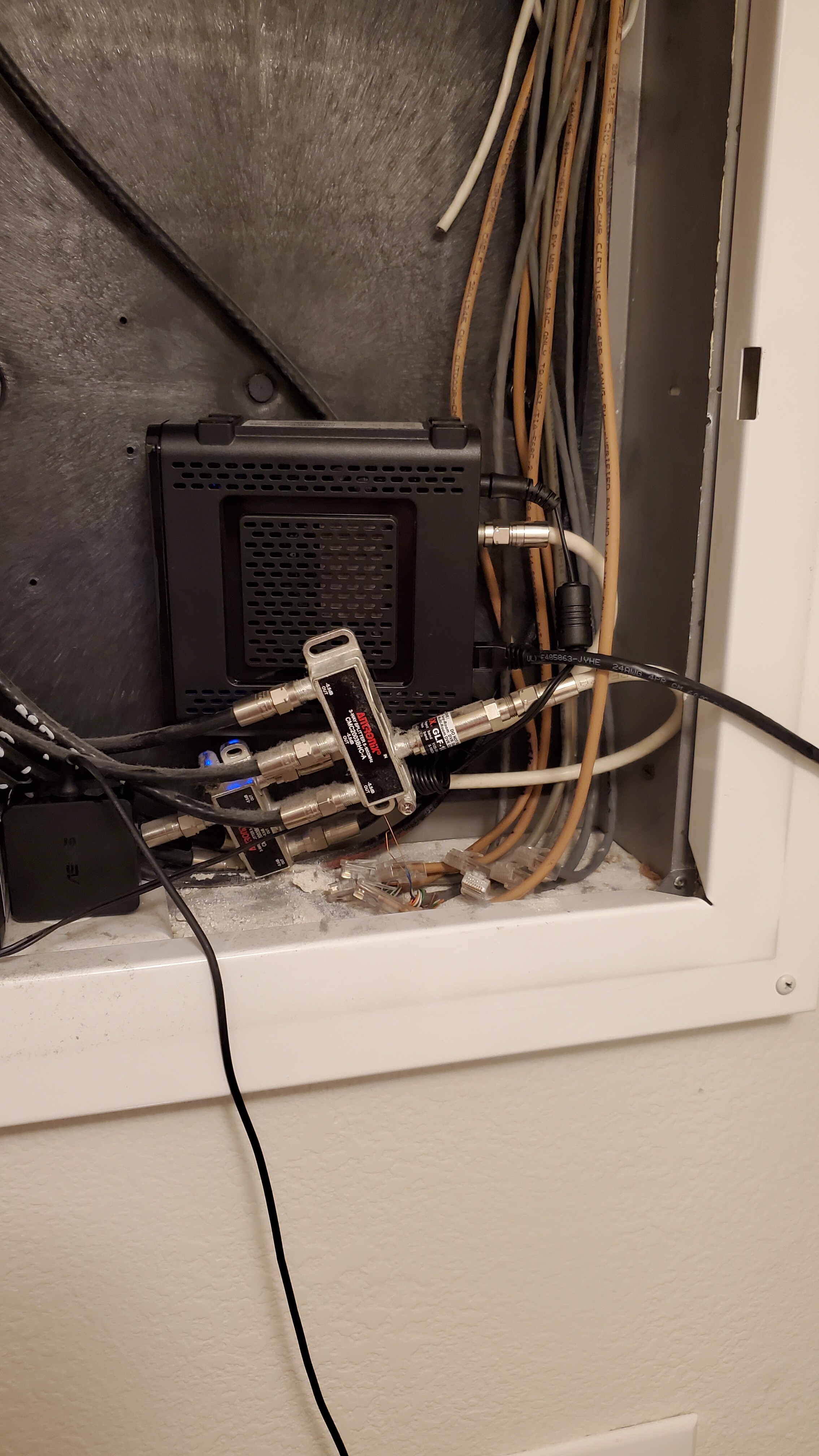
Oh, bonus, the apartment has a patch panel for hardline connections woot woot. They are even labeled (partially) by location in the apartment :+1:

7 Likes

Wow, I wonder if that was put in when they built it or if some previous tenant was really handy and had the same computer autism as the rest of us.

2 Likes

Yeah I’m not sure. From how well it’s routed it looks like it was adapted from phone lines, but there are also multiple connections for coax as well for cable in the rooms. Also a nook was designed as a “tech center”. I’ll have to send a pic when I get a chance. It’s moving day today… so movers most the day.

1 Like

Finally got a good look, it marked out well for data and phone lines here in the apartment. Next I’ll add a small power strip and switch for continuity testing… probably some command strips for my organizational needs and sanity. Lol

3 Likes

Command strips are the unsung heroes of home networking

3 Likes

okay, okay, maybe the hook&loop fabric strips (velcro) put less pressure on stiff, but still, one doesn’t Have to ratchet the cheaper zip ties…

2 Likes

Zip-ties, hook and loop, and command strips really just solve so many problems nicely.

1 Like

I honestly haven’t used command strips. they look really cool tho.

Presumably they don’t need adhesive to attach to the wall? they just use some crazy suction or something, more like poster putty / blu-tac / white-tac principal? in strip form? Or a mild adhesive over a large area, like post-it notes?

1 Like