Best Linux Distro for a Linux Beginner?

I'm a Windows guy through and through.  Other than using Macs in school, I've always used Windows (since Win 95 to Win 8.1).  But I want to get into Linux on the PC.

Main reason: I want to learn how to manually do something with the computer OS and not just get a graphical interface.  I want to feel more "one" with the machine, if that makes sense...  Also, I would like to eventually get to the point where I can take a minimal distro and build it from the ground up how I would like the OS to be.  I know this will take some time to get there, but ultimately, that's what I'd like to be capable of doing.

What do you guys suggest?

Also, any places online I can read to get familiarized with Linux in general, as well as the specific distro?

I'm not a computer novice by any stretch of the means.  I can put together a Windows machine with my eyes closed and ask me to do something specific and complex in a Windows OS and I can have it done.  So I have a sturdy background, but I know that Linux is a different beast than I'm used to.

Thanks


EDIT:  I forgot to mention, I tried Ubuntu (version 12.04) briefly, set up as a virtual machine using VM VirtualBox.  It seemed okay, kinda felt like it was trying to be more user friendly to Windows guys like me.  I got the hang of using the Terminal to install/uninstall programs (like installing Chrome and other packages).  This is the only frame of reference I have of using Linux on a PC.

2 Likes

Okey first things first the Linux lot on here will say avoid deb based distress like Ubuntu, you won't learn as much as you will with something else.

Manjaro is a dam good starter, it works out of the box flawlessly almost, driver support is good and stuff like steam is installed.

If you wish to build your own use arch base, it can be done by a noob, I did it, if youbreally want to build your own distribution use gentoo or Linux from scratch 

I personally recommend Manjaro it uses pacman setup and is faster than Ubuntu plus it's bleeding edge so expect up to date packages about a year before Ubuntu gets it into its testing stage.

Sabayon is another good one, as you want to learn more and eventually build your own I would use this, you will learn portage this is a nice simple setup at first which is also bleeding edge, you can build your own Linux using gentoo base but I wouldn't recommend that yet.

For desktop environment use something like lxde for starters to ease you from windows then move to a different environment or use a text based desktop like awesome.

Hope this helped :)

Thanks!  I've heard of most of the distros you mentioned, just not described in those terms.


Thank you!

For through-and-through Windows users, I would recommend OpenSuSE KDE. The benefit of having a single place for all the settings, just like Windows, the benefit of having a really good installer that takes care of most configuration things and gives you windows-like feedback, and the compatibility with everything Microsoft out of the box, because Microsoft pays for a very large chunk of OpenSuSE development.

OpenSuSE is a popular distro, that is constantly popular, the user base shows a very high degree of fidelity to the distro. It's an intermediate distro, it's not quite as bleeding edge as the bleeding edge triumvirate distros, but it's not old like the other distros either, it sits right in the middle, with Mageia and Rosa. The benefit of these intermediate RPM-distros, is that they can be used for any role right out of the box, whereas the bleeding edge distros are more HPC and desktop/workstation distros, and Debian/Slackware are more server/ARM distros. Another benefit of OpenSuSE is that it has the best online and printed documentation of any distro, and that there is real support, not only with information, but also with SuSE services, that are available to all distros, but are directly accessible through OpenSuSE from within the system. It's a great distro, that allows you to try out a lot of different linux concepts without having to reinstall anything or use other distros.

XDroidie626, I don't really know, but I'd speculate that that's painting Debian with too wide a brush, no? One advantage with Debian would be excellent user support, as well as very good application/driver support, both of which due to popularity.

I haven't used them but two Debian-based OS that seem good are Linux Mint and crunchbang.

A person could learn a whole lot from something like Arch Linux but that's because it takes knowledge to set up; unless I'm mistaken I'd say that ease of use is dichotomous with learning, and one would always need to perform that trade-off.

Hence, for starting off, something relatively easy would be good, especially if they're just going to switch OS later on to something more bleeding edge and bare-bones like Arch.

I agree, debian is good, but on servers more than Desktops, the update series is just too slow, the fact of a security point also, I do agree its better than Windows and OSX but its still slow, I also took into account Arch has a superb guide, The guide can help you in almost every aspect.

As well for Arch, Manjaro is very easily setup, hardest part is partitions, and that is not hard, although arch base is superb for learning.

And why switch when the basic option is already there in the form of a distro that is very highly rated? Superb driver support out of the gate and  has a lot of choice? I can see where your coming from but to be honest Manjaro would be better for getting terminal dirt

If you really want to learn "Linux" then I'd suggest sticking with one of the base distros. Those would be, in no particular order: Debian, Slackware, Fedora (Red Hat), and SuSE (Open SuSE). I'm sure I may have forgot a couple like Mandrake/Caldera/???, but that's really about it when you trace the Linux roots back.

You may note that I didn't say Ubuntu or even Linux Mint which are probably the two most popular distros right now. That's because both Ubuntu and Mint are really derivatives of Debian. About the only differences are the desktop GUI and/or shell (along with other stuff like support). In fact, a very large number of Linux derivatives come from Debian. So maybe you might want to start with that.

Now, if you want more stability then you might want to go with Fedora / Red Hat which is still a very popular choice too. "Fedora" is the "free" side of things whereas the actual "Red Had" often requires payment when you go looking for support (which includes stuff like updates). That's not to say that a free distro like CentOS wouldn't be a superb choice. Just know that it's all "Red Hat" when you get right down to it.

Then there is the SuSE line of Linux's which hasn't really branched out all that much. And that may be because of it's licensing. So be warned that even though it's "free" that there may be terms you may want to know about. And I doubt very many people who use SuSE or any other Linux distro are even aware of potential licensing issues. But SuSE is a bit more restrictive than most so that may be it's one deterrent. (About the only thing worse would be the "Red Hat" line and anything to do with commercial servers.) Of course, the up side with SuSE is that it's pretty darn stable and has some excellent support.

Finally, if you are a purist and really want to jump in at the deep end, there's that one distro which is still around and which helped start it all - Slackware. Originally, it started as SLS which is what Linus Torvalds helped develop when he was messing around with Minix (also still available but hardly even recognizable from those early days). But Slackware is by no means for beginners! Support can sometimes be a bit lacking and must usually be done by hand too! Despite some great documentation, Slackware is not very user friendly. In fact, Slackware is more geared for people who write code. But it is about the most "open" OS you can find both in terms of source code and licensing.

Of course, there are still other xNix OS's like the BSD line (which is where Apple's OSX comes from). But despite the similarities to Linux, the BSD / UNIX OS's are not Linux. Only the shells and GUI's are similar/same which is why there is a very high degree of cross platform compatibility. In fact, you can usually use the exact same KDE Windows environment with OpenBSD as you can with Kbuntu. But make no mistake, BSD is really UNIX and nothing like Linux when you delve into the actual binary heart of it all - the kernel.

I don't know if that helps. Frankly I'd suggest researching the licensing if you have any big plans. Either that or just settle in on the most popular distro - Ubuntu. Then again, Ubuntu's grand daddy is Debian.

Learn the command line (C-Shell) and the directory structure, how it boots, etc. Learn how to use basic stuff like the Vi text editor and the never ending myriad of command line modifiers. You never need to get into a Windows environment to really understand Linux. In fact, that's what appeals to some of the more seasoned Linux guru's since it's the absence of GUI that gives it any real power - even on low end hardware! Although it is a bit difficult to browse the web, watch videos, play games or edit graphics without a GUI.

(BTW, there are no drive letters like you have with Microsoft. There is no C: drive in Linux which is probably going to be your first major mental hurdle. Please know that if nothing else. It's something I wish someone had told me in my first few hours with Linux.)

 Good Luck.
i just started to experiment with open suse with KDE, and i have to say till now im very happy with it. its realy user friendly, very easy to use, en there is a great online support community.

Wow, thanks!

And just to clarify, I'd like to get *away* from a graphical interface to do things.  Not saying I don't want to have a graphical interface at all, but keep it to a minimum and do things with commands, not just pointing and clicking.


Thanks again!

Tiling window managers work very differently to what you would be used to in Windows. Grater emphasis on key commands and minimal interfaces, etc.

They can be difficult to learn if it's not what you're used to, but it may be closer to what you want with trying to get away from the Windows type gui and learn more about using the terminal.

It could be fun to use something like Manjaro and when you get more comfortable with linux, install a tiling wndow manager.

These are some that I've used a bit in the past:

i3

Awesome

xmonad


Also, if you just want somewhere to read and learn, the Arch linux wiki usually has a lot of good information.

At the moment I'm using Manjaro which uses openbox as the window manager. Openbox (and other *box, such Fluxbox and blackbox) are different again in that they offer a very minimal interface compared to gnome and KDE. But when I first started using linux it was with Fluxbox and, looking back, it was much better than if I had have done so with something that was just aping Windows.

i3 can only tile vertically and horizontally by default - that isn't terribly useful. Config is in plain text, though.

Awesome is alright - as a tiling WM, it does its job - I just don't care for the config being in Lua.

Xmonad - config is in Haskell, which is rough for, well, anyone who doesn't know Haskell.

those are probably the 3 most popular, Awesome and Xmonad trading blows for most used. I personally hate all 3 of them now that I've used Bspwm. It just trumps everything else out there for my personal workflow - everything works intuitively, and moving windows/window groups, splitting windows, the config, the ease of piping in controls, and such, just makes it incredibly useful (and gorgeous). Best WM I have ever used - for a person using a tiling WM that isn't Qtile (if you use Qtile, please don't ever stop using it), that wants a tiling WM for X, Bspwm is worth a serious consideration.

How do you linux folk feel about Zorin OS? I like the idea of it, but is it practical for use?

I liked i3 a lot because of it's easy configuration.

I do like Awesome, but frankly Lua can be a pain and in the end I don't need something so feature packed for that particular pc. I kind of want to use it again though.

Is Bspwm fairly simple?

More than simple - easy as hell to install and configure (via an rc file). Incredibly feature-rich, but very lightweight, and for serious work.

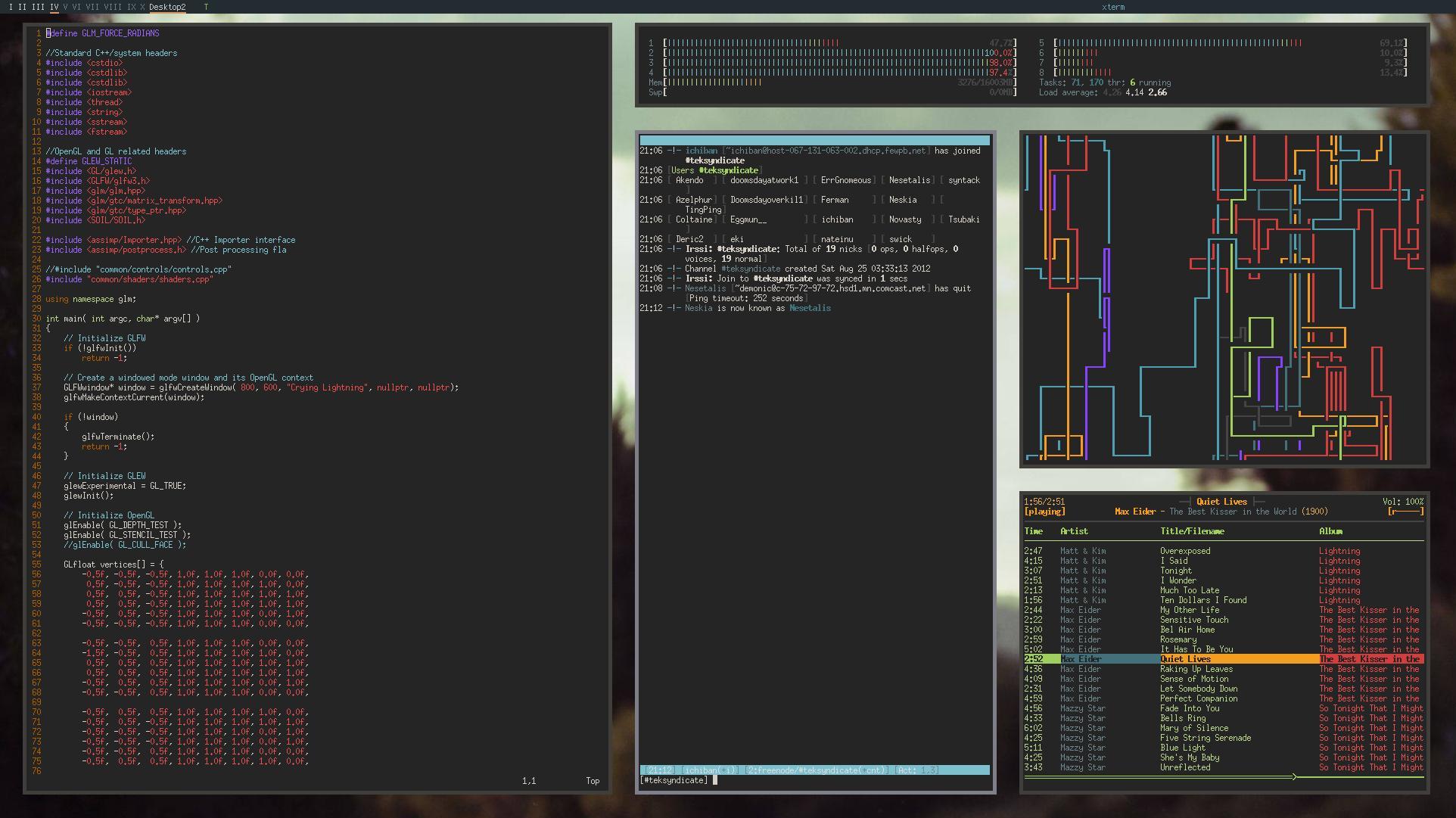
Shameless screeshot of my main work monitor (still working on my getting my others to work well with tiling/position).


I would have to say Ubuntu... easy to install in many ways and forms. 

Sorry for thread jacking, but I can't seem too find a good answer for this. Whats the most recommended distro of linux for dota 2. Steam os is too big for the computer I'm planning to use it in(64gb.)

Edit: I think I wrote this in the wrong type of thread.

Edit-2: seems like ubuntu has the most compatibility with dota2.