wait for the more-cpu-beefy one, due soon, and I’ll send it to you when I’m done. Anything else I have you could port coreboot too?
2 Likes
Oh wow, that would be awesome, thanks! I’m familiar with Intel platforms so that’s what I’m looking for primarily. It has to not have Intel Boot Guard to be able to run unsigned firmware, and it should have a CPU that’s supported in coreboot already. Alder Lake-N is supported for example
You might be able to convert the wifi slot to fit a 2242 optane. However having 7 ssds might be too much power. 
Edit: Seems to be CNVio2 card. So removing it to save 1-2w might be better for a nas.
1 Like
That slot looks like a generic wifi slot, but it’s proprietary Intel CNViO so only xx1 wifi cards work in there, like an AX201 for example. It’s not PCIe, it’s exposing a capability of the chip on a slot.
Hey all — looking for some help with eMMC health checking on TrueNAS.
I’ve recently installed TrueNAS on a 64GB eMMC storage. I’m trying to eval eMMC wear and tear, but so far I haven’t found any SMART health reporting or wear-level data via the GUI.
I’m considering mounting /var/log as tmpfs to minimize write churn and prolong the eMMC lifespan. I understand it’s volatile and logs won’t persist — I’m fine with that. My priority is long-term endurance, not long-term log retention.
Has anyone here done this on TrueNAS before? Any caveats I should watch out for (e.g., middleware failures, upgrades, missing dirs)?
Thanks in advance!
For anyone wondering what Wendell is talking about here, here’s an excerpt from Bee-link’s news post from March:
“The product lineup includes three models: ME mini, ME Pro, and ME MAX, each targeting different scenarios and usage requirements.”
Can’t find any release date or specs on the Pro and Max.
I keep losing disks out of my zfs pool when my Beelink Mini is under load.
I’m going to try removing two SSDs and see where I end up. Thanks all for the discussion and exploration.
Currently: 4x Crucial P310 4TB and 2x TeamGroup 4TB pcie 3rd gen SSDs and the Beelink is only using 25ish watts at the wall.
Anything else noteworthy in the following dmesg?
[   42.327558] nvme nvme0: controller is down; will reset: CSTS=0xffffffff, PCI_STATUS=0xffff
[   42.327564] nvme nvme0: Does your device have a faulty power saving mode enabled?
[   42.327565] nvme nvme0: Try "nvme_core.default_ps_max_latency_us=0 pcie_aspm=off pcie_port_pm=off" and report a bug
[   42.357566] nvme 0000:03:00.0: Unable to change power state from D3cold to D0, device inaccessible
[   42.357672] nvme nvme0: Disabling device after reset failure: -19
[   42.367592] zio pool=tank0 vdev=/dev/disk/by-path/pci-0000:03:00.0-nvme-1-part1 error=5 type=2 offset=939170578432 size=4096 flags=3145856
[   45.408245] zio pool=tank0 vdev=/dev/disk/by-path/pci-0000:03:00.0-nvme-1-part1 error=5 type=5 offset=0 size=0 flags=2098304
[   45.409889] zio pool=tank0 vdev=/dev/disk/by-path/pci-0000:03:00.0-nvme-1-part1 error=5 type=5 offset=0 size=0 flags=2098304
[   45.410438] zio pool=tank0 vdev=/dev/disk/by-path/pci-0000:03:00.0-nvme-1-part1 error=5 type=5 offset=0 size=0 flags=2098304
[   45.412299] zio pool=tank0 vdev=/dev/disk/by-path/pci-0000:03:00.0-nvme-1-part1 error=5 type=5 offset=0 size=0 flags=2098304
[   96.720965] perf: interrupt took too long (2528 > 2500), lowering kernel.perf_event_max_sample_rate to 79000
Tried an A + E single chip Coral and it didn’t work, wasn’t showing up in Proxmox 9 with lspci. Fortunately, had a B + M key Coral and that worked fine in one of the (many) M.2 slots. Interestingly, it did not passthrough to a HAOS VM in some of the slots. M.2 slot 4 worked, which is the higher bandwidth slot.
lspci output of interesting bits (using SR-IOV for iGPU):
IOMMU Group 14:
01:00.0 Ethernet controller [0200]: Intel Corporation Ethernet Controller I226-V [8086:125c] (rev 04)
IOMMU Group 15:
02:00.0 Ethernet controller [0200]: Intel Corporation Ethernet Controller I226-V [8086:125c] (rev 04)
IOMMU Group 16:
03:00.0 System peripheral [0880]: Global Unichip Corp. Coral Edge TPU [1ac1:089a]
IOMMU Group 17:
04:00.0 Non-Volatile memory controller [0108]: SK hynix Gold P31/BC711/PC711 NVMe Solid State Drive [1c5c:174a]
IOMMU Group 18:
05:00.0 Non-Volatile memory controller [0108]: SK hynix Gold P31/BC711/PC711 NVMe Solid State Drive [1c5c:174a]
IOMMU Group 19:
00:02.1 VGA compatible controller [0300]: Intel Corporation Alder Lake-N [Intel Graphics] [8086:46d4]
IOMMU Group 20:
00:02.2 VGA compatible controller [0300]: Intel Corporation Alder Lake-N [Intel Graphics] [8086:46d4]
IOMMU Group 21:
00:02.3 VGA compatible controller [0300]: Intel Corporation Alder Lake-N [Intel Graphics] [8086:46d4]
IOMMU Group 22:
00:02.4 VGA compatible controller [0300]: Intel Corporation Alder Lake-N [Intel Graphics] [8086:46d4]
IOMMU Group 23:
00:02.5 VGA compatible controller [0300]: Intel Corporation Alder Lake-N [Intel Graphics] [8086:46d4]
IOMMU Group 24:
00:02.6 VGA compatible controller [0300]: Intel Corporation Alder Lake-N [Intel Graphics] [8086:46d4]
IOMMU Group 25:
00:02.7 VGA compatible controller [0300]: Intel Corporation Alder Lake-N [Intel Graphics] [8086:46d4]
1 Like
check the output of smartctl -a and nvme tools – these are really meant for lower power nvme like the teamgroup nvme.
some nvme have an explicit low power mode you can set with nvme-cli and that would be a good idea if you’re facing this problem. I knew the samsung 980s were a problem but I had no idea the problem was so widespread.
Some anecdata in case it’s helpful for anyone, particularly if you’re worried about reports of NVMe drives being dropped.
I’ve whacked 6xKingston 4TB NV3 (SNV3S4000G) drives in this.
On what little data I could find for power draw by M.2 drives, the NV3 seemed the right mixture of power consumption, cost and ready availability from our distributors.
Having rolled the dice on getting them, according to smartctl the highest selectable power profile for these drives is 5W max:
Supported Power States
St Op     Max   Active     Idle   RL RT WL WT  Ent_Lat  Ex_Lat
 0 +     5.00W       -        -    0  0  0  0        1       1
 1 +     5.00W       -        -    1  1  1  1       10      10
 2 +     5.00W       -        -    2  2  2  2       50      50
 3 -     0.30W       -        -    3  3  3  3     5000   10000
 4 -     0.30W       -        -    4  4  4  4    10000   40000
Even at 5W each that only leaves 15W for the CPU if the NVMe drives were actually consuming their max. Given the burst power for the CPU package it would have been nice the PSU to have at least another 10W headroom. As it is, given each drive has limited lanes etc and I expect that to naturally limit power draw, I haven’t manually selected any power profile (yet).
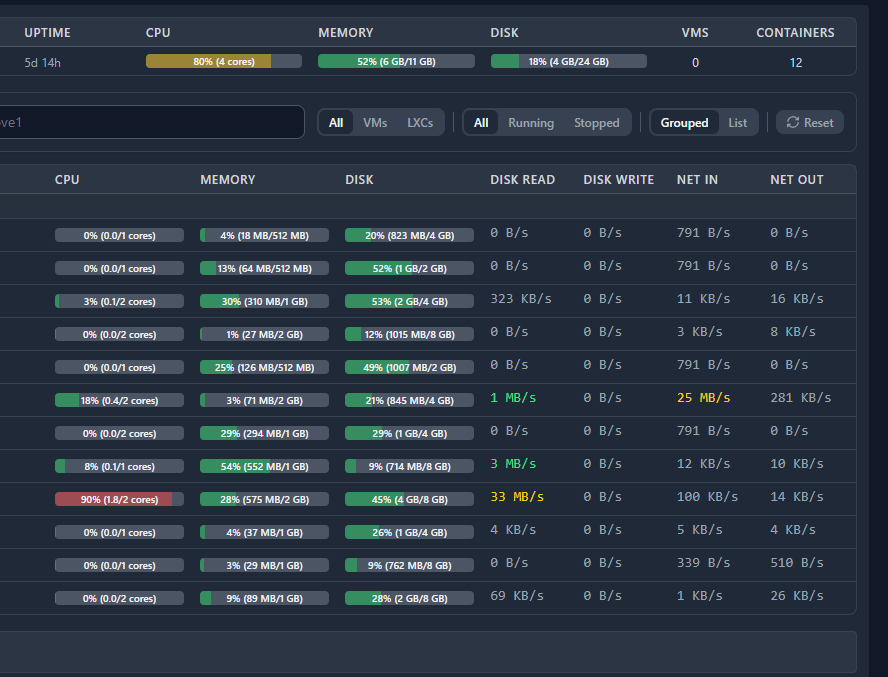
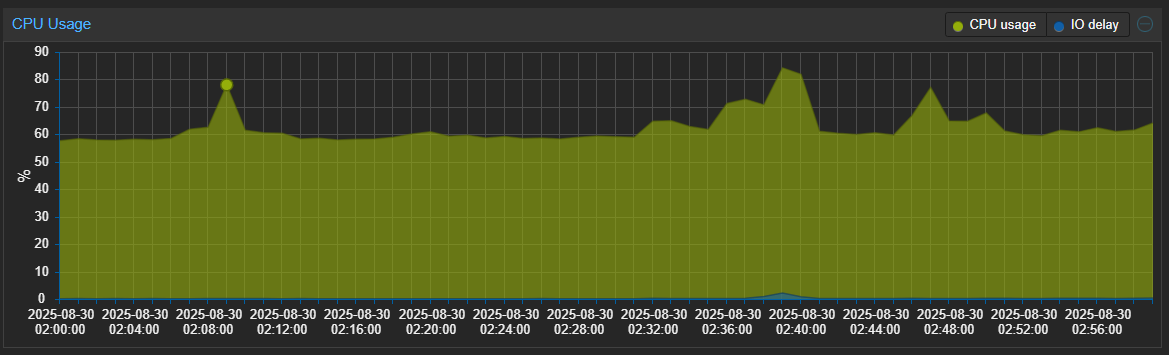
With proxmox installed on the mmc, log directory redirected to the ZFS RAIDZ1 mount, 12 LXCs running, reading & writing ~30-60MB/sec whilst hovering around 60-80% CPU, and 1 NIC connected at 1Gbps, it’s sitting at around 29W total at the wall and while it certainly hasn’t been running this hard the entire time, it hasn’t noticeably skipped a beat since I built it ~5days ago.
Now I confess I haven’t tried beating the absolute crap out of this with synthetic loads: I’m just using it with as much load as I am realistically ever going to place on it, and for me so far it works fine.
A quick snippet of the overview of the host / LXC activity figures as I was writing this post;
It’s been loaded like this for over an hour now;
It’s worth mentioning I actually have it raised up on a little stand so it’s not just sitting on a warm surface in a pool of it’s own heat, as I think the feet could have been a little taller regardless of the airflow direction.
Like others I’m not overjoyed about drawing cool air in from the top and unnecessarily fighting convection but I guess maybe they were worried people might put it on soft/dusty surfaces?
Ambient ~22-23C
CPU cores 78-82C
6 NVMe drives each have 3 sensors
58-59 / 61-62 / 72-80C
The vent mesh is pretty dense and I think this is probably a good candidate for a 3D printed top case with a more open mesh in the right places to reduce the airflow resistance a bit.
That said most of the time it’s practically silent. Right now as hot as it is I can hear it from 5 feet away behind me over the sound of my tower under my desk, but it’s a relatively gentle and consistent white noise and no more than a warm laptop would sound like at that distance. If I had something playing I’d not notice it at all.
Info here about NVME randomly disconnecting on Me Mini (hardware fixed on units produced after september 8 2025) :
https://www.reddit.com/r/BeelinkOfficial/comments/1nr73c8/comment/ngkuhfo/