Asus WRX80 Sage - can't update BIOS through IPMI

This might as well be a rant on shitty Asus products is.

I am using TR Pro 3975WX with 256 GB Ram, all PCIe slots populated with Hyper M.2 cards & gen 4 Pcie SSD, running proxmox for specific VM solution.

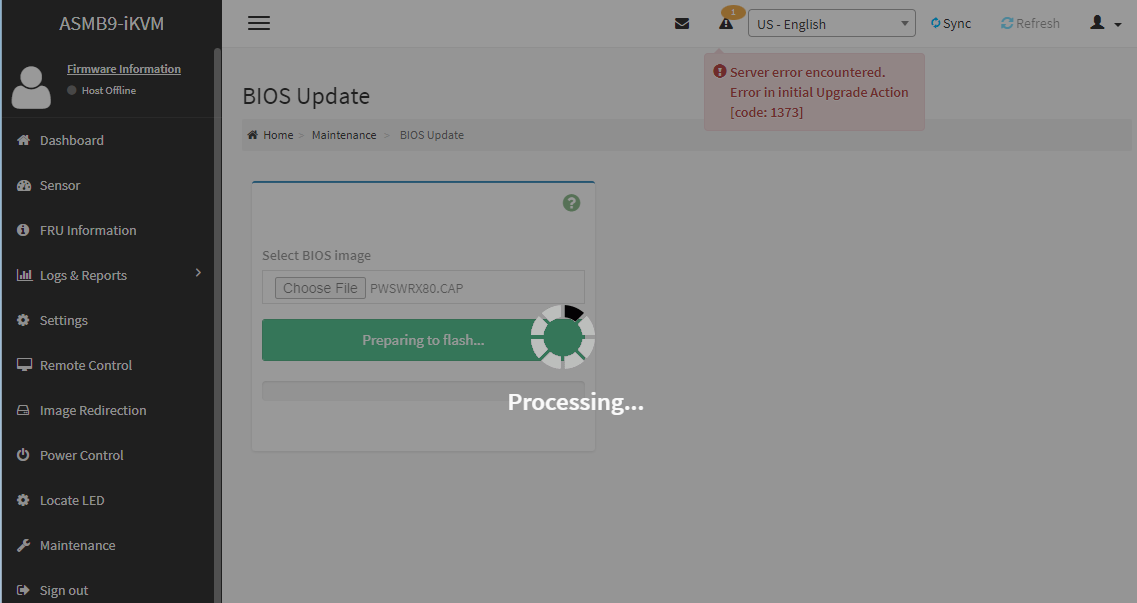
Given how PCIe is unstable, sometimes computer doesn’t POST at all, leavming me locked out from even changing BIOS settings. This leaves me with no option other than reflashing BIOS. Since the whole setup is remote, the and whole purpose of me buying this motherboard was to be able to remote everything, the only option is to flash MB bios remotely through IPMI which doesn’t seem to work.

The shitty interface just displays and error and refreshes quickly before am able to see anything, but was able to get a screen shot
Next time am building a workstation I’ll buy supermicro.

I usually upgrade the bios through the bios screen. I do upgrade the IPMI firmware through the IPMI interface. It’s kind of clunky for that too. But I did try the bios update from ipmi and even after a fresh power off and restart it hasn’t worked.
But since you got me to look and see a new bios, a flashing I will go.

I don’t have that model, but… If you reset it repeatedly early in the POST process, doesn’t it automatically revert to failsafe settings and prompt you that “The system has POSTed in safe mode”?

Other than that… I guess you need to remove the CMOS battery so it loses settings every cold boot?
Or maybe wire a relay to one specific fan header that you can control the speed via the web UI to toggle the relay on & off, or something?