All you need is a display server (X and Wayland), and applications to run (web browser, terminal windows, file manager, the 'taskbars' of Gnome, KDE, and the like). And GPU drivers, of course.
X (and Wayland, but it might work differently) is a display server; the really simple explanation is that it provides what the OS and its applications need to make a GUI.
The applications are clients that use X to render their GUIs and take input from your keyboard and mouse.
The GPU drivers work just like they do on Windows, and X sends the GPU what it needs to render out on screen.
Now, desktop environments (collections of applications. Gnome and KDE are examples) and window managers (explained later; Gnome has Metacity, KDE has Kwin), these are applications. They are, in a low-level sense, like your web browser in that they use X to show their GUI and take input from the keyboard and mouse. But whereas your browser is for browsing, your desktop environment's applications are there to provide you a way to interact with your computer.
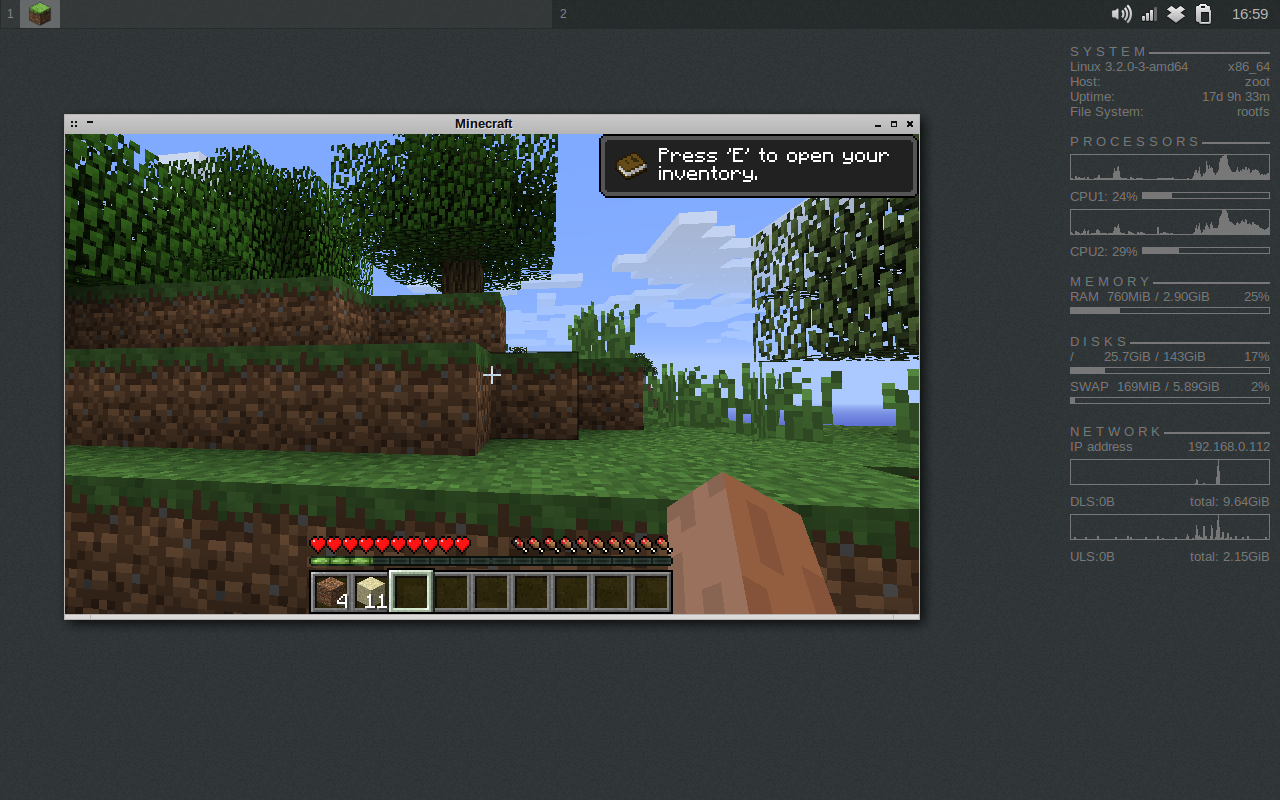
Take for example, Crunchbang Linux. Its window manager is Openbox. It takes care of where windows are on the screen and how their window borders look, what functions they can do, things like that. In this screenshot, Openbox has five buttons; on the left side, two buttons... the first I don't know of, the second will 'roll' the window up, so only that top titlebar will be shown. On the right, your standard minimize, maximize, and close buttons. That's all done with Openbox.
At the very top of the screen, you see a taskbar-like bit, with a Minecraft task icon, tray icons on the right, and a clock. That's Tint2. It's an application, just like the rest, but its job is to provide a taskbar. Same with the stuff on the right; that's called Conky.
That comes to a little point of info that some people don't know: while desktop environments are nice for getting an interface with lots of nice and integrated components, you don't need a DE. Crunchbang, for example, doesn't have a pre-set desktop environment. Instead, its developer decided to take Openbox and mate it with Tint2, Conky, and other programs. You could replace Openbox with some other window manager, if you wanted. He essentially created his own desktop environment, and you can too (and it's pretty easy to do).
Beyond that, I don't know enough to give you more information, but I hope that clears some things up.
Awesome is the shortened name for 'Awesome Window Manager'. Now, to understand what Awesome is, you have to know that there are two main forms of window managers: stacking and tiling. Stacking WMs are what you think of when you think of most popular Linux distros, as well as MS-Windows and OSX: windows are drawn on top of eachother. Tiling WMs, on the other hand, use any sort of methods to make it so that windows do not overlap. Here's a visual example.
Multi-monitor support is based on your GPU drivers and the X server configuration, and can be a PITA if you want to use proprietary GPU drivers. Most of the work will be done to a file called xorg.conf, or in some cases a set of files in the directory xorg.conf.d (both of which can be found in /etc/X11/). Use these terms to search for your answers.