+1 I was under the impression you were pinning cores
To be frank it looks like you’re out of other options. I had fewer issues on a far weaker rig with 8 threads pinned without a gpu. Perhaps turn your attention to the cilent side to see how well it is decoding.
Plex is pretty clear cut on their recommendations.

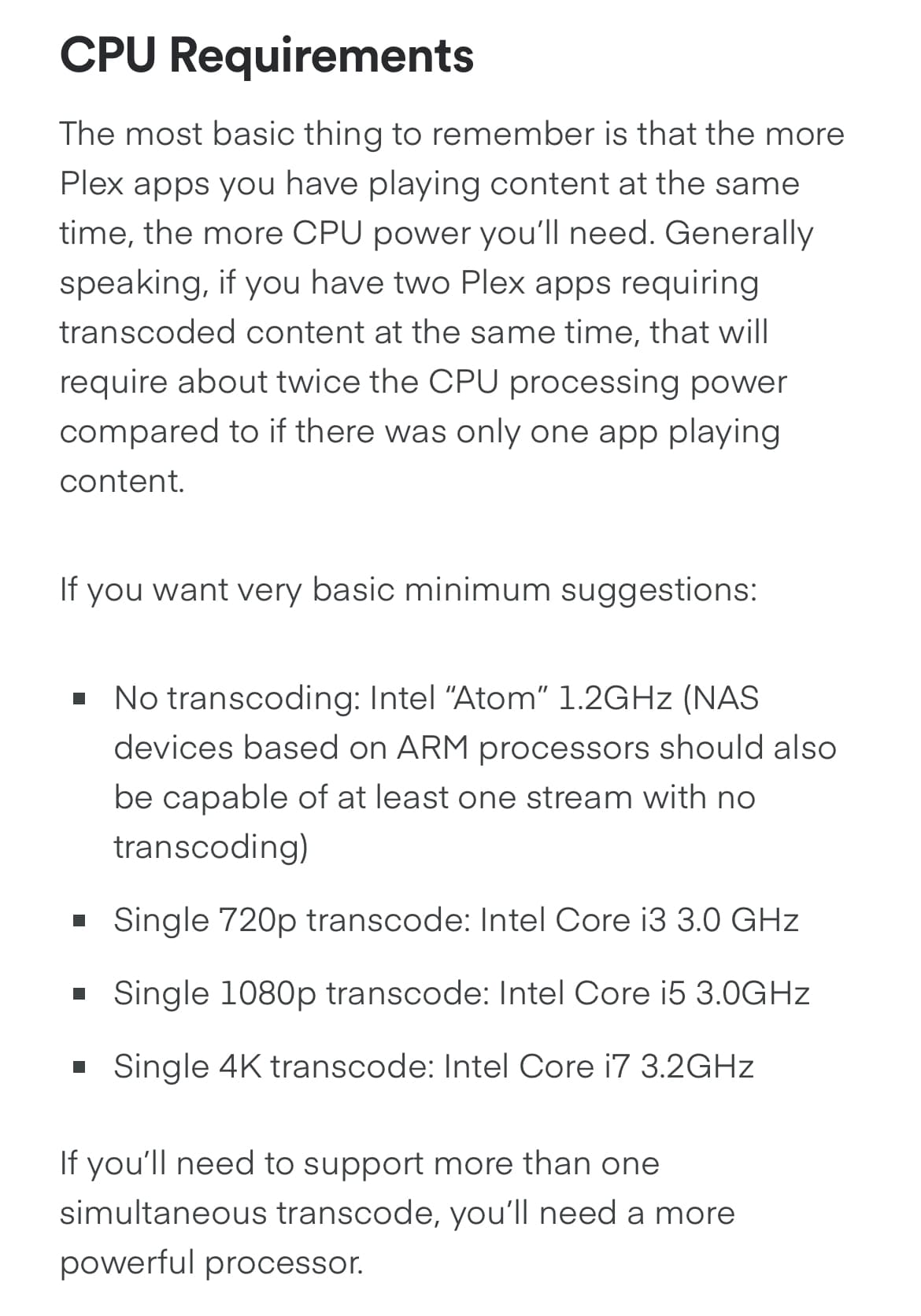
You might’ve found it.
I installed it through TrueCharts, and I changed it to these settings:
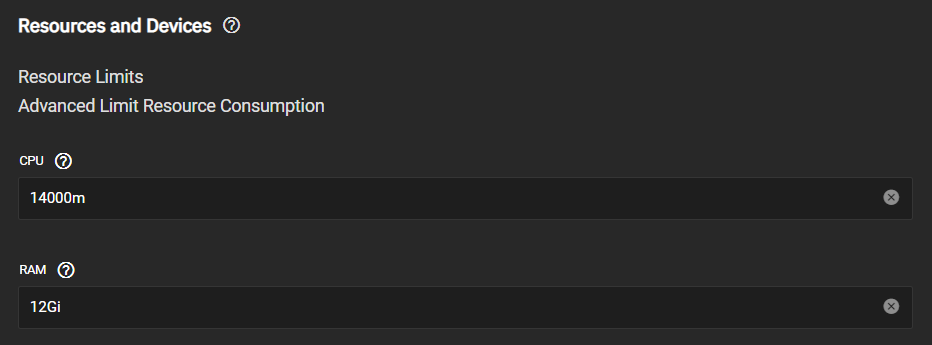
On the other hand, Plex (official) has no “resource reservation” set:

Is there a way to run without whatever KVM64 is?
Based on what you’re showing, I should easily be able to run 1 transcode stream without issue.
Right, hence suggesting it a non-Jellyfin config issue or cilent issue
What should I ask the TrueCharts folks about it? What specifically is the issue? Just the resource limiters or is it virtualizing the CPU wonky?
Just out of curiosity have you tried testing by spinning up a Ubuntu VM or a Jellyfin docker container. I’m not familiar with true charts.
P.s don’t pin core 0
https://www.truenas.com/docs/api/scale_websocket_api.html#vm
It looks like truenas scale uses kvm but does not make cpu type settings available through any current config system. There is a forum post stating these can be changed through SCALE API via command line.
This looks like you may be up against ‘i want a real hypervisor, not a do it all nas’ situation. I do not know if TrueCharts can, or would be interested in changing this option.
1 Like
We’ll have to see.
This next part might be related to why it’s transcoding in Jellyfin and not Plex.
I took this screenshot while viewing Jellyfin (left) and Plex (right) for the Leviathan Dolby Vision Demo:

This video is HDR10, and Plex is correctly tone mapping whereas Jellyfin is not.
Looking through the options, the “tone map” checkbox is only available for hardware acceleration.
But Plex requires you to pay for PlexPass to get HDR tone mapping, so something else might be wrong. I checked this video file, and there’s only the HDR video stream at different resolutions:

Also, I noticed Jellyfin was set to Auto while Plex had Very Fast for the transcoder. Not sure if that’s related or if it’s, like you said, something going on with TrueChart’s configuration of the Docker container.
It seems to be HDR videos that Jellyfin transcodes. Many of my demo videos are HDR, that’s probably it.
From what it looks like, but Plex web is playing these back without any transcoding:

On the other hand, the same video shows transcoding in Jellyfin:
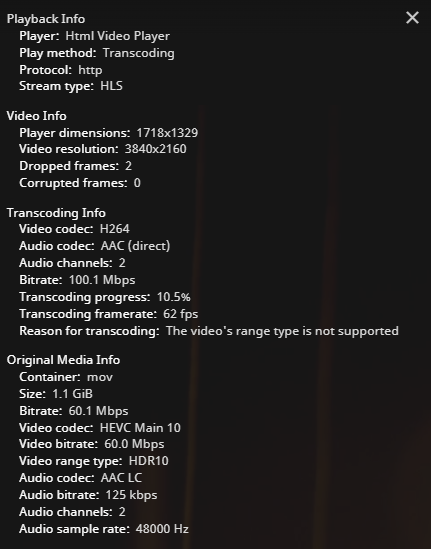
Not only that, the colors are all wrong in Jellyfin.
I’m starting to wonder if Jellyfin is actually trying to tone map whereas Plex is letting it clip, and I’m just not noticing any clipping because the peak brightness isn’t that high.
It could also be because of the transcoding that the HDR is getting messed up. I tried both “transcode in HEVC” and not having that checked, but that doesn’t change anything.
Loading Jellyfin on an HDR display in HDR mode, I’m seeing the same coloring issue:

This is an SDR screenshot of an HDR display. The right-side (Plex) is properly clipping in SDR whereas the left-side (Jellyfin) is washed out.
Here’s a comparison of both videos on an SDR display:

The Jellyfin one looks more color-accurate but desaturated in comparison.
I’m trying to figure out why it’s transcoding and why transcoding is so choppy, and I think it comes down to HDR videos at this point. These comparisons should help us narrow it down.
Here are some more:
SDR
Jellyfin | MPC-HC (MadVR) | Plex

SDR
Jellyfin | Windows 11 Media Player | Plex

HDR in SDR (should clip)
Jellyfin | MPC-HC (MadVR) | Plex

You guys know why HDR doesn’t work in Jellyfin?
Yeah, HEVC 10-bit is the issue:

Notice here, it doesn’t work in Chrome, and only works in Edge if I have the HEVC Extensions (which I do), and it still doesn’t enable HDR; although, this is a separate Jellyfin issue.
Now why transcoding performance is so bad, I still don’t understand that, but it seems like a Docker settings issue with the TrueCharts version of Jellyfin.
1 Like
I haven’t pinned anything  .
.
I haven’t spun up any VMs on this box aside from TrueNAS’s official Docker containers and the TrueCharts ones.
TrueNAS SCALE (Debian) uses Kubernetes to install apps. In TrueNAS Core (FreeBSD), those apps would install in jails rather than Docker containers.
But this isn’t a full Debian install either. There’s no apt for instance. You get what TrueNAS gives you, and if you want more, you have to use a container. You can create your own, but it’s not straightforward in my opinion.
The simplest way to get more supported apps was to go with a 3rd party “charting” library. TrueCharts configures their containers for you with many more apps.
1 Like
That washed out image happens when the player doesn’t recognise the video as HDR and displays it using gamma. So if you’re seeing that then no tone mapping is happening. If plex isn’t transcoding and you’re getting the correct colour then the player (or the display) must be doing the HDR tone mapping.
1 Like
if i was even going to mildly consider building custom docker instances for TrueNas Scale, i would also consider putting ProxMox on the bare metal, then running Jellyfin in a VM, and TrueNas in a separate VM. ProxMox is pure KVM hypervisor and would make some of the things you are trying to fix far easier.
3 Likes
This is how I was planning to configure my server but for whatever reason I could only get ubuntu server to recognise my HBAs. I might have to revisit that.
You might as well just get a used AMD pro card on eBay.
W3100’s are single slot low profile and about $50
The WX 5100 has more cores and vRAM is single slot but full height. Their about $150 right now.
AMD Radeon Pro WX 7100 is still single slot tho a little longer and with more cores. Heres 1 for $190
The more modern w6400 is low profile single slot and about $250
And the w6600 is single slot but not low profile but has more cores and vRAM. These are about $800 but heres one at auction for $400 with a buy it now of $525
These cards will transcode happily all say and since their pro cards they should be happy in a virtual environment and not have any superficial limits tho AMD doesn’t really limit their hardware as much as NVIDIA and Intel in general. Also their are single slot Quadros on eBay is you must have team green.
1 Like
It’s something worth looking into if I start using Plex or Jellyfin more often. Right now, it’s family photos and demo videos (Dolby, DTS, IMAX, THX, TV manufacturers, etc).
I just installed these earlier this month, so I haven’t had a huge use case.
I’m thinking the WX7100 seems like a really good deal, but I’m not sure how many streams each supports. Is there a way I can look that up?
1 Like
AMD doesnt really knitpick stuff like that like NVIDIA does. So it would most likely be as many streams as the hardware can handle. Aka until the GPU is under full load.
1 Like
Don’t GPUs need to, in hardware, support things like 4K h.265 10-bit in hardware or else it goes back to CPU transcoding?
Since I personally own NVIDIA consumer GPUs, I’m only familiar with how their encoding works.
For instance, the WX7100 is from Polaris on the GCN architecture. That’s pretty old, but maybe this pro-GPU doesn’t have restrictions on it. That or AMD’s different architecture can utilize more of the GPU for encoding.
This topic was automatically closed 273 days after the last reply. New replies are no longer allowed.