Several here and other store forums have used ASM1166 just fine, be aware that some are only 1x despite the hardware slot while the controller is capable of 2x. I’ve had no issues with my Silverstonetek ECS06 card myself.
Yes they can; typically the power scales with the amount of ports that they offer, and older generations tend to use more power. I know ASPM was problematic on the very old cards, which cannot immediately be dismissed because it seems like the majority of people are running cards that are older than 10 years which is a testament to how reliable they are, but also we can’t expect modern features on these cards.
This is just my person take, but if you expect ECC to consistently work on an AM5 motherboard, I wouldn’t buy a motherboard from anyone but supermicro, tyan, msi enterprise, gigabyte enterprise or maybe asrock rack. The other brands aren’t validating ECC properly on these AM5 motherboards and have broken it with BIOS updates or just straight up doesn’t work to begin with despite it being reported as active.
I’m not brave enough, there are some very serious security implications to using it.
Both Gigabyte and Asrock has shown to be ranging from poor to trainwreck level on the “server/workstation boards” and do you have something solid to back up your claims about testing?
You might have a point about the Gigabyte enterprise boards, I have been hearing a lot of negative things about them the past few years from fundamental hardware flaws to bad BIOS releases; but I have no recent personal experience with them. Asrock Rack seems to be a bit more hit or miss, but at least some of their boards work as advertised… perhaps I shouldn’t have recommend those two, the point I was trying to get across was that the consumer brands aren’t doing the validation work.
As to the claims about validation of AGESA/ECC, this is anecdotal, but when AMD released the series of AGESA patches that broke ECC on AM5, Supermicro skipped all the affected AGESA updates for it’s AM5 boards and only release BIOS updates after all the bad code was gone.
I haven’t been following the other manufactures close enough to say if they did the same, but this is something they should be doing if they are selling boards to the server market.
Another thing that’s peeved me about many of the board manufactures is their IPMI implementation is buggy and/or unstable, I can personally attest to Asus and Asrock Rack IPMI having stability issues across multiple motherboard models.
I’m commited now. I’ve ordered the case, 64GB ECC RAM and bought the HDDs, and got a very competitive deal on a 7900X (which I’ll run in ECO) plus ASUS ROG Crosshair Hero X670E board.
However, sometimes not every deal is what it seems. I picked up the set from the owner and inspected the board. I noticed a speck of dust on the socket but the board was otherwise okay.
Lo and behold, that dust ended up now being dust at all but a bent pin! Three of them in fact. I’m not sure how I missed it, but it’s probably due to the different lighting.

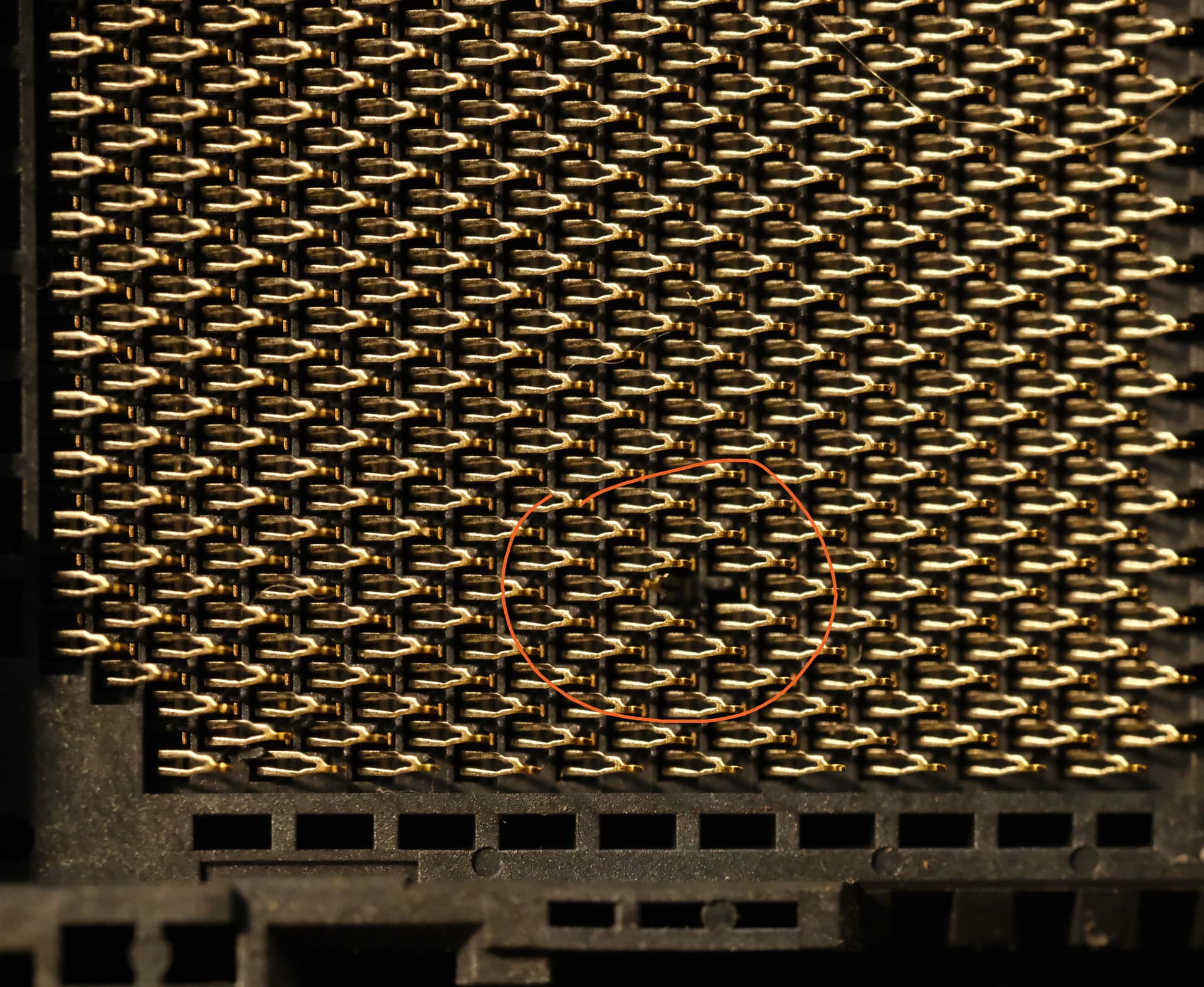
Upon closer inspection with my camera, I saw that the pins weren’t bent down, but up and away, like this:

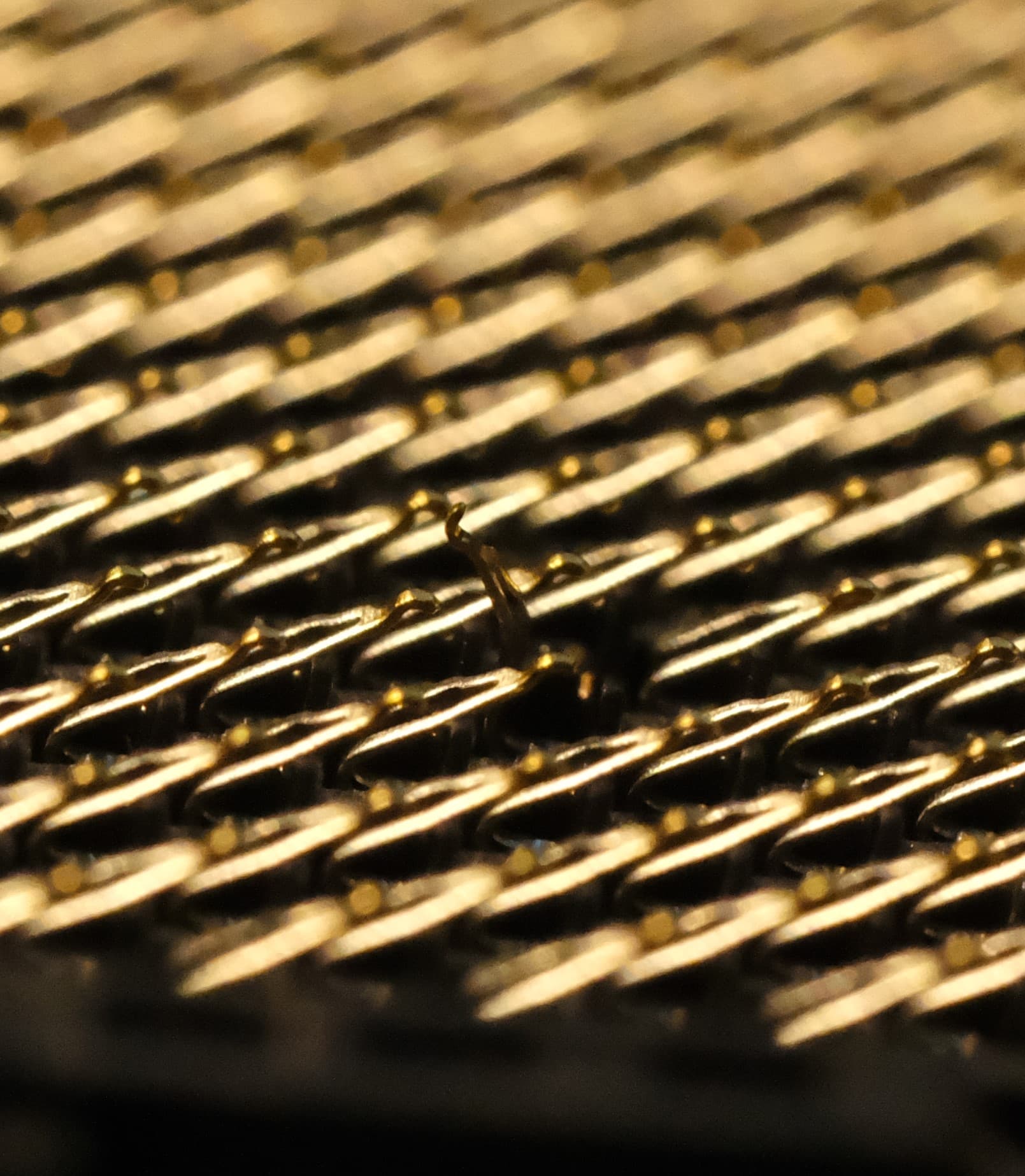
I’ve used a magnifier and some surgical needles to place the pins back where they’re supposed to go, but the pins are permanently bent in a way that I can’t really fix. I’m very curious if it will post.
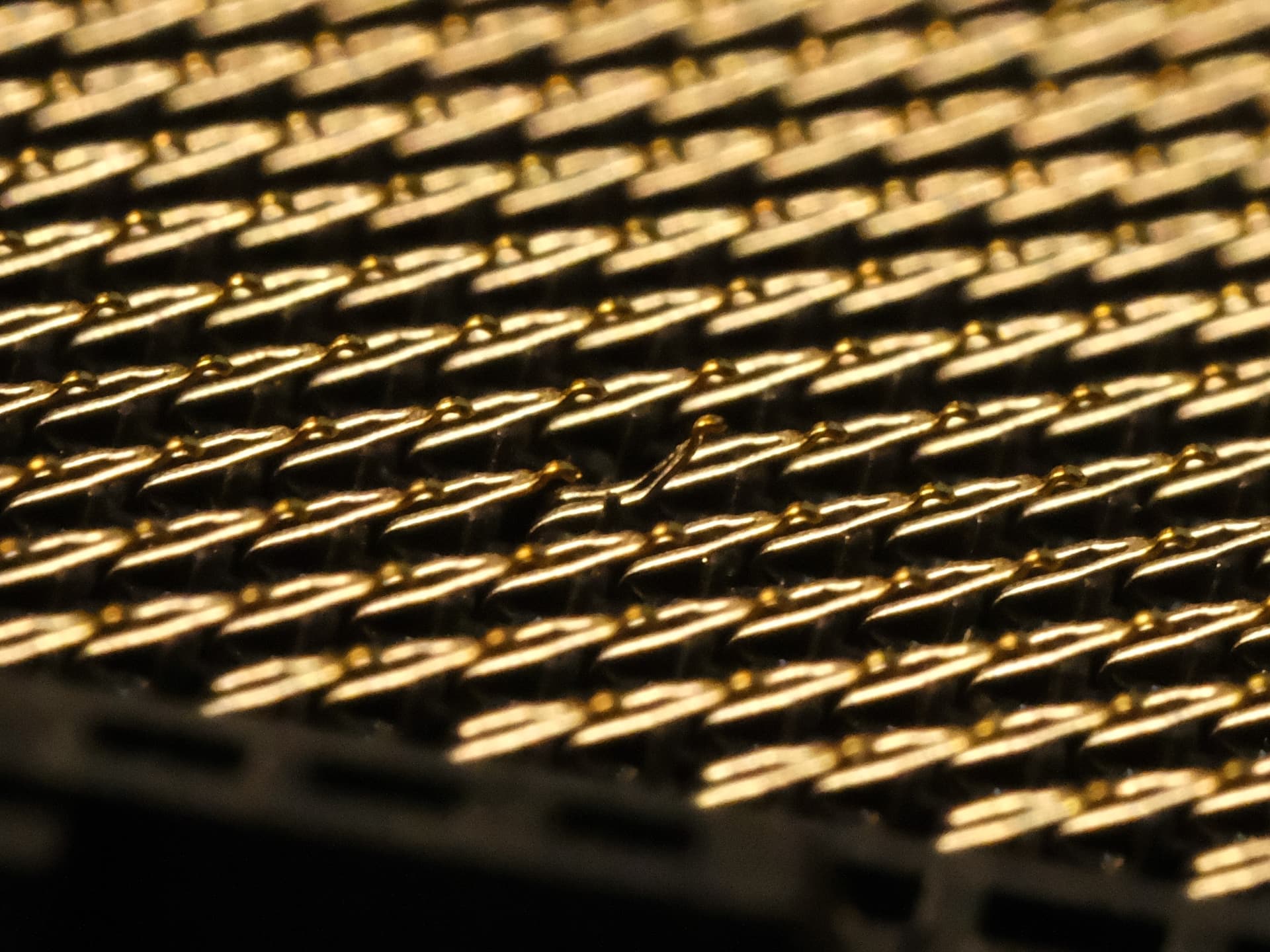
Anyway, nothing to do with the topic at hand. Just figured you guys would appreciate the lesson to inspect goods carefully under various lighting, and enjoy some motherboard gore.
4 Likes
I believe I have two options. I either run Unraid or TrueNas on bare metal and try spinning VMs from that. Or I install Proxmox and spin Unraid or TrueNas as a VM. I think for my (admittedly) ambitious goals, the Proxmox route is probably the best way to go but I’m wondering how the stability is running my disk management within my VM. Will my storage be at any additional risk compared to bare metal? Either getting corrupted or simply losing allocation somehow due to the fact it’s just a VM? I understand this might be a silly question.
Another question. If I pass through my GPU in the Windows VM, would that mean I should ideally install another GPU, like a low powered Arc card to be dedicated to transcoding in the Docker VM?
25 gig more likely…
as above
10 gig again
depends on site traffic
gigabit is fast enough
gigabit is fast enough again
gigabit more than suffices
sounds like you need EPYC on AM5…
I’d strongly recommend EPYC on AM% for your use case. Ryzen could theoretically fulfill your needs with frequent reboots. But, uptime is the name of the game with this workload.
Factor in ECC UDIMM RAM and someone will be along to recommend Thermaltake fans.
Your workload is well suited to U.2 NVME drives as it’s a light enterprise load.
oh, and welcome to the forum
You might consider upgrading to the copper version of that cooler, I’ve had great luck with it for my compact file server.
Loss of all connected drives and the upstream PCIe PHY when the adapter fails. Haven’t read about one taking out the CPU or chipset yet but as PHYs have blown that’s clearly a risk.
This is the first I’ve looked at this thread, but see aBav’s thread for the mechanical and thermal issues created by use of NGFF rather than a half height (or shorter card). Not that it matters with the Crosshair’s six SATA points.
From what I can tell ASMedia’s just fine but most ASM1166 cards’ thermal solutions are iffy at best, especially in M.2, as are Jmicron’s port multipliers. I’d run an ASM1166 six port card with a decent heatsink but not without checking the paste and arranging LFM commensurate with activity. Given how bad Broadcom is and how high the prices I can get on Areca, Adaptec, and Microchip tend to be, monitoring an ASM1166 with a thermocouple’s more appealing.
EPYC 4004’s rebadged Raphael.
Thanks! I already have the CPU now but if I’ll consider dropping in EPYC if I run into issues. I believe the only difference between Ryzen and AM5 EPYC is some additional validation testing and official ECC support. For where I am right now I don’t see the need to pay double a similarly specced Ryzen. I did purchase 64GB of ECC UDIMMs.
I hadn’t considered U.2. I figured I would just go with regular M.2 SSDs with TLC. Is the durability radically better? How many drives would you recommend and how would you deploy them?
1 Like
Radically
Using the 990 pro as an example: 150 drive writes in 5 years
To a Intel P4510: 1500 drive writes in 5 years
The intel is a 4Tb drive with zero hours that litters eBay at $250
there are much faster options that still undercut M.2 pricing per TB with even higher write endurance and random io performance.
We put flash storage as primary now with HDD’s as cold storage or archive backups.
there are microcode changes and features unlocked on EPYC
They were the same price forever, and deals can still be had.
I bought my 4464p for $360 delivered from a random vendor unloading OEM packaged 4004’s.
Others bought the 4564P for $275 on NewEgg during the Black Friday sale, I missed that one even though NewEgg didn’t sell out. My mistake.
If you run into issues, just swap CPU’s and build another machine…
It’s wasteful to have extra parts, so you always gotta use em!
Source? Samsung’s spec’s the usual 600 write endurance for consumer TLC, no timeframe specified. Intel’s spec is 1 DWPD, which is 1826 writes in the five year warranty period, but total endurance doesn’t appear to be specified.
Such as? U.2/U.3/E1/E3 doesn’t have a pSLC sequential advantage over NGFF and has to be fairly high end for IOPS advantage. Cache folding rates aren’t well documented but I don’t know of options exceeding current gen consumer NGFF’s ~1.5 GB/s at lower cost.
Source? Raphael officially supports ECC, I’m not finding anything on microcode differences, and AMD’s datasheet and reasons to buy EPYC 4004 don’t list anything distinct from Raphael. All I’m seeing is TSME could be enabled on OEM builds but that doesn’t apply here.
Can’t say I’m enthusiastic about trying to keep a ~25 W U.2 within its operating temperature spec in an SFF build handling much of a workload, particularly with the N3’s drive sleds and need to pull over the backplane. If the workload’s low enough thermals coming off a ~7 W idle aren’t a concern then probably 600 write TLC’s fine.
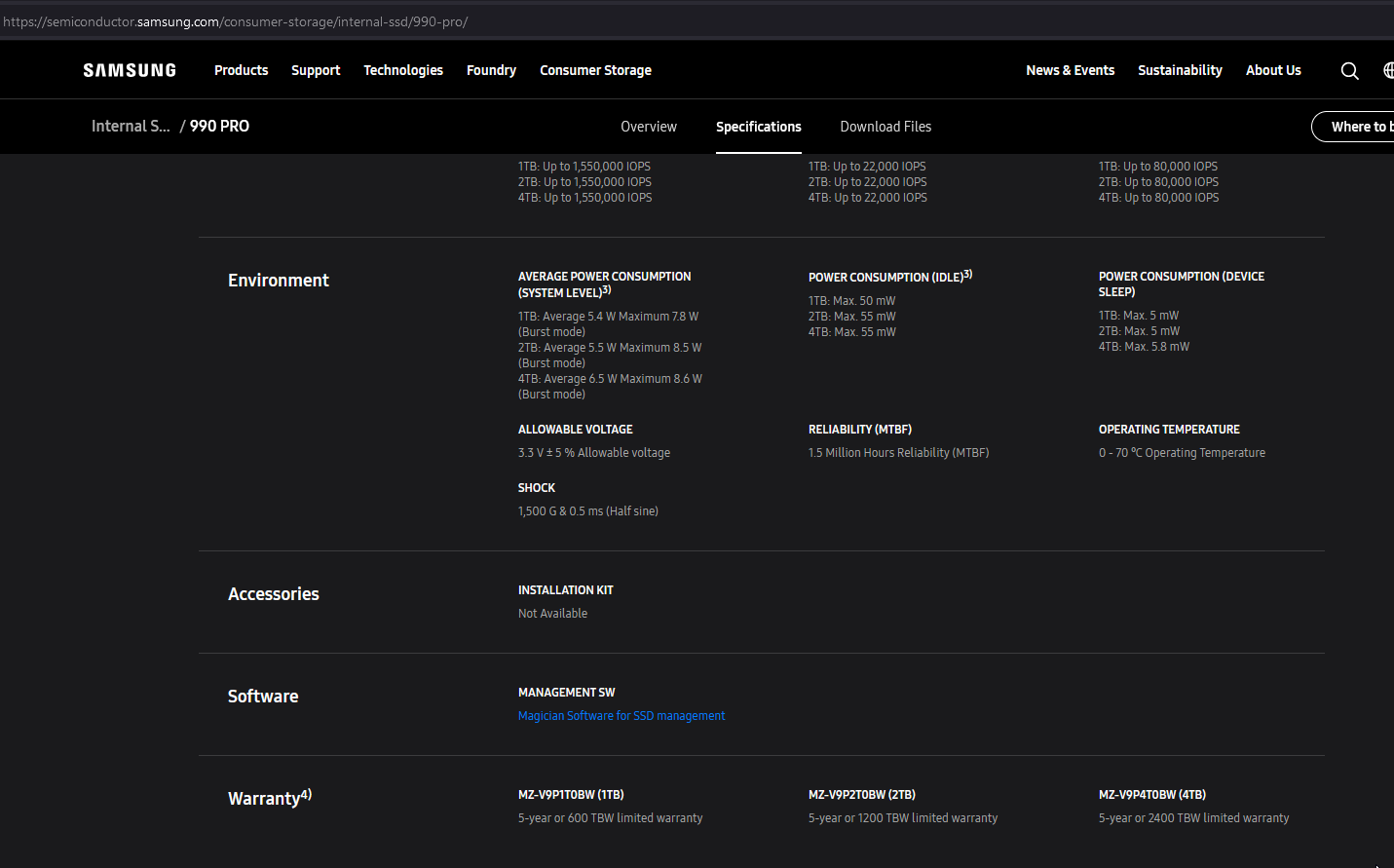
Enterprise drives use DriveWritePerDay
so that’s 4TB*.9DWPD*5years for the P4510 (just one I knew off the top of my head)
that’s 6.5 PetaBytes vs Samsung 990 Pro’s 2.4 PetaBytes assuming you go with same 4TB
purely sequential workloads are rare, and U.2 drives aren’t as impressive on paper, but in actual deployment they’re nothing short of magic
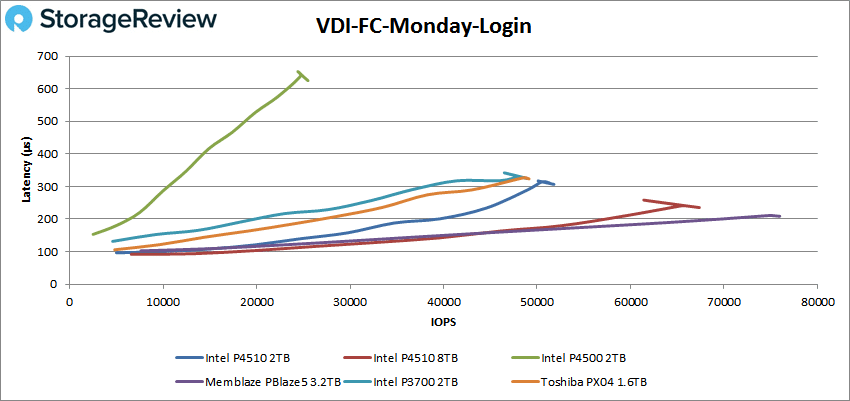
Here we’re comparing PCIe 3.0 U.2 vs PCIe 4.0 M.2 drives and you get this:
U.2
M.2
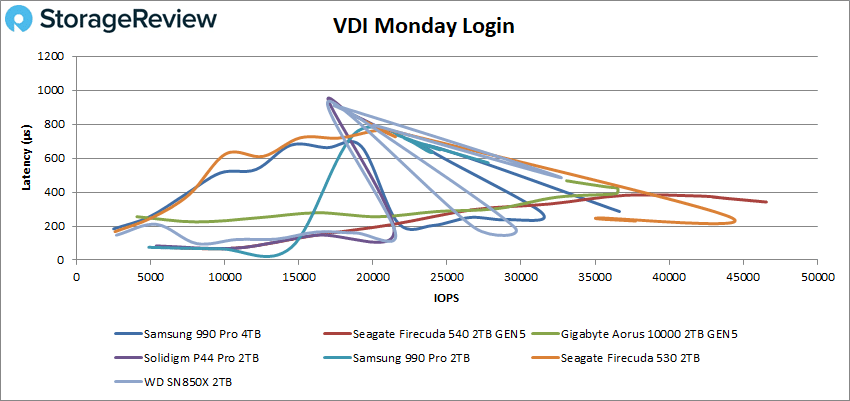
at 16 watts for the U.2
I work with everything from low end consumer clients up to servers that cost $50k per hour they’re down and everything in between.
U.2 drives are a different animal and when he wants all of the everything server, it’s a better performance versus cost proposition.
E3.x are still insanely expensive and or esoteric to implement as of 2025 but superior and will be the recommendations later.
only fixed for 4004 series not Ryzen Zen 4
Apart from the fact if you have a working firmware/bios which you always seem to “forget”
First of all – thanks everyone for the storage suggestions, but I’m honestly now more confused than ever in terms of the SSD drive types, their allocation and honestly even number of drives.
My layout is the following:
3 PCI slots, 1 x16, 1 x8x8 and an x1 slot.
4/5 M.2 slots, outlined below
CPU
- M.2_1 slot (Key M), type 2242/2260/2280 - PCIe 5.0 x4
- M.2_2 slot (Key M), type 2242/2260/2280 - PCIe 5.0 x4
- PCIe 5.0 M.2 slot (Key M) via PCIe 5.0 M.2 card, type 2242/2260/2280/22110 - PCIe 5.0 x4
(But this would eliminate a card slot)
Chipset
- M.2_3 slot (Key M), type 2242/2260/2280 (supports PCIe 4.0 x4 )
- M.2_4 slot (Key M), type 2242/2260/2280 (supports PCIe 4.0 x4 )
I’ll use the x8x8 slot for my GPU as that’s the only location it will physically fit in the case (as it’s longer than 180mm). As I want to be able to transcode in Jellyfin in one VM and stream games in a Windows VM, I’ll probably need to add in another smaller GPU, taking up either the X1 or top X16 slot. That leaves me with one card slot left which should be reserved for a 10 Gbe NIC or the Asmedia SATA controller.
So whatever else I want to manage should be done through M.2. I’m seeing a lot of options, like U.2, Optane, regular NVME, enterprise SSDs with PLP etc. I can’t really see which path makes sense in terms of:
- Price, up-front and in terms of power draw
- Layout
- Allocation (for the VMs, pools, cache, SLOG?)
If you were in my shoes and considering my use case (which is perhaps not as enterprise-grade as I’m seeing in the comments), how would you set this up?
We run SN850X mostly. If this an update to an existing host I’d look at activity and $/TB to see if U.2 would make more sense. Given the mentions of idle I’m guessing probably not but, if deploying consumer flash with some uncertainty, I’d want to have the upgrade path mapped.
Okay, I’ve been doing some planning and this is the idea I’ve landed on:
ZFS Pool 1: Archive up to 2023 and bulk media
VDEV1: 3x Toshiba MG07ACA14TE 14TB raidz1
VDEV2: 3x Toshiba MG07ACA14TE 14TB raidz1
ZFS special allocation: 2x Intel DC 3520 480GB mirror
ZFS Pool 2: Smaller files, frequently accessed files, archive from 2024
VDEV1: 2x Micron 5210 ION 1.92TB mirrored
The idea is to provide rapid access for Cloud access and split up the workload. I’m not sure if this is a good idea or if I can even have such granular control over which files go to which pool though.
What I’m still really struggling with is the software. Would Proxmox ZFS and then managing through Cockpit/Samba still allow me to utilize all ideas for the homelab? I’ve heard conflicting reports on using Truenas as a VM so I might be better off avoiding it?
You need a bit of knowledge investment. I prefer freebsd, but if you’re using proxmox anyway, you can look at linux tutorials on doing nfs exports (it’s not that complicated). Run the exports on proxmox and mount the shares on the VMs inside pve. Alternatively, you could install something like openmediavault on proxmox to control the exports in a GUI.
Technically speaking, all you’d need to do is point the stuff that requires quick access to the zpool2 and what you don’t on zpool1. BUT that won’t be exactly easy with certain software (idk about nextcloud). I believe nextcloud has support for SMB in the GUI, but idk how to setup certain files going to certain external shares (unless you’d use some kind of FS level tiered storage, e.g. mergerfs).
1 Like
This topic was automatically closed 273 days after the last reply. New replies are no longer allowed.