2nd hand U.2 SSD usage problem

SO…all these are Amazon Japan links as that’s where I’m based, there is an English option right next to the search box on top.

As mentioned in the original post, this is what I originally had, where after slightly heavy load, the drive stops working.

This is the next one I tried where it worked the very first time, but stopped working during CrystalDiskMark, and never recovered even after a reboot. It just completely stopped working. (I know this actually says PCIe 3.0 and not PCIe 4.0, was trying my luck)

And finally this is the significantly better but still not great single U.2 board that I’m currently using, coz someone in another forum suggested to test using a single U.2 board which has less chips on it. Admittedly also only says PCIe 3.0 support. But again, I’m currently limiting myself to what I can get very quickly via Amazon.

I still have another that I will try soon. I do not have any hopes (not anymore), I’m just literally trying everything with quick (same day/next day) shipping from Amazon.

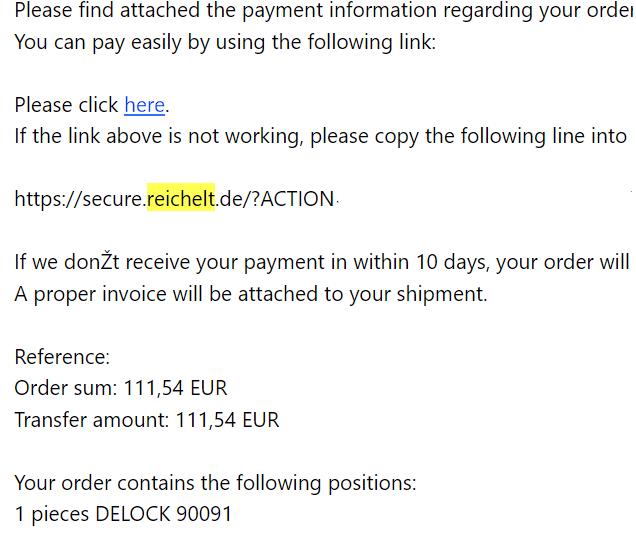
I do have a 90091 on order, but am waiting for the German retailer to figure out how to ship it to me…

I am also in contact with (as far as I can tell based on photos) the actual manufacturer behind Micro SATA Cable’s stuff, which is in Taiwan, trying to get them to sell one x8->2xU.2 board to me direct, as I am unable to find any retailers carrying their stuff (except micro sata). They’re slow with emails, but it’s Computex and I know they have a booth there so…probably not helping.

https://www.minerva.com.tw/Products/Gen_4/Golden_Edge/PCIe_x8_Series/DP8109.html
https://www.microsatacables.com/pcie-x8-gen-4-for-bifurcated-u-2-nvme-dual-port-aic for reference

p.s. again just for reference

https://www.minerva.com.tw/Products/Gen_4/Golden_Edge/M.2_Series/DP6401.html
At least he acknowledged that the 90151 is too new to tell if it’s actually good or not. I asked them how to choose between 90151 and 90091, which is better, and that’s their reply. Props for being honest.

And yes I also found that 90151 seems to be cheaper.

I think I tested one of the black x8-to-2xU.2 adapters you linked to a few years ago before I started my bigger blog thread:

  • It worked fine with 2 PCIe Gen3 SSDs (tested with Optane 905P) without any PCIe Bus errors.

  • When loading it up with two Gen4 SSDs, the first one (near the slot bracket) got recognized with PCIe Gen4, but the second one only with PCIe Gen1 (!), both SSDs created horrible PCIe Bus Errors then.

  • If you are looking for an M.2 adapter to connect to U.2 SSDs or backplanes via a cable, I strongly recommend the latest models with a MCIO connector, not SFF-8654-4i, OCuLink or SFF-8643.

  • As soon as copper cables are involved you can only go up to PCIe Gen3 with completely passive parts without getting PCIe Bus Errors. Gen4 or Gen5 should always have an active component like a ReTimer or ReDriver.

  • If you you succeed in purchasing from that Taiwanese OEM directly please report back here, would also be interested in that. Tested a few MicroSATACables adapters over the years and quite a few arrived DOA, so I’m not that happy to order from them again.

Forgot to answer how I test a load over 24 h:

  • I don’t want to kill my SSDs with never-ending write cycles but of course you have to write to them to completely test the PCIe Bus stability.

  • I use a pretty old tool that was intended to test storage products like USB thumb drives or SD cards (H2testw, the language of the tool can be switched from German to English), this tool writes test files in 1 GB steps on any kind of drive and then reads them and verifies their content.

  • That tool is not optimized for fast modern SSDs, but you can launch many instances of it and let each instance write to an isolated folder on the same drive (limit the amount of test files each instance writes). These multiple parallel operations can tax even a powerful modern system.

  • Some almost good adapters don’t throw any PCIe Bus Errors when you write contineous data to a drive from 0 to 100 % but the moment you then switch from writing to reading data you get a burst of errors.

  • So far if an adapter works fine with an SSD without any PCIe Bus Errors while writing the entire drive’s capacity and then reading back from it for hours they then never caused any issues in real-life day-to-day operation in my personal experience.

2 Likes

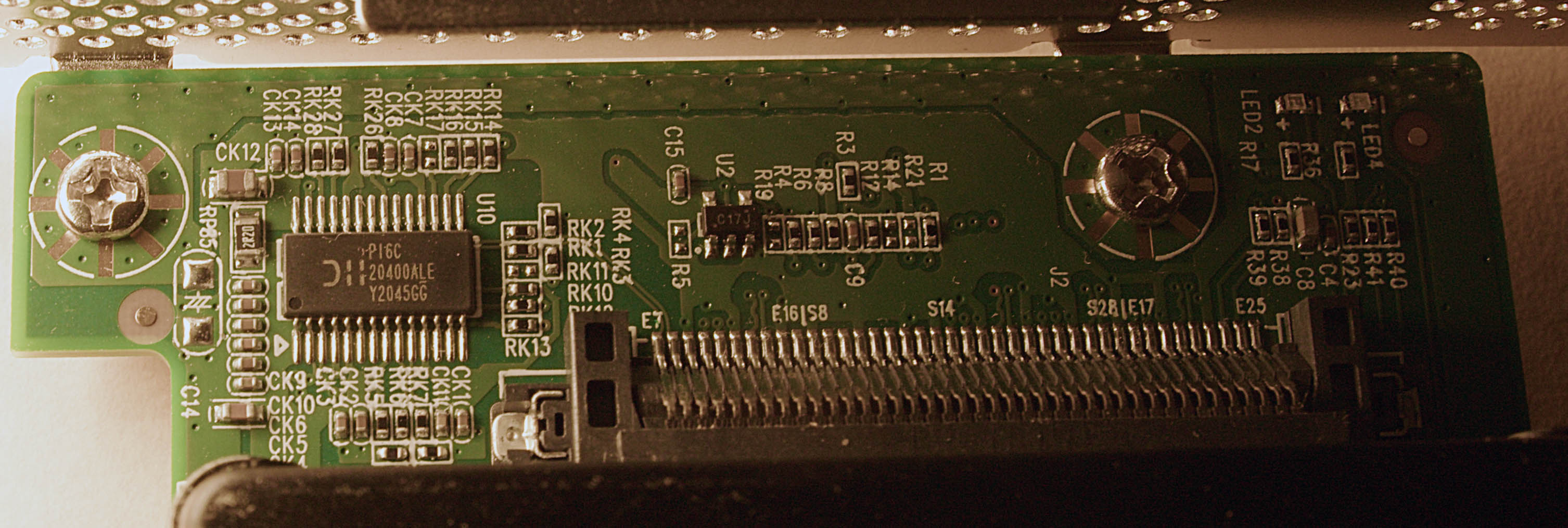
Here is a detail photo of the chip that is on the 90091 that judging by the public product photos got removed on the 90151:

If you have trouble getting Delock products in Japan I could do a quick test on them (to make sure that they aren’t DOA) and send them to you via DHL, the relevant shipping prices are:

  • Parcel tracking + Insurance up to EUR 50: EUR 22.49

  • Parcel tracking + Insurance up to EUR 500: EUR 49.99

Thanks for the offer, I have success in getting it. Will report back when I recieve everything

image

2 Likes

Looked it up. The PI6C20400ALE’s an obsolete package option for PCIe 2.0 clock distribution.

1 Like

Reichelt has been super reliable to me, then again, I live just one city over from them :smiley:

1 Like

Can you explain why such an old part “only intended for PCIe Gen2” can do a fine job on the Delock 90091 with PCIe Gen4 SSDs that do >7,400 MB/s each (one of the few adapters without any PCIe Bus Errors in my testing)?

Maybe it’s for compatibility? Like, an alternative clock gen or something, since 1.0/2.0 are 2.5/5GT/s, and gen 3/4/5 are 8/16/32GT/s?
Would be my guess, but I am nob.

PCIe 1.1, 2.1, 3.1, 4.0, 5.0, and 6.0 all use a 100 MHz reference clock. The PI6C20400A’s likely compatible with 2.1’s 3.1 ps RMS phase jitter allowance but not the ≤1.0 ps of subsequent versions.

I’d start with the jitter rejection of the NVMes’ PLL bandwidths.

Hello all, just an update

I finally got the Delock 90091 today. Frankly, I’m slightly surprised it took this long for it to arrive. I have not tested it yet because I managed to get my hands on the Taiwan Minerva DP8109 earlier. https://www.minerva.com.tw/Products/Gen_4/Golden_Edge/PCIe_x8_Series/DP8109.html By chance I was going to Taipei anyway, I managed to have a chat with a guy from that company and managed to get him to sell me one even if they normally don’t do retail. I also got (verbal) confirmation that they are the manufacturer behind (at least some of ) Micro SATA Cables’ stuff.

I’ve been using that for a few days now, so far so good. I’ll probably test the Delock one after a while, just to have some real-world experience with it as well.

Anyway, very happy to finally have the 2x U.2 card so both of my U.2 drives can run as they should.

2 Likes

This topic was automatically closed 273 days after the last reply. New replies are no longer allowed.