1Gbit/s <-> 10Gbit/s: internet bandwidth issues caused by switch?

Hi everyone :waving_hand:

I just signed up to this forum because I’m out of ideas. I hope you forgive me that I signed up just to ask for help.

TL;DR:
New 1000/200 fiber connection (OPNsense VM as router, plugged into a gigabit port on a TP-Link T1700G-28TQ). Clients on the switch’s gigabit ports get ~930 Mbit/s in speedtests, but clients on the 10G SFP+ ports only get 760–840 Mbit/s. This happens on Windows and Ubuntu, with two different NICs (AQC100 and X710-DA2), on different hosts, DAC cables and SFP+ ports. Local 10G transfers are fine. My suspicion is the switch’s small buffer (1.5 MB) can’t handle the 10G→1G speed step-down. Has anyone seen this, is it brand-specific, and is a bigger-buffer switch really the only fix?

I recently got a new fiber internet connection (FTTB via G.Fast).
I’m using pppoe passthrough on the modem and a virtualized opnsense instance on an HP EliteDesk Mini running proxmox.
My biggest fear was single-threaded pppoe performance on FreeBSD, or the fact that my router is virtualized and bandwidth could be limited.
Neither virtualization nor single-threaded pppoe turned out to be the bottleneck in my setup.

My network switch is the TP-Link T1700G-28TQ, which has 24 gigabit ports and 4 SFP+ 10Gbit/s ports.
The LAN interface of my proxmox host is a regular gigabit nic that I’ve connected to one of the 24 gigabit ports.

I’ve used my main Windows “server” (actually Windows 11, but I use it as a headless server) to verify if my new ISP is delivering the promised data rates - and was quite disappointed.
Between 760 and 840Mbit/s are the download rates I’ve seen, but I never came close to the theoretical maximum.

At some point during my testing (different modems, direct pppoe from a linux host, etc) I noticed that my second proxmox host saw consistently higher download rates with the ookla speedtest cli than my Windows server - up to 930Mbit/s.

Today I’ve tested a 1GbE connection on the Windows server, the 10Gbit/s connection in a Ubuntu live session on the same hardware as well as 1GbE in Ubuntu live.
The picture was quite clear at first: the 10Gbit/s network connection always resulted in lower speed tests, in both Windows and Ubuntu.

I’ve tried tweaking some driver settings with the help of my friend Claude, but didn’t end up improving the speeds.
Errors or dropped packets could not be observed on the proxmox host, the opnsense virtual nic or the Windows server’s nic.

The network card was one of those cheap AQC100 based TrendNet models with a single SFP+ port. So naturally, I blamed it.
I replaced it with a spare X710-DA2, flashed the newest firmware (it collected dust for a while) and tested again.
To my surprise, no improvement.

At this point I limited the bottleneck to two options: a bad DAC cable or a bad network switch.
I didn’t want to believe in either, since local file transfers were able to saturate the 10Gbit/s connection without any trouble.

So I tested another host, connected to the same switch with a different DAC cable to a different SFP+ port - and saw the same issue there. Consistently lower speedtest results.

So my only bottleneck option is now the switch itself, which apparently can’t handle a gigabit internet connection through a 10 gigabit port.

Now AI says it’s the small internal buffer of the switch (1.5MB) and I can maybe get behind the idea.
On the other hand, even $1000 enterprise switches come with similarly small buffers.

Have you guys ever heard about such issues? Is this something which only affects certain switch brands? Is a bigger buffer really the only answer?

ANY help would be greatly appreciated. I’ve spent multiple days on this now and I am absolutely unhappy with the conclusion so far.
I am sorry for the wall of text. I’ve added a TL;DR, but it might not cover it adequately.

Thanks in advance!

Managed switch? Or one of those chinesium box of random surprises?

that’s kind of weird that a switch can’t do the switching at line speed. Especially at gigabit speeds.

From what I gather, you seem to have used speedtest so it’s a connection to another server in the internet, maybe you connected to two different endpoints so the speed is not the same, which is normal.

Can you repeat the test but 100% local using iperf3 tool? Set it up as server on a device on a gigabit port and then try reaching it with iperf3 from a device on the 10gbit, and also the reverse.

You can also try increasing the amount of concurrent streams and see if that changes anything.

Your friend claude can support you with iperf3, it’s a very common network testing tool.

Imho if you test with iperf3 you should see the switch is switching fine and at line speed as it should.

unless you have a businness contract with guaranteed data rates, the numbers they sell are an “up to” number that depends from their benevolence, the phase of the moon and how overcrowded is the network switchbox your line goes to. I would not be crying at getting 700+ mbit/s on an alleged gigabit contract. I mean I know that’s how the businness works and I would not be surprised it’s not perfectly as high as advertised.

he said he has a TP-Link T1700G-28TQ, which is not a chinesium PoS, although I’m far from the biggest fan of TP-link in general it’s not as bad as the famed Aliexpress Special network equipment

I could’ve made my post much longer and maybe I should’ve.
The speedtest . net cli lets me pick a server and I’ve always chosen the closest with the most reliable test results (and in the same provider network). I’ve repeated the tests often enough to be confident that there’s really a difference between the nics. I’ve always tested from two different devices alternatingly. There really is no doubt in my mind that there’s meaningful performance difference. Usually 50+ Mbit/s, sometimes even 100 Mbit/s.

Here’s the thing: none of this is reproducible with a local iperf run. In neither direction. AI is arguing that this is related to the difference in latency to the target. For local tests the burst buffer needs to be much smaller to saturate a gigabit link. Also any “disturbances”, like a dropped packet, can be reacted to much sooner (depends on the round trip time) and won’t affect the throughput as much. I can’t judge myself if these explanations are sound.

Yes I’m well aware. Here in Germany we have a useful little law that describes exactly how customers should be compensated (or offered a way out of their contracts) if the ISP is not delivering what they promised. There are 3 speeds (minimum, normal and maximum) that the ISPs have to specify for any given contract. Then there is an official measuring tool that you’d need to use for 30+ measurements over 3 days to prove that they underdeliver. That’s why I was checking the speed in the first place.

I’m also not the biggest fan and I wouldn’t buy it again today. Back then it was the only fanless option with 10G ports.

Read right past that.

Being unfamiliar with them, any way to do the equivalent of show interface ?? brief or similar statistics displays?
I suspect high error rates.

On some Mikrotik switches, it is possible to saturate the internal link between the switch chip and CPU when coloring too far outside the lines. Helpfully they provide block diagrams and switch-chip featuresets to check how far from intended use one lands.
With “big boy” equipment from the usual suspects, those limitations are lifted by drowning them in cash. In exchange, one gets to fight arbitrary licensing issues.

I don’t know if the statistics exist on this switch.
I can see “Alignment Errors” and “Undersize Packets” on the receive side and “Collisions Errors” on the send side. All of these are zero though, on all involved switch ports.

telnet didn’t let me see additional error counters.

SNMP includes “ifInErrors”, “ifOutErrors”, “ifInDiscards” and “ifOutDiscards” - all of these don’t show any anomalies on the involved ports. At least not during the time I’m speedtesting.

1 Like

More experiments:

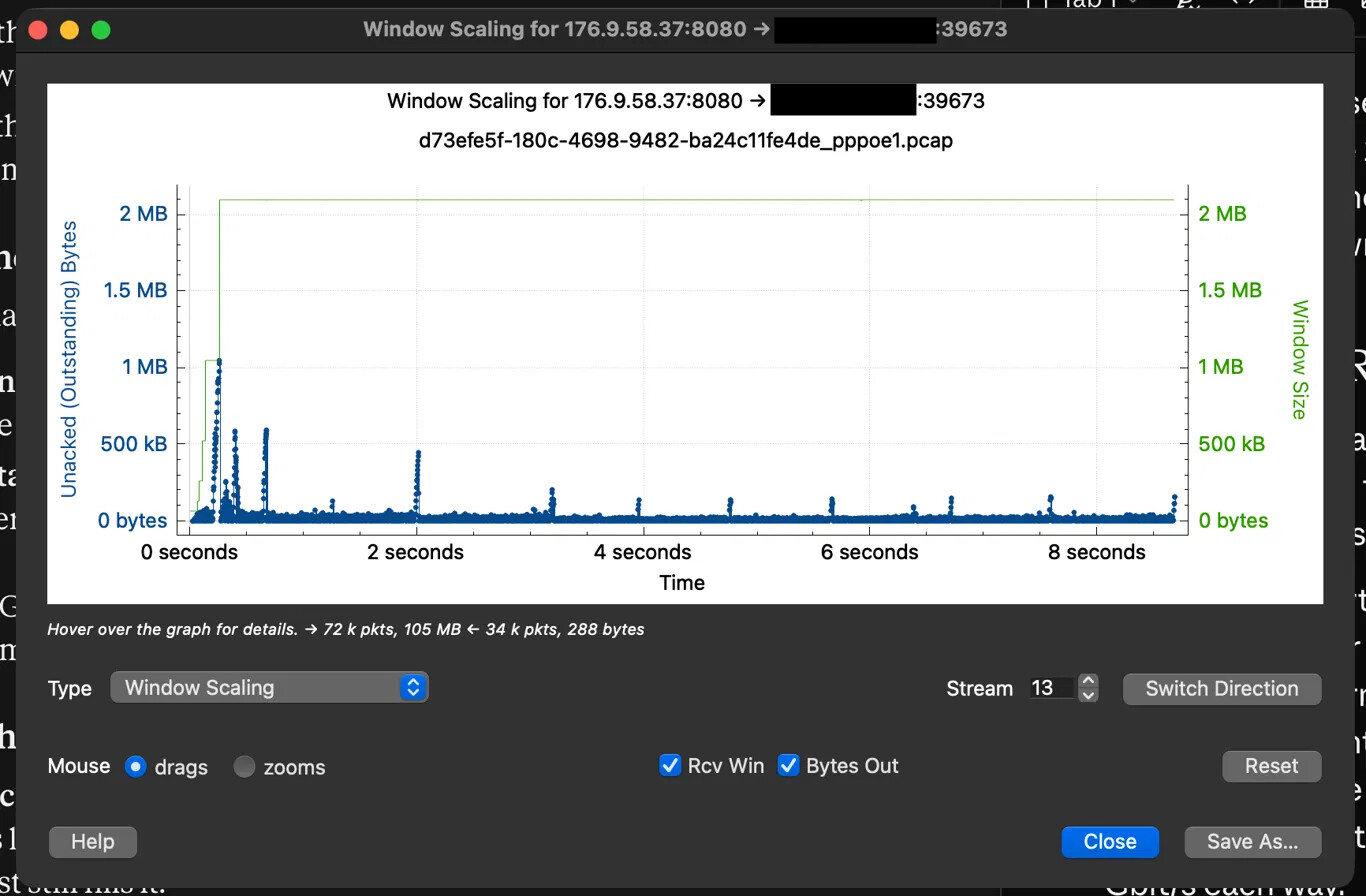
This is a captured speed test on the Windows server using the 10G link to the switch:

This is a captured speed test on the same Windows server using a 1G link to the switch:

I am not confident enough to interpret this myself, but this is where Claude has lead me. The ACK rate is supposedly a lot higher on the 10G connection (~2 packets per ACK) versus the 1G connection (~4 packets per ACK).

I’ll do more experiments soon.

Forgot to mention: these were captured on the pppoe interface in opnsense.

So I’ve reached a new conclusion with Claude.
I’ve changed the link between my modem and my proxmox hypervisor to 2.5G and saw speeds of over 1Gbit/s directly on the proxmox.
After we confirmed that no packet loss is happening anywhere in the network, I captured the packets on the pppoe interface again and we compared the statistics between a speedtest on the proxmox host system directly and my 10G-connected windows server.

proxmox host 10G client
Speedtest result 1,058 Mbit/s 775 Mbit/s
Total packets 1,087,295 ~1,060,000
Retransmissions ~67,000 (~6.2%) 56,454 (~5.3%)
Packets per gap ~1.2 (isolated) ~6.6 (bursts)

What this establishes

  • The proxmox host lost even more packets, and was still 37% faster. So the amount of loss doesn’t explain the difference.

  • The pattern of loss does. The proxmox host loses single packets, which TCP shrugs off. The 10G client loses runs of packets, which repeatedly force the speedtest server to slow down sharply.

  • All loss happens at the ISP. That’s normal for a G.fast line run at full speed, and your network adds none.

The findings are definitely interesting. Even worse packet loss on the system that reaches clearly higher internet speeds.

Now Claude claims that things could improve if I replaced my network switch with a 2.5G capable model. I am not yet convinced.

I still remain hopeful that one of you has seen this before and knows exactly what’s happening :slight_smile:

Some more experiments were done in the meantime - setting up an artificially bandwidth limited container on the proxmox host running opnsense to simulate different bandwidth bottlenecks.

The results are included in the following document that I am updating with every new experiment.
I’ll keep updating this thread with new information until I hopefully can resolve the issue at some point. Maybe someone in the future will run into similar issues. Then they can hopefully find this thread and find it helpful.


Switch Upgrade: UniFi Pro HD 24

Oct 11, 2026

UniFi Pro HD 24 fits best

The UniFi Pro HD 24 (USW-Pro-HD-24) covers every requirement in one 1U switch: 3 DAC devices, ~20 copper devices, the modem, the Proxmox host and a 10GbE run to one room.

Need Pro HD 24 provides
3 × 10G DAC devices 4 × 10/1G SFP+ (1 spare)
10GbE link to a room 2 × 10/5/2.5/1 GbE RJ45
~20 clients + modem + Proxmox 22 × 2.5/1 GbE RJ45
Rack space 1U
Power (max) 50 W per spec sheet; 60 W per Dateks
Price ~€602 at Dateks (Latvia); check Geizhals for German prices

It also supports DC power backup via UniFi’s optional backup unit.

The PoE variant (USW-Pro-HD-24-PoE, 600 W budget) lists at €909 net / €1,090.80 incl. VAT. For one access point that isn’t worth it: take the non-PoE model plus a PoE injector.

Other UniFi models don’t fit

Each alternative misses on SFP+ count, 2.5G count or the room link.

Model Ports Price Why not
Pro XG 24 16 × 10GbE RJ45, 8 × 2.5GbE, 2 × 25G SFP28 $1,243.87 (CDW) Mostly power-hungry 10GBASE-T; only 2 SFP28 slots for 3 DAC devices
Pro Max 48 16 × 2.5GbE, 32 × GbE, 4 × 10G SFP+ $649 (US store) Twice the ports needed, only 16 at 2.5G, no 10GbE RJ45
Pro Max 24 16 × GbE, 8 × 2.5GbE, 2 × SFP+ ~€441 (Galaxus) Only 2 SFP+ slots

Caveat: UniFi needs a controller

UniFi switches are configured through the UniFi Network application, not a standalone web UI. Without a UniFi gateway, you self-host the controller.

  • Run it as an LXC container or Docker container on the Proxmox host, on the management VLAN.
  • It only needs to run when you change settings; the switch keeps working without it.
  • Define VLANs in UniFi as “VLAN-only” networks, so OPNsense stays the router and DHCP server.

Why the new design should fix the 10G slowdown

The T1700G-28TQ’s small buffer is not the cause: iperf3 through it runs at full speed with zero retransmissions, and no drop counters rise during speedtests. The real cause is any step in the WAN path that is slower than the line (~1,168 Mbit/s), which turns isolated losses at the ISP into costly bursts (see the 10G client investigation below).

The new design removes both such steps:

Step slower than the line Today New design
FRITZ!Box → switch 1G 2.5G
Proxmox host → switch (LAN) 1G NIC 2.5G trunk

Every link between the line and a 10G client is then faster than the line, the same situation in which the Proxmox host and the test container reached ~1,050 Mbit/s. Buffer size plays no role here: the Pro HD 24 has 2 MB vs the T1700G’s 1.5 MB, a negligible difference.

10G link to a room

Use one of the switch’s 10GbE RJ45 ports over copper, or the spare SFP+ slot over fibre.

Option Reach Trade-off
Cat6a, 10GBASE-T up to 100 m Power-hungry at both ends
Cat6, 10GBASE-T typically ~55 m Often enough in a house; same power cost
Fibre, SFP+ far beyond house scale Lower power; needs a fibre run and uses the spare SFP+ slot

Current and proposed setup

[embedded content: current setup · WAN and LAN on separate NICs, both at 1G]

Today the modem and the host’s 2.5G NIC both negotiate 1G on the old switch, so WAN is capped at 1G.

[embedded content: proposed setup · 2.5G trunk for WAN + LAN, 1G for management]

In the proposed setup, WAN (VLAN 10) and all LAN VLANs share the 2.5G trunk, and Proxmox stays reachable over the 1G management NIC even if OPNsense is down.

WAN line: FRITZ!Box 7632 on G.fast

The line delivers about 1,090 Mbit/s of usable download, so today’s 1G link to the FRITZ!Box caps it at 930. The 2.5G link removes that cap.

The ISP’s wall port connects to the FRITZ!Box’s DSL port. That’s G.fast over the building’s telephone copper (FTTB), not Ethernet. The FRITZ!Box terminates DSL and bridges PPPoE onto its 2.5G WAN/LAN combo port, where OPNsense dials the session. The 7632 supports G.fast up to 1 Gbit/s; its 212 MHz profile gives about 1 Gbit/s each way.

Line value (FRITZ!Box) Download Upload
Provider profile cap (DSLAM max.) 1,168 Mbit/s 292 Mbit/s
Line capacity 1,337 Mbit/s 325 Mbit/s
Current sync rate 1,168 Mbit/s 292 Mbit/s
Measured today 930 Mbit/s (1G port limit) 275 Mbit/s (line limit)
Expected with 2.5G link ~1,090 Mbit/s (line limit) 275 Mbit/s, unchanged

The line syncs at the provider’s cap with headroom to spare, so it should be stable. Usable throughput is about 6–7% below sync because of line encoding and Ethernet, PPPoE, IP and TCP headers.

Next steps:

  • Make sure the FRITZ!Box combo port runs in LAN mode and links at 2.5G to the new switch.
  • Set the OPNsense FQ-CoDel upload pipe to ~250–260 Mbit/s (90–95% of 275).
  • After the switch upgrade, measure download with the shaper off, then set the pipe to 90–95% of it (expect ~1,000–1,040 Mbit/s).
  • Confirm with a bufferbloat test under load; if PPPoE stalls below line rate, check single-core load on OPNsense.

10G client investigation

10G clients download slower because a step slower than the line (1G) in their path turns isolated packet losses at the ISP into bursts. A 2.5G step does not, so the upgrade should largely fix it. One part, the 10G NIC’s extra sensitivity to these bursts, is not yet explained.

The symptom

On the same Windows host, same speedtest server: the onboard 1G NIC reached 925 Mbit/s, the 10G SFP+ NIC only ~775–850 Mbit/s. The same happened on Ubuntu, on two switch ports and with three different 10G NICs.

What was ruled out

Suspect Test Result
Switch buffer (T1700G-28TQ) iperf3 OPNsense ↔ 10G client, both directions 937–944 Mbit/s, 0 retransmissions
Drops inside the network Counters on Proxmox NIC, its queue, OPNsense interfaces 0 drops during tests
Receive window size Windows autotuning restricted 799 Mbit/s, startup loss only slightly smaller
Too few ACKs (stretch ACKs) RSC off; interrupt moderation off Worse (736 Mbit/s); the 1G NIC actually ACKs less often
FRITZ!Box 1G port FRITZ!Box cabled directly to the host’s 2.5G NIC 10G client still 775 Mbit/s

All packet loss happens upstream at the ISP, which is normal when a G.fast line runs at full speed.

Key finding: loss pattern, not loss amount

Same server (37.51.193.149), FRITZ!Box on the 2.5G direct link, captures on the OPNsense WAN interface:

Client Speed Retrans. % Packets per gap
Proxmox host (no step) 1,058 Mbit/s ~6.2% ~1.2
Windows, 10G NIC (behind 1G step) 775 Mbit/s ~5.3% ~6.6

The host lost slightly more packets but was 37% faster. Its losses are isolated single packets, which TCP repairs cheaply. The 10G client loses runs of ~6–7 consecutive packets, which force the server to slow down much harder.

Controlled experiment: artificial step in front of a container

An LXC container on the LAN bridge, with an htb + fq_codel limit on its veth interface to simulate a step, same server:

Run Speed Retrans. % Packets per gap Drops at step
A: no step 1,036 Mbit/s 6.4% 1.4 –
B: 1G step 911 Mbit/s 4.3% 4.7 3
C: 2.5G step 1,056 Mbit/s 6.7% 1.2 0

Conclusions

  • Proven: a step slower than the line turns isolated ISP losses into bursts (B vs A), even without any 10G NIC.
  • Proven: a 2.5G step behaves exactly like no step (C vs A), because it is faster than the line. This is the 10G clients’ situation after the upgrade.
  • Unexplained: behind the same 1G step, the container reached 97% of the 1G maximum, the 10G client only 83%, with longer loss runs (6.6 vs 4.7). The 10G NIC’s receive path handles the bursts worse; earlier tests point to its ACK behaviour, but the mechanism isn’t pinned down.
  • Hypothesis: the local queue at the step absorbs excess data without dropping, so TCP builds up more data in flight and overshoots the ISP’s queue by more at once.

Verification after the upgrade

  • Run the 10G client against 37.51.193.149 with a WAN capture.
  • Success looks like ~1,050 Mbit/s with ~1–1.5 packets per gap.
  • Keep container 900 for comparison runs; remove the limit with tc qdisc del dev veth900i0 root.

Recommendation

Buy the UniFi Pro HD 24 (non-PoE) plus a PoE injector for the access point, provided you’re fine self-hosting the UniFi controller. If you’d rather avoid a controller, the MikroTik CRS326-4C+20G+2Q+RM remains the alternative (20 × 2.5G, 4 combo SFP+/2.5G, 2 × QSFP+, RouterOS).

The new switch arrived yesterday.
I’m happy to report that I now get the full internet speeds on my 10Gbit/s clients as well.

The old switch is not to blame though, since also with the UniFi Pro HD 24 I’ve had the same issues with the 1Gbit/s step between the 10G client and the modem.

Whatever the technical reason was, the recommendation is this: avoid connecting high speed clients to a switch that has a slower link speed to your modem than your maximum download/upload speed.