192gb DDR5 9950x AMD5

Hello folks,

I just wanted to hear from folks who have been able to get 192gb DDR5 working on 9950x (or 7950x). I thought 9950x improved memory compatibility?

I am looking to replace my ESXi box which is currently running 5950x with 128GB RAM.

I don’t necessarily need fastest RAM. But I need something that is rock stable even at 5200Mhz or something. If VM creation fails on ESXi because of memory errors, it gets pretty funky to debug it.

Also which motherboard has best support for 192gb DDR5? I am primarily looking into MicroATX form factor because of space I have. But I am open to options.

3 Likes

Only 3600MT/s is guaranteed. 5200MT/s may not work.

1 Like

Yeah, getting 4x sticks of dual rank RAM all running together on enthusiast grade boards will likely limit bandwidth/latency or be unstable.

You can check the latest AMD 9950X specs which are similar as those shown in the video https://www.amd.com/en/products/processors/desktops/ryzen/9000-series/amd-ryzen-9-9950x.html

Basically only 2x DIMM configuration is faster, still DDR5-3600 limit for 4x dimms.

My AMD 9950X build has 2x 48 GB G.Skill Trident Z RGB 96 GB (2 x 48 GB) DDR5-6400 CL32 and running “gear 1” uclock=mclk=3200Mhz for DDR5-6400 at EXPO/XMP voltages with inifinity fabric slightly OC’d to 2133MHz…

I wish I could get 4x dimms at this speed hah… Haven’t tried, not gonna…

1 Like

Ha. I was getting hopeful seeing some reddit posts. I wonder how much of speed difference is between 3600 vs 5200 speed for something like virtualization, compiling and running database etc.

I know games benefit for fast RAMs, but I am yet to see a benchmark that quantifies speed difference for other kind of workloads.

2 Likes

Yeah good question. Just saw a recent Ryzen 9950X DDR5 benchmark results over at phoronix which shows how the higher end stuff impacts different workloads. Maybe could extrapolate downwards from there?

If I had 192GB @ DDR5-6400, I’d probably try to do AI LLM inferencing with some of the big Mixture of Experts (MoE) models like DeepSeek etc… Memory bandwidth really bottle-necks CPU inferencing, especially with the “deep” models e.g. 70B and 123Bs e.g. ~2 tok/sec. The MoE models have less active parameters so are a little more forgiving e.g. ~7 tok/sec.

If you plan to have that many VMs actively carving up the RAM, or have a database big enough to need that much cache it might be worth having more slower RAM rather than either not run it or be forced to SWAP more than one would like.

It’s a big price jump, but there are some Threadrippers and Xeons that can probably get you 4x or more channels of DDR5-5200… Probably not in MicroATX either hah…

Keep us posted with your max stable speed if you do roll the dice! :game_die: haha… Cheers!

1 Like

Theres also the option of epyc. Getting cheap nowadays. Not ddr5 but a great platform for lots of memory and memory channels.

1 Like

Yeah, I could boot 4x48 DDR5-5200 Micron B die with a 7950X but it wasn’t stable even with default timings. 4800’s fine.

I’m not aware of any meaningful differences. FWIW, personally I like ASRock so I used them for my 192 build.

Indeed. Even ASRock Rack just redirects to the WRX WS90 Evo. They do deep mATX SP6, though.

2 Likes

Looks like this post got featured in latest video from level1tech and @wendell had some luck in getting 4x48GB working at 5200Mhz on x870! That sounds amazing.

I also noticed RAM from Nemix - https://www.newegg.com/nemix-ram-192gb/p/2SJ-000N-00R14?Item=9SIA7S6K8B0523 being sold on newegg that directly claims compatibility with motherboards.

I wonder if Nemix’s claim will hold up.

3 Likes

Hah yes I came here again after watching the ASRock Taichi X870E and X870E Lite video featuring this forum thread xD

Interesting that Nemix RAM kit is advertising compatibility at higher speeds. The advertised specs only show timings of CL 46 @ 1.10 volts.

I haven’t done enough testing to see how overall RAM bandwidth (e.g. 80000 MB/s AIDA64 benchmark) vs latency (e.g. 70ns) effect various workloads. I gotta spend some time tuning and playing hah…

Also curious if I could achieve DDR5-5200 on 4x48GB DIMMs on my R9950X and “old” ASRock Taichi X670E haha… Is it the CPU or the MoBo or a combination of both that improves the chance of running stable? (probably both, but makes me want to gamble haha…)

1 Like

Both, yes, as well as probably how much headroom the DRAM has (A/M-die versus B-die). It’s pretty clear AGESA’s also involved, presumably by influencing how memory training’s conducted, and my experience is DIMM thermals also become significant around DDR5-4800.

1 Like

I can confirm that the ROG x670e Hero (BIOS v2403) with a 9950x and 4x48GB G.SKILL (F5-6400J3239F48GX2-TZ5RK, 6400MT, CL32-39-39-102) runs stable at 5200MT. It has passed all MemTest86 (24hrs), TestMem5 (extreme @anta777, 72hrs), Prime95 (large FFT, 72hrs), and HCI tests(48hrs). You’ll need to increase RAM voltage and fine-tune advanced timings to achieve stability.

7 Likes

I have yet to achieve stability.

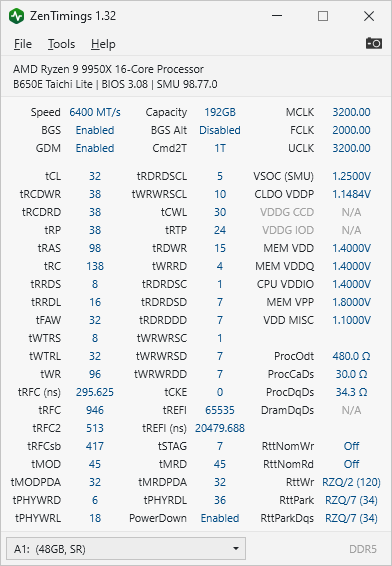
Memory is 2x KingBank SharpBlade 2x48GB DDR5-6400 found at aliexpress.

Settings not shown above or differ are:

DRAM Profile Setting = EXPO-6400 CL32

DRAM Performance Mode = Aggressive

Processor ODT Impedance = 53.3 ohm

DFE Read Training = Enabled

Processor ODT Impedance Pull Up P0 = 60 ohm

Processor ODT Impedance Pull Down P0 = 53 ohm

Dram ODT Impedance RTT_NOM_WR P0 = RTT_OFF

Dram ODT Impedance RTT_NOM_RD P0 = RTT_OFF

TX DFE Taps = 1 Tap

RX DFE Taps = 1 Tap

TX2D Voltage Step Size (2^n) = 1

RX2D Voltage Step Size (2^n) = 1

DDR Training Runtime Reduction = Enabled

Under AMD CBS\UMC Common Options\DDR Options\DDR Timing Configuration

Active Memory Timing Settings = Enabled

Memory Target Speed = 6400

Under AMD Overclocking\DDR and Infinity Fabric Frequency/Timings\DDR Options\DDR Timing Configuration:

Active Memory Timing Settings = Enabled

Memory Target Speed = 6400 MTs

If anyone has any stability advice, I’m all ears. Anything I’ve tried has made it worse, but it hasn’t been very much since achieving the POST at this speed.

1 Like

Try following.
VDDP 0.95.
tCL 34, and drop the VDD/VDDQ/VDDIO to 1.3.

Some basic info’s missing:

  • What dies did KingBank use?
  • What’s being used for stability testing?
  • What’s the tightest-fastest configuration known stable?
  • What are the SPD reported temperatures?

Also, for those unfamiliar with the mobo, the 3.08 BIOS is AGESA 1.2.0.2.

Check the DRAM’s datasheet but DDR5’s supported tREFI’s usually 3.9 μs to 85 °C and half that to 95 °C.

  • KingBank used Hynix M-die for these sticks.
  • I used TM5 for stability testing, but only got about 10 seconds in before an error appeared.
  • The best config is the one I posted.
  • All SPD temps were under 40°C, but I have active cooling ready to go.

I can’t seem to find the datasheet for my memory.

1 Like

With these settings, the bios hangs or restarts training before or during the mobo logo screen.

With my 7950x, it likes lower VDDQ/VDDIO. It seems different on your setup.

Which is unstable. The question was what’s known stable. Since it appears that basic isn’t in place, drop down to DDR5-5600 with 2x48 (or below, e.g. JEDEC 4800 2x48, 3600 with 4x48) and validate that’s unconditionally stable before incrementally working up through overclocks.

In particular I’d watch for long tREFI problems when tightening timings. With 2x48 DDR5-5600 1.25 V testing I get maybe +45 °C ΔT at the SPDs several hours into hot testing. V²f suggests ~65 °C ΔT for 6400 1.4. All the Hynix M-die datasheets I’ve found are JEDEC standard (3.9 μs to 85 °C).

I was hoping to avoid doing this as I feared that settings which are able to stabilize @ 5600 would be very different from 5800, but if it’s just tweaking some things on each step up, that would not be so bad.

I’m ready for any memory-related thermal issues that arise.

2 Likes

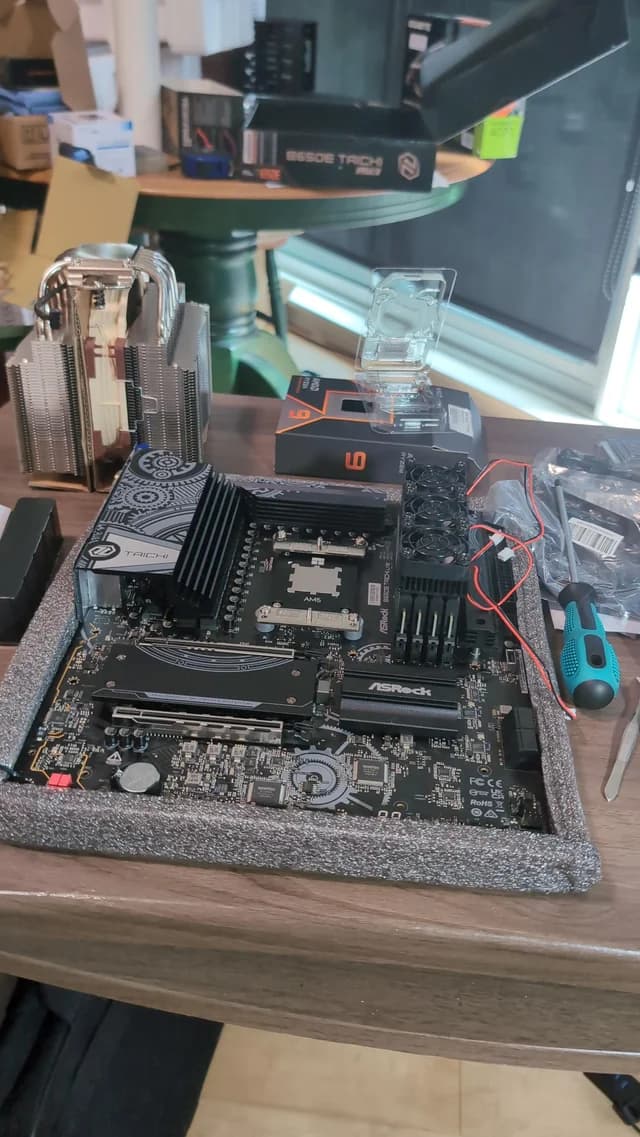
Nice fan kit for the ram. You go all-in to the 192GB memory overclock.

3 Likes