$0.64/kw has me needing to do some new builds

There are two power guzzlers I need to put to pasture.

  1. My mesh wifi 7 setup.
  • While I am willing to give up most of the wifi coverage the 10 g/bit wired network needs to stick around (but if I can do that for less power and or faster too win win)

Internet → HungryWifiCow1 - 10Gb → TP-Link TL-SX105 → devices
-—HungryWifiCow2 - 10 Gb → TP-Link TL-SX105 → devices

Normally I would just build a openwrt or pfsense edge here but looking for advice on what people would do in a power cost sensitive environment. Happy to go build it myself or buy something pre-assembled, trying to keep this under $5k one time cost.

  1. My 30 TB NAS/MediaCenter filled with spinning disks of electron guzzling mania. The objective of this device is to enjoy video/music/light gaming/backups
  • Arm? Zen 5 Mobile? NVME? SSD?

Would like to match or expand the storage here, 10+ Gb Nic and probably something like a 4000 SFF gpu. Hoping to keep this around $10k one time cost.

Appreciate any and all discussions, recommendations, and insights people may have on this topic. In the past I completely ignored power draw of these devices except to verify I wouldn’t be blowing out any fuses, now doing everything I can to stop giving the power company $$$$$ every month.

Fiber, fiber, and more fiber,

Best you can do with large storage is high density modern drives, 20TB+ SATA

interesting choice

for anything with high IOps

that’ll do

1 Like

You can always get three 20TB drives in a parity array. Write speed sucks, but media center is mostly read anyway and only 3 disks will probably be less power than what you have now.
NVME are actually very power hungry, and the faster you go the more power hungry they are. It costs energy per bit you transfer, so faster transfer and more bits = more power. So Id stick with gen 3 if you can live with that performance, or gen 4 at most. Gen 3 is usually around 3-4 watts, gen 4 is closer to 7-9w, and gen 5 is 10-12w. So if you had 9*4TB NVME drives to get the 30TB you want with using single parity so 1 drive can fail without data loss (since you probably don’t want 8 drives without any sort of data protection) you would be pulling a lot more power than 3 HDDs (30w for HDDs), though of course performance would be a higher too so depends what you want to prioritize.

You can get a 12th gen i3 or i5 and use its iGPU for quicksync to get very power efficient media transcoding and relatively good overall power consumption on the CPU as well, especially if you undervolt and downclock a bit. The Ryzen iGPU doesnt have as much media compatibility with a lot of the generally used software yet for some reason.

Though to be honest, with a $10k budget in one section and a $5k budget in the other, why not go with a small solar panel system and some battery storage? That will be FAR better on your energy bill than any of the changes you will do here. Especially since by spending $15k initially you have to recoup that cost in the energy savings on the new hardware, which will likely never happen in the usable life of the hardware.

I got solar 2 years ago now, and it has saved me around $7500 a year so far in electricity bills (kwh costs between $0.36 and $0.75 depending on time of day). This year will be even more with the raised prices. We are just past halfway through the year and I have already saved $4250

6 Likes

Hard Drives

Just looking at the published specs there isn’t much difference in “Average” power draw and even tho its 4TB vs 18TB the 4TB nvme drive is drawing less wattage, the idle power draw between the two again nvme looks like the winner. Not sure where this idea that nvme drives suck infinite power but as far as I can tell on paper they seem to be more efficient.

Fibre vs Copper 10gb

Looking at SFP+ and my copper 10gb setup there is only about 1w of difference so given I already have the copper setup the outlay doesn’t make a whole lot of sense.

Solar

I do have a limited solar setup that is as big as my city lifestyle can accommodate and it does offset most of my workstation it doesn’t cover my entire usage and is already maxed. So my only option is to reduce power consumption of my non-critical QOL devices.

Outtake

I guess this isn’t really an area people think about much which fair enough til I was paying almost a dollar per killowat I wasnt thinking about much at all. Guess Ill get the spreadsheet out and start ripping through spec sheets

You could also invest in photovoltaic panels, warm air pump, geothermal pump, wind mills(icewind.is). And sell the excess back to them for the same price. Or selling the excess to neighbours.

Prices in Finland right now. On short term prices. It changes the price after a time. Could be cheaper in case there is a short time price hike in electricity.

Also, you can under volt the CPU and run it with 2 or 4 cores instead. I heard there is better power efficiency with higher rated ones. Turn of RGBs and indicator lights. Might even consider switching to Linux or scrape Windows. Change the power settings. Might want to disable XMP and 4G Decoding.

City life limits the available renewable energy sources I have access to and currently maxed out on solar panels which don’t cover my entire usage.

There is a cheaper solution if you’re bold enough…

For the NAS/Mediaserver at this point you’re probably going to want to consider something like the ASUSTOR FLASHSTOR 6, or the 12 Pro. It’s a solid state SFF NAS with either 6 or 12 M.2 drives. The bigger one has 10GbE. Wendell made videos on it. M.2 drives range up to 8TB. The CPU is a little anemic, but it makes up for it with an IGP for hardware transcoding purposes. You won’t be able to reduce your power consumption below something like that. Downsides are upfront cost, the selection of 8TB M.2 drives is limited, and the price per GB is worse for the M.2 form-factor. And the SSD brands I’d recommend max out at 2TB, so I wouldn’t know what 8TB drives to suggest. You could also just roll your own SSD NAS and use 2.5 SATA or U.2 drives as an alternative.

On the flipside, mobile Zen 5 seems like overkill for the benefits. I am no expert here, but that being said entire architecture is already mostly power efficient unlike Intel, and you can adjust the TDP of the desktop parts to run as if they were mobile parts anyway. It’s Power Package Tracking or something similar in the UEFI that caps the power draw of the processor, and basically lets you reduce the power envelope. With some testing you could probably find the performance per watt sweet spot to make an efficient desktop system.

I’d favor the SK Hynix P41 Platinum for the system SSD, for reliability, performance consistency, and lower power draw than most others for the performance.

1 Like

How much is gasoline or bio-degradable organic seed / fat oils? You could run a generator at its lowest RPM setting for low power equipment and run it on bio-fuel.

So after intense math, my plan is to actually not replace the wifi/nas with lower power solutions and instead consolidate all of the functions into my workstation and deploy low power edge nodes (probably just rasppi’s with m2 hats).

MediaStation/NAS: deleted - absorbed by workstation

WIFI: replaced by onboard wifi from embedded arm boards which will be wired, only wifi only devices I have are in proximity to the points of contact where they will be located.

Network switches replaced by a PCIe network card in workstation and onboard lan.

Embedded arm boards deployed to points of contact in the house.
Backups will be handled by a ceph deployment across the arm boards.

Welcome to the wonderful hell of hyperconverged administration.

I STRONGLY recommend a barebones hypervisor without a GUI, then running even your DE in a lightweight VM.

Remember that Docker shares the kernel with the hypervisor so if you need one, stand up a Docker hypervisor VM and build everything on top. Else, a wonky container will take down the cluster.

UpTime is king here.

2 Likes

I’m looking forward to building out the orchestration. Been sketching out a p2p mesh setup between the arm boards that looks like will be fun to code up.

It looks like you’ve already come to this realization, but spending $15k to shave off some $0.68 power is insanity. I don’t know what kind of power savings you can achieve, but even under the WILD over-estimation of an entire kilowatt shaved off running 24/7, that’s a 2.5 year break even timeline. Given the true power savings potential is likely a rough order of magnitude lower… yeah this is a fool’s errand IMO.

Unless it’s a mental justification/other consideration for upgrades you want anyway, in which case have at it.

4 Likes

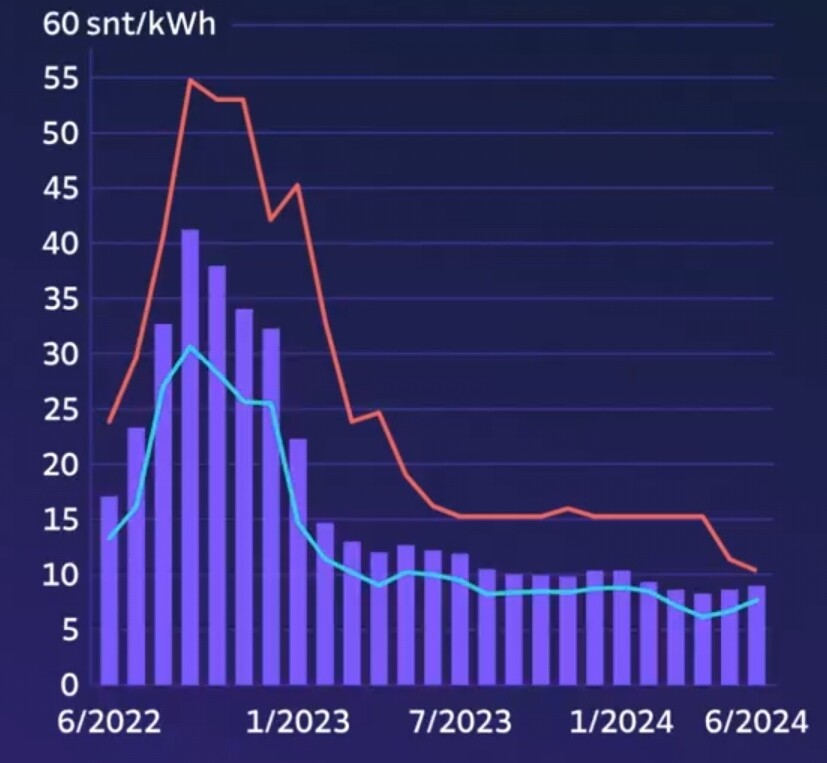
Well the estimation right now is about $400 a month in savings by consolidating assuming the spec sheets I’ve read are remotely accurate. Still awhile to break even but its really annoying giving the power company over $1000 a month.

Edit: Just for a little context, a year ago I was paying about 30c kw/h. Somehow in less than a year they have got the approvals to more than double the rate. Its insane.

Why is nobody asking what the workload is here? And why is everyone just jumping to conclusion to suggest stuff, before they understand the scenario? I’m a bit disappointed.

  • what are you using your NAS for?
  • can you live with it powered down most of the time?
  • if not, what’s the most essential thing on your NAS that you can’t get rid of? - make a list!
  • what hardware would you need to accommodate those “essential” services?
  • do you really need to use 10G for everything?
  • what’s your daily computing life look like? i.e. are you doing any kind of daily blender renderings 8h / day, or is your general computing life not very resource intensive, like just browsing the web?

Here’s my $0.02. I think I’m among the most insane people on the forum, who chases low-power consumption at the expense of performance (I’ll literally take something that uses less power on average even if it means perf / watt is not as good, like ARM SBCs and low-powered intel atom-based CPUs). My end goal is to have my whole lab completely off-grid, solar powered (and maybe have a small vertical wind turbine). I think I’m qualified to give at least some advice here and show you examples of what I’m doing.

If you can afford (it seems like you can, my idea is not even going to touch 10% of your budget in the best-case scenario) and you can deal with a “split-brain” approach, then build yourself a 2nd PC with something lower powered, that serves as your 24/7 system. Something like a ryzen 6 or 8 core (latest gen) will do. Maybe even go with a mobile ryzen PC, like, idk, minisforum or something (it seems like some or even most forum members who have bought some kind of minisforum are very unhappy with them because of quality concerns - I didn’t buy 1, I can’t say either way, I’m just forwarding what I saw). Whenever you need more oomph, power on your current workstation and have at it.

Your NAS, if you can’t live without some of the services, can be migrated to a smaller box, that also stays 24/7 on. I’m generally very much against forbidden routers, but it might be a good idea in some cases if you need hardware to push 10G and network storage at once (and VMs or containers with services). It makes sense from a power standpoint, as you’d have everything in 1 box (and a SPOF at the same time, which is horrible).

My advice almost always, is to get a lower powered router that can handle your network traffic and build a separate NAS or NAS + hypervisor combo. That way, your router can stay up most of the time, even when you frequently patch and restart your NAS. The choice is yours to make.

As a NAS, something like an odroid h4+ or ultra with 4 sata SSDs can handle a lot of stuff. It won’t have much space to hold most of your library, so if you go consumer SSDs (which are the ones that use the least amount of power, enterprise ssds will use a lot more power), you’ll only get about maybe 8 TB of usable space (stripped mirrors). Should be able to handle most of the generic things, like a file share, some small network services (idk, home assistant? I haven’t heard yet what your workload is).

Otherwise, if you want more capacity, go for nvme. It uses a bit more power, but “overall” it should kinda be negligible. The Asus Flashstor is praised around here. I also don’t have one, but I think it’s an ok hardware. With the flashstor 12 pro you get… well… 12 nvme slots. If you get 8TB gum sticks (which would be pretty costly) and populate 10 or 11 slots in a raid-z2 or z3 configuration (enough redundancy for a lot of storage), you get 80% or ~73% respectively space efficiency. And you have 2 or 3 nvme drives that can fail. In both cases, if you get the 8TB m.2s, you get 64TB of usable storage. Pretty sweet for such a low power, eh? (but the price tho’, oof).

Don’t go for high performance nvme drives, those draw a lot of power and won’t even be very usable anyway (bandwidth limit on the pci-e switch). Get something high capacity and low power consuming.

The way I dealt with it in my lab, is that I have a rockpro64 as a NAS with 2 mirrored pools, 1 hdd and 1 ssd pool. I’m actually keeping my NAS powered off most of the time too, but I plan on ripping the ssd pool out and build another similar NAS with them. I don’t recommend this for your needs, you’re probably a power user, but this is an example of how low you can go (you can go lower than this actually, but not for much more benefit IMO).

My PC, an odroid h3+ (with a portable USB monitor) and my gigabit switch (with 2x 2.5gbps ports, 1 of which my PC uses and another 1 to another ssd-only NAS and hypervisor that gets powered on way less frequently) use about 13W of power total. My VPN gateway router uses about 5W (another rockpro64, this one with just 2gb of RAM, because it only serves as router, dhcp and it will serve dns at some point). Total power on day-to-day usage: ~20W burst.

I could literally keep these up 24/7 and wouldn’t worry, but I won’t be able to afford a large solar installation, so I’m being frugal with my power consumption. Add my NAS, which I forgot what it uses, I think 15W idle, let’s say 25W average and I’m still <50W. Yet I power off my NAS most of the time and only power it when I need to get something off of it.

My backup server is an odroid hc4. It only gets powered on when I have a backup to run, at worst it runs for 1 night, then it gets shut down. It’s power is about 18W IIRC, but I’d say its power is negligible, because of how rarely it gets powered on.

Towards the end of the day, when I’m not just idly playing music or a podcast or something on my PC, I’ll turn on my 27" 170Hz 1440p monitor and play some doom 2 mega wads, for maybe 2 or 3 hours. Otherwise, I might just be a couch vegetable and watch some entertainment on the large screen. This adds about 30W to 35W to my power draw (in total, with the L1 KVM).

If I didn’t have a WiFi WAN, I would’ve kept my router (and AP, which I don’t have) always on, but their power would be negligible. If I were in your shoes, I’d have a separate day-to-day network that’s low power (maybe a 2.5g switch) and I’d keep the 10G infrastructure separate. At best, I’d get a switch with 4x SFP+ ports, populate 3 of them with some of the most important stuff (router, NAS and maybe high-powered workstation) and use the last link to connect the 10G switch.


From the above, you can see how, even without spending a dime, you can save money just by powering off your existing infrastructure and only power it when you actually need to. Alternatively, if you put some money down on very low power consuming hardware, that’s just barely enough to be usable, you can use that as your daily drivers and power the workhorses for even less amount of time.

IMO, I’d probably keep the router and wifi mesh on, that’s a bit hard to power on on-demand (my situations allows right now, but at some point, I’ll have to keep things on day and night). But I’d get a “core switch” that’s actually the exact opposite of what a core switch in the datacenter is, which is something low-powered that can saturate just the bare minimum at the maximum link of the devices (router, APs, 1 or 2 PCs and a NAS) and have a separate “edge switch” (again, opposite to what the datacenter one is) that is very high powered and can feed your whole homelab in all its glory. I’d consider your “core” the homeprod and the “edge” the homelab.

6 Likes

I love this. My gaming PC runs entirely on solar with my modded “overclocked” charge controller running in series.

It puts out so much heat that I have an hvac system piped in to keep the room habitable.

If I remember correctly, what makes Ryzen mobile or the Ryzen Pro APUs so popular is the idle power draw reduction since they are monolithic. Defiently may not be worth the cost.

I am doing a video on this:
https://www.aliexpress.us/item/3256806981045291.html

its surprisingly low power, and can function well as a forbidden router/vm host. You could use it to power on/off more power hungry devices, or use it as a nas. It is possible to spin down your mechanical hard drives if you use a small ssd pool for “hot” data and then have the media files etc live there. The cpu is fast enough for encode/decode you dont reallylyyyyyyy need a separate encoder/decoder, but that would work with the pcie slot. Consolidaiton probably does save more power except, depending on your workstaiton? you could set your workstation to suspend/resume. workstaion should use < 15 watts in this state when you arent sitting at it.

If you had any long-lived sessions, vpn sessions, etc you didnt want to fool with tear down/bring up, you could terminate those on the always-on vm/router host then on suspend/resume auto-attach back to something running on the router. pfsense/openwrt/whatever can run as a vm on the host and you could have 10g or 2.5g or a combination. might not need a switch if your low power devices direct attach to the 2.5g ports, and use a pcie 10g or m.2 10g adapter.

this is also ali express, maybe not awesome for longevity, but it does have 9 sata ports and 2 m.2 and x8 pcie so its got that going for it. topton is… okay…

6 Likes

It’s been ages since I’ve heard of topton. I can’t believe they’re still around and kicking!

Can you mention at some point that host uptime is critical in hyperconverged deployments?

Hyperconvergence is fine if architected that way from day 0; but guys have USB connected drive pools and random Docker containers downloaded from GitHub repos last updated when Obama was in office.

Glue on some heat sinks and send it. Cheap Chinese computers are great while we have them, just plan on replacing every few years.